Nexeed
    • Introduction
    • User manual
      • Getting started
        • Device registration overview
          • Registering a device
          • Self-registration of devices
        • Device claiming
          • Adding a ctrlX Core device
          • Adding a Rexroth connectivity unit device
      • Device overview
        • Setting the filter for the search
        • Device details
        • Edit device properties
        • Roll out artifacts on one or more devices
        • Rolling out a distribution
      • Device groups
        • Creating a device group
      • Machine overview
        • Create, edit and delete machines
        • Adding machines and devices via CSV file import
        • Structure of the CSV import file
      • Activity overview
      • Distribution overview
        • Managing distributions
        • Managing commands in a distribution
    • Operations manual
      • Overview
      • System architecture and interfaces
        • Element descriptions
        • Network connections overview
      • System requirements
        • General system requirements
        • Ingress controller
        • idm/idm-device-administration-app
        • idm/idm-software-management-app
        • idm/idm-device-monitoring-app
        • idm/idm-device-master-data-mgmt-app
        • idm/idm-device-app
        • idm/idm-solution-app
        • idm/idm-webapp-backend
        • idm/idm-device-tunnel-app
        • idm/idm-artifact-repository
        • bci-app/opensearch
        • bci-app/opensearch-dashboards
        • bci-app/valkey
        • bci-app/nginx
        • bci-kube/nexeed-ansible-operator
      • Migration from previous versions
      • Setup and configuration
        • Installation guide
          • How to initialize OpenSearch
          • How to create MACMA tenants with basic authentication
          • How to configure tenants for artifact-related use cases
        • Configuration
          • Detailed configuration parameters
          • Recommendations for service meshes
      • Start and shutdown
      • Regular operations
        • Whitelist new certificate
      • Failure handling
        • Device Portal data is out of sync
        • How to synchronize devices and machines to OpenSearch
        • Synchronize communication id mapping to key-value store (Redis/Valkey)
      • Backup and Restore
      • Logging and monitoring
      • Known limitations
    • Developer guide
      • Communication ID
      • Adding diagnostic functionality to devices
      • Add command processing to devices
      • Add the backup/restore functionality to devices
      • Reducing data consumption of device communication
      • Access through a custom application
    • Artifact Repository guide
      • Introduction
      • Providing artifacts for roll-out
        • Establishing a connection to the Device Portal
        • Uploading and managing artifacts in the repository
      • Downloading artifacts
      • Sending commands
    • API documentation
    • Glossary
Device Portal
  • Industrial Application System
  • Core Services
    • Block Management
    • Deviation Processor
    • ID Builder
    • Multitenant Access Control
    • Notification Service
    • Ticket Management
    • Web Portal
  • Shopfloor Management
    • Andon Live
    • Global Production Overview
    • KPI Reporting
    • Operational Routines
    • Shift Book
    • Shopfloor Management Administration
  • Product & Quality
    • Product Setup Management
    • Part Traceability
    • Process Quality
    • Setup Specs
  • Execution
    • Line Control
    • Material Management
    • Order Management
    • Packaging Control
    • Rework Control
  • Intralogistics
    • AGV Control Center
    • Stock Management
    • Transport Management
  • Machine & Equipment
    • Condition Monitoring
    • Device Portal
    • Maintenance Management
    • Tool Management
  • Enterprise & Shopfloor Integration
    • Archiving Bridge
    • Data Publisher
    • Direct Data Link
    • Engineering UI
    • ERP Connectivity
    • Gateway
    • Information Router
    • Master Data Management
    • Orchestrator

Nexeed Learning Portal

  • Device Portal
  • User manual
  • Device groups

Device groups

Device Groups allow you to organize and manage devices efficiently. You can share devices with other users and tenants, making collaborative device management possible.

Overview

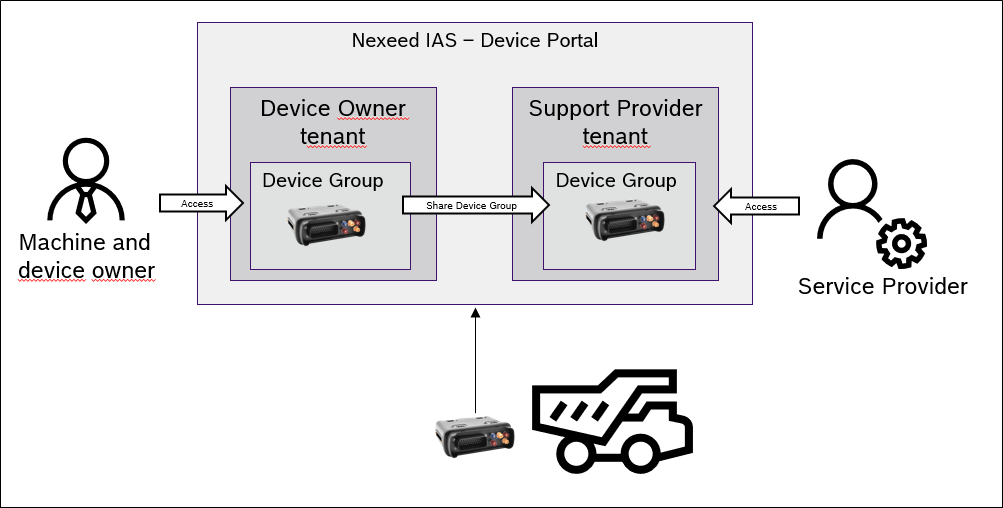
In some cases, it is necessary to share devices with other users who work in a different tenant.

Example

Company A owns a machine in which the device is installed.
Company B offers a service for the device in the machine, for example. Company A would like to hand over the administration of the device to company B in order to carry out this service.

To enable this, the device group has been created. This allows you to specify which device types should be added. This means that a group can be created for each device type available in the tenant.

All newly registered devices are automatically added to this group, so no further manual effort is required.

Once created, the group can be shared with another tenant with which a digital contract has been concluded. The users of the target tenant can then manage the device as if it belonged to them.
241024

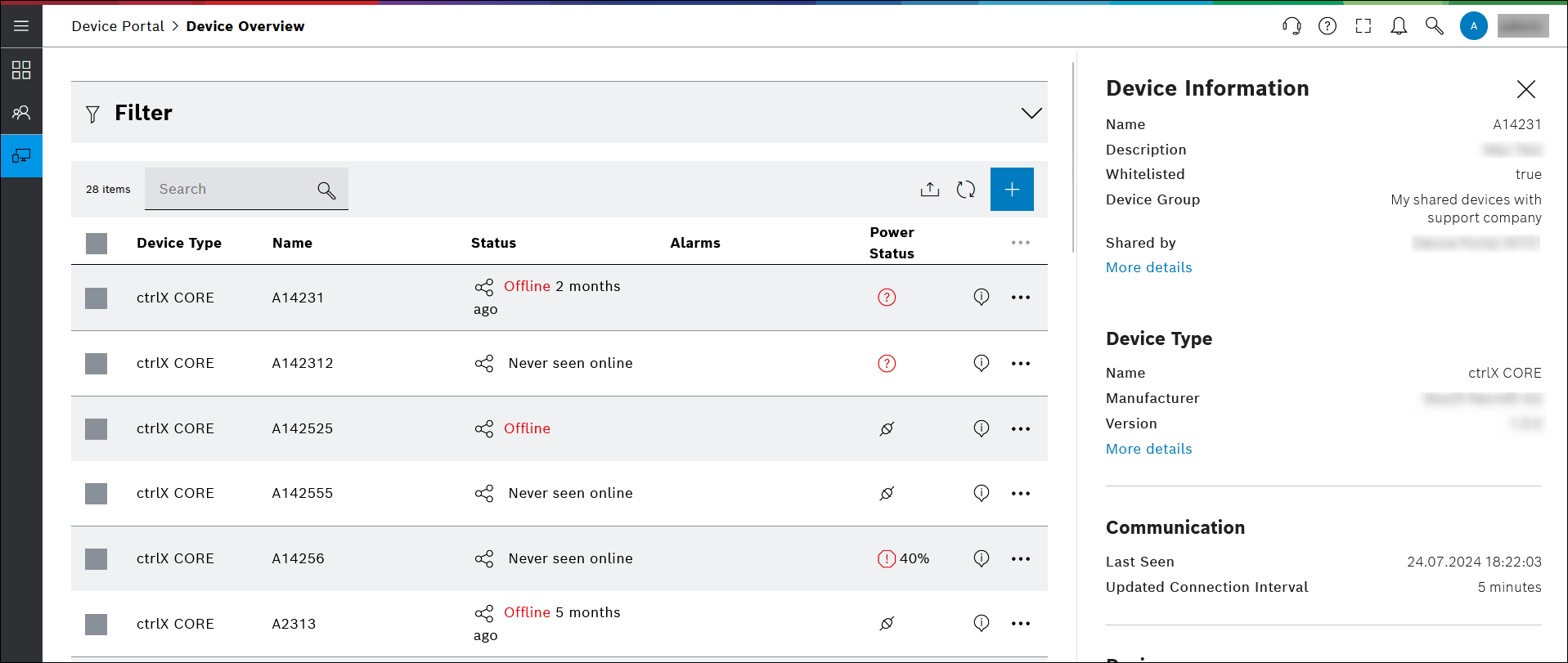
Device View for Company B — "Shared" Devices of Type ctrlX CORE
241027

Share devices

  1. Create a contract between the two company tenants: Multitenant Access Control

  2. Create a Device Group

All devices of the selected device type are automatically shared to the target tenant. Ensure that the target tenant has the necessary permissions to manage the shared devices.

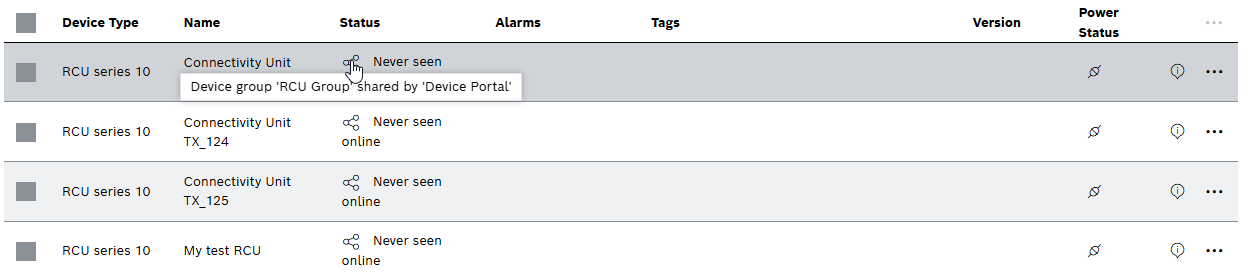
Shared devices are marked with the "shared" share icon in the device overview.

Shared Devices Overview

Contents

© Robert Bosch Manufacturing Solutions GmbH 2023-2025, all rights reserved

Changelog Corporate information Legal notice Data protection notice Third party licenses