SOT
    • Introduction
    • Release notes
      • Breaking changes
    • User manual
      • Introduction
      • Navigating Industrial Application System
        • Navigation menu
        • Header
        • Managing favorite menu entries
      • Dashboards
        • Creating a dashboard space
        • Sharing a dashboard space
        • Creating a dashboard
        • Editing a dashboard
        • Applying dashboard filters and templates
        • Marking dashboards as favorites
        • Adding Web Portal widgets
      • User profile
      • Support
      • User help
      • Screen display modes
      • System information
      • System Settings
        • Footer and Privacy
        • Skinning
        • Navigation Menu
    • Operations manual
      • Overview
      • System architecture and interfaces
      • System requirements
        • portal/coreservice
      • Migration from previous versions
        • From 5.24 to 5.25
        • From 5.23 to 5.24
        • From 5.22 to 5.23
        • IAS 2025.01.00 (Portal 5.20)
        • From 5.15 to 5.16
        • Helm job for database migration (>5.15)
        • From 5.14 to 5.15
        • From 5.13 to 5.14
        • From 5.12 to 5.13
        • From 5.11 to 5.12
        • From 5.10 to 5.11
        • From 5.9 to 5.10
        • From 5.8 to 5.9
        • From 5.7 to 5.8
        • From 5.6 to 5.7
        • From 5.5 to 5.6
        • From 5.3 to 5.4
        • From 5.1 to 5.2
        • Resource mapping from MES to IAS
      • Setup and configuration
        • Permission and roles
        • Support section
        • Training & documentation section
        • Legal information and footer section
        • Cookies
        • Secure configuration
        • Configuration of sections in menu
        • API documentation - footer configuration
        • Environment variables
          • Global variables
          • portal/coreservice
          • portal/systemtests
          • Application variables exposed in Helm chart
      • Start and shutdown
        • Startup dependencies
        • Background tasks
        • Health and availability APIs
      • Regular operations
        • Removing / deregister / unregister a module
        • User data deletion
      • 09_failure_handling/index.adoc
      • Backup and Restore
      • Logging and monitoring
      • Known limitations
    • Developer documentation
      • Concepts
        • General
        • Navigation
        • Dashboard
        • Cross-module communication
        • Documents
        • Security
        • Limitations
      • How to…​
        • register your module & views
        • implement context contribution
        • develop a Web Portal-compatible frontend
        • use the iframe integration library
        • build widgets
        • check the integration status
        • improve UI performance
      • Troubleshooting
    • API documentation
    • Glossary
Web Portal
  • Smart Operations Toolkit
    • Deviation Processor
    • Multitenant Access Control
    • Notification Service
    • Ticket Management
    • Web Portal
  • Shopfloor Management
    • Andon Live
    • KPI Reporting
    • Operational Routines
    • Shift Book
    • Shopfloor Management Administration
  • Product & Quality
    • Process Quality
    • AI Services
  • Machine & Equipment
    • Condition Monitoring
    • Device Portal
  • Enterprise & Shopfloor Integration
    • Information Router
    • Master Data Management

SOT Learning Portal

  • Web Portal
  • User manual
  • Dashboards
  • Editing a dashboard

Editing a dashboard

Prerequisite

You have edit permissions for the selected dashboard.

  1. Open the required dashboard.

  2. Click Edit in the dashboard toolbar.
    Edit mode starts, the dashboard grid becomes editable and the widget catalog becomes visible.

  3. (Optional) Select a module in the Module filter field to narrow the widget list, or keep All Widgets to show every available widget.

  4. Add the required widgets from the sidebar onto the grid by clicking Add on the catalog entry.
    The grid expands vertically and horizontally as needed. Use horizontal scrolling when adding columns beyond the visible area.

  5. Move, resize, or configure widgets until the layout matches your needs.

  6. Click Edit again and confirm changes to leave edit mode.
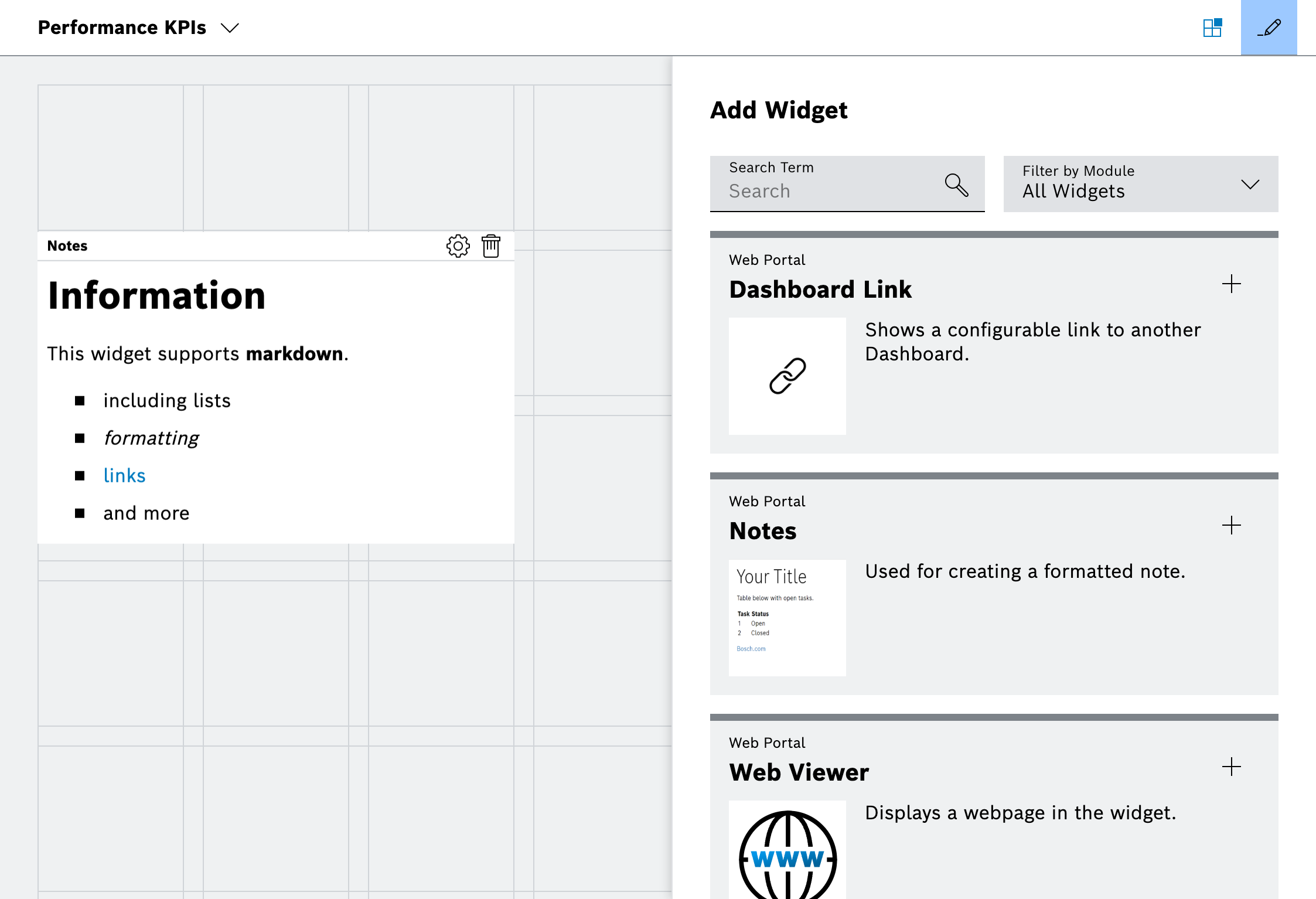
Dashboard edit mode with widget catalog

The dashboard layout is stored and available to all users with access to the dashboard.

Contents

© Robert Bosch Manufacturing Solutions GmbH 2023-2026, all rights reserved

Changelog Corporate information Legal notice Data protection notice Third party licenses