Deployment process
The deployment of the Nexeed IAS is a smooth and efficient process that can be completed quickly and with minimal disruption to ongoing operations.
Overall, the deployment process for the Nexeed IAS is a well-designed process that is easy to execute and minimizes disruptions to ongoing operations. By following these simple steps, organizations can ensure that they are taking full advantage of the latest version of Nexeed IAS and that their industrial processes are running optimally.
Streamlined declarative K8s deployment
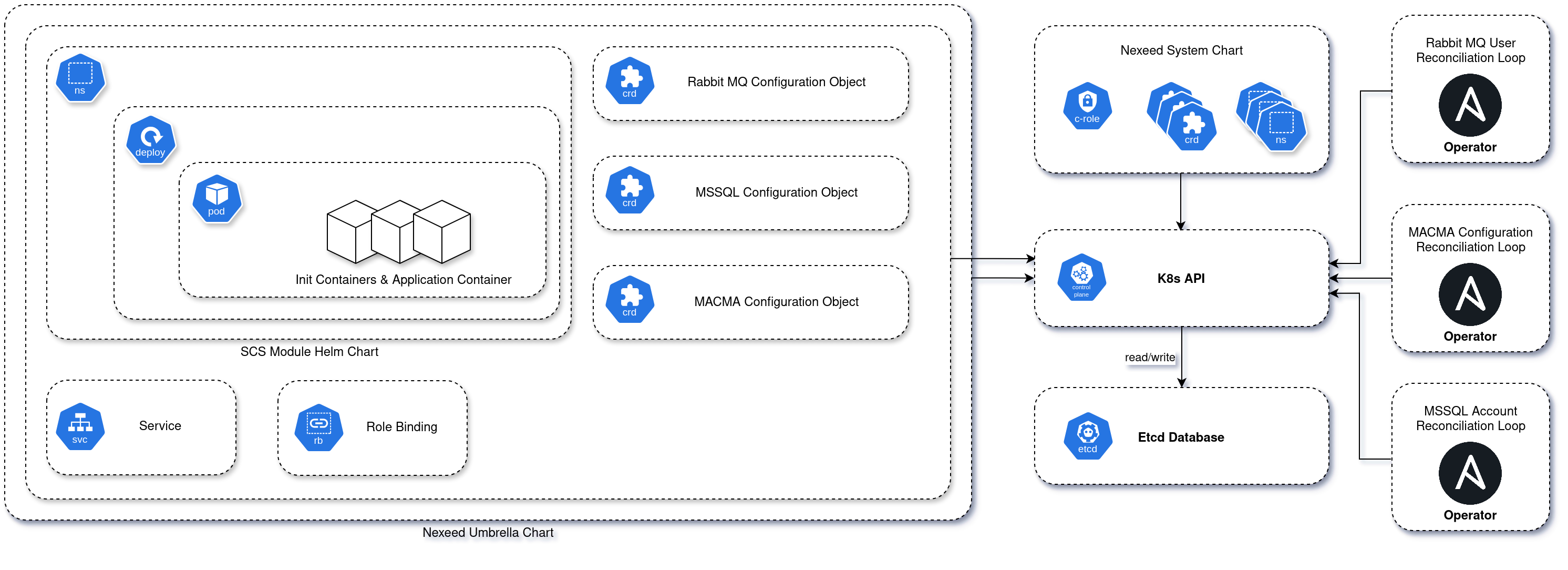
The entire process of deploying k8s is automated in a declarative manner by using Helm and the k8s operator pattern (custom controllers watching for custom objects and reconciliating the configuration based on it).
The latest deployment automation is using a set of operators that are all based on the Ansible Operator SDK (https://www.ansible.com/integrations/containers/operators). In general, Ansible-based operators provide a lower entry barrier and allow for fast operator development by using the well-known Ansible playbook concept to perform actions on a set of resources.
Within in Nexeed IAS deployment, the various operators take care of the automated creation of database credentials, message broker credentials, role assignments and module configurations within MACMA. To achieve this, the operators are instructed and controlled by custom objects that are based on so called CRDs which have to be installed in the cluster (see: CustomResourceDefinitions).
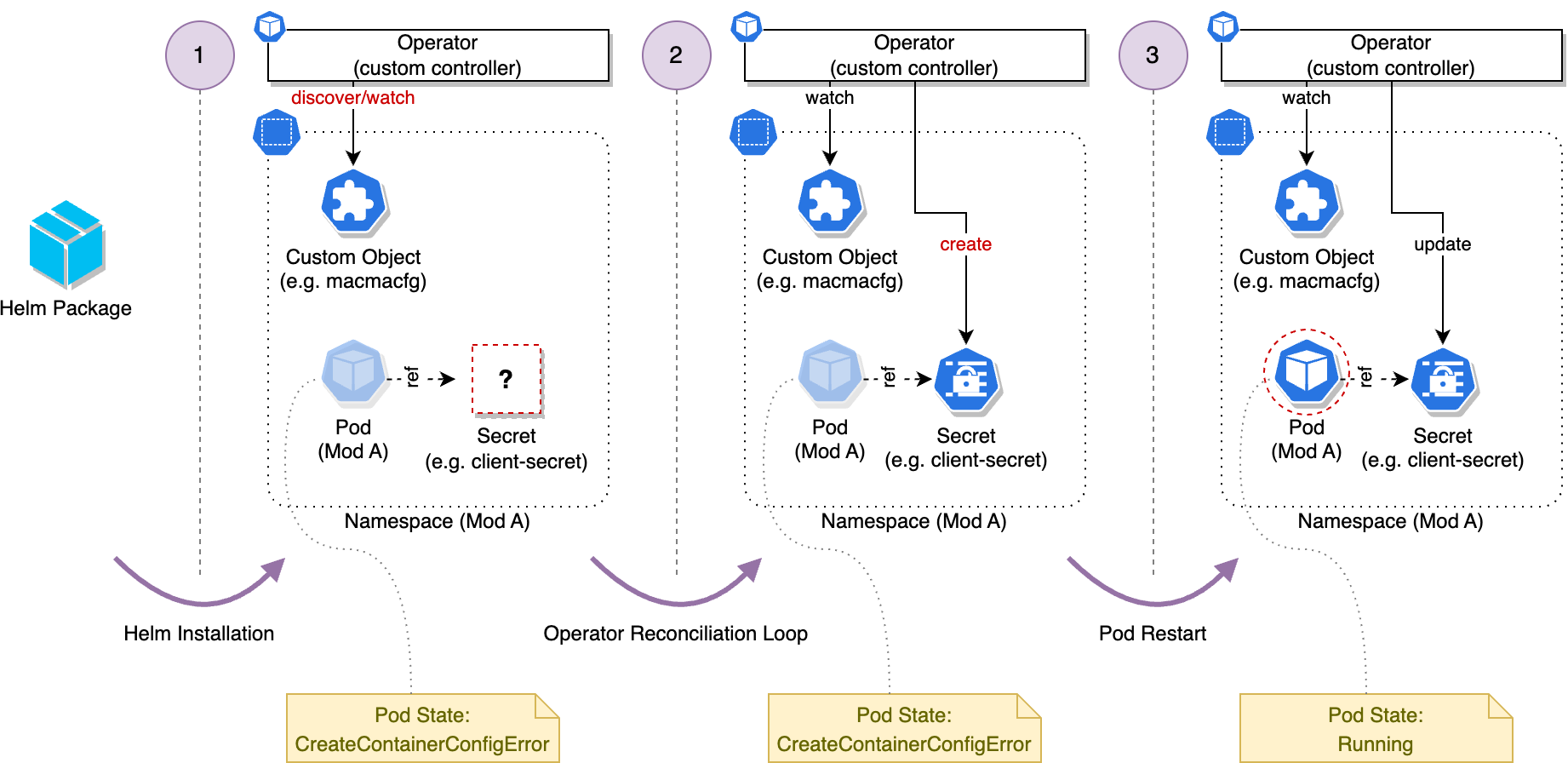
The following diagram shows the general concept of operators watching and reacting to custom objects as part of their reconciliation loop:
As part of this operator-based management concept, it is a common scenario that a Pod first stays in a transitional state called CreateContainerConfigError after it got scheduled and created within the cluster. Reason for this are missing configurations (e.g[]. ConfigMaps or Secrets) which are still to be created by the involved operators, once all necessary information is available. While this concept might look a bit counter-intuitive at first sight, it has clear benefits in scenarios in which complex systems, consisting of dozens of modules, each having various hard and soft interdependencies to other modules, need to be deployed and managed. One key benefit of a operator-based approach in such scenarios is that it removes the necessity to create a global deployment order to resolve dependencies, which might not even be possible in some cases.
The following figure shows an example deployment process and the involved state transitions. In the first step, all pre-defined resources are created within the cluster as part of the Helm installation operation. This step creates and deploys the operator (if not already present because of previous deployments), creates the custom objects holding configuration information for the operators and finally creates the deployment and thus the Pods. At this stage some configuration information, like the client secret shown in the example, are not yet created, because they might not yet be known. A typical example for this would be a module that has to be registered with the MACMA service and the resulting client credentials that have to be provided to the module as a result of this registration process.
At this stage, the operator will discover the created custom object holding additional information, for example, about the MACMA registration that needs to be performed for the given module. Using this, the reconciliation loop of the operator will run (step 2 in the figure) and perform the required registration actions and finally create the missing secret (client-secret in the example). Please note that the actions performed by the operator are not limited to these kind of registration actions, but can also involve more complex tasks, like data base schema provisioning and similar.
After the operator has created the missing secret, the Pod can restart and thus transition from the CreateContainerConfigError state to the Init and later Running state.
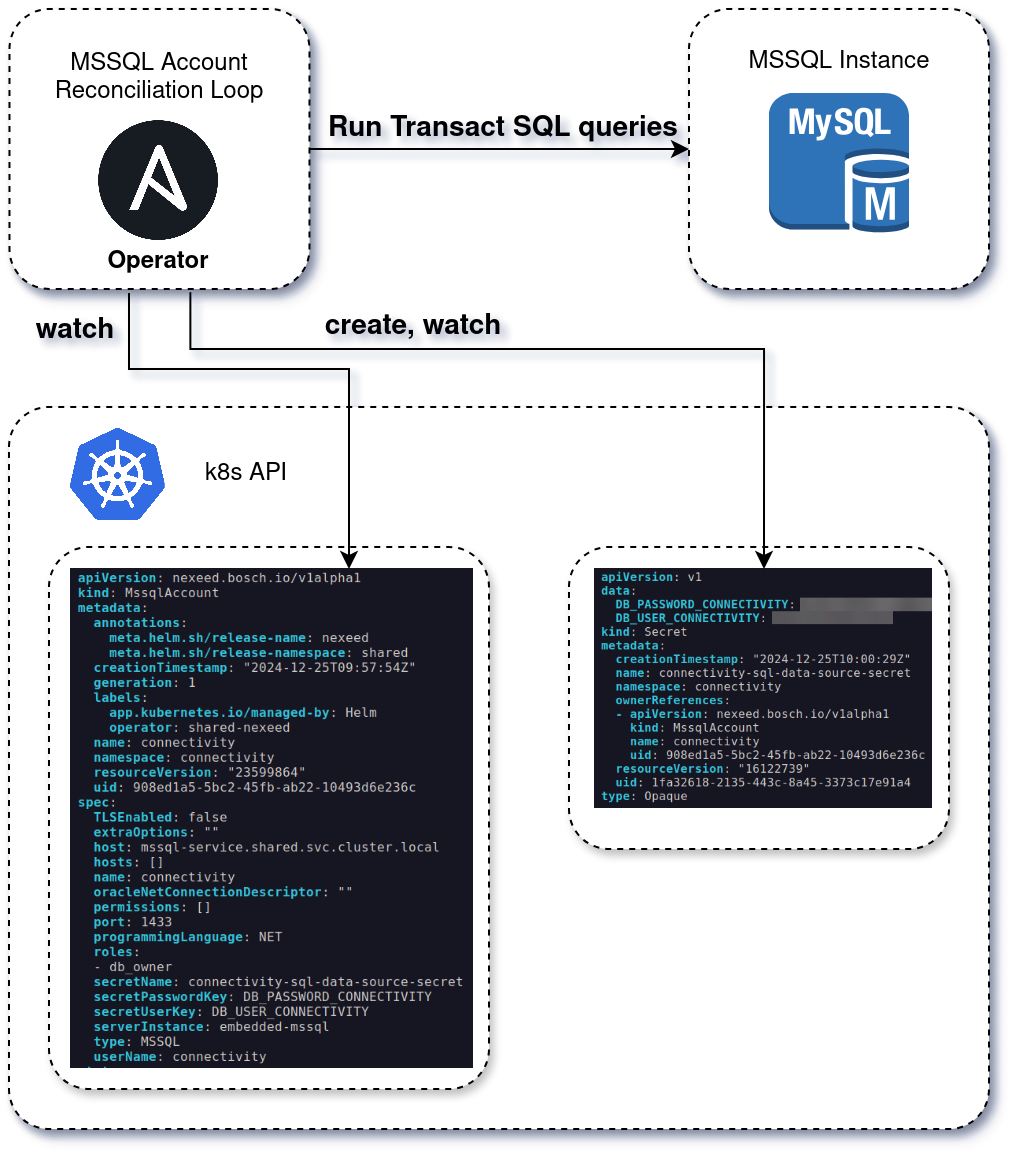
The following figure gives a more concrete example and shows possible content of the involved custom objects and generated secrets. It shows how the MSSQL operator creates the database credentials (in form of a secret used by the module Pods) and provisions them in the database according to the configurations provided in the custom object:
For deployments which rely on an operator to create some of the required resources (e.g., secrets), there is no additional need for parametrizing any secrets except administrator credentials. The deployment automation will automatically generate individual random secrets.
If the administrator credentials for the infrastructure services (e.g[]., databases) are not available, and thus the operators are not allowed to create the respective accounts and credentials, the credentials for each individual module must be manually provided via Helm override. In this case the operator will pick up the provided credentials and forward them into the correct k8s secrets.
Involved operators and their responsibilities
The following sections provide a more detailed description about the individual operators that are part of a Nexeed IAS deployment and are typically deployed within a namespace called aops.
MACMA configuration operator
The MACMA configuration operator is the most important operator within every Nexeed IAS deployment. It watches for custom objects (CustomResourceDefinitions) of kind MacmaConfiguration deployed in the namespaces of the individual modules.
Using this, the operator creates the application within MACMA and creates the respective k8s secret with the client credentials for consumption by the the module. It is also able to create MACMA users and service accounts and takes care to assign the respective roles. Finally, it ensures that all secrets to access foreign modules are created and usable by the modules.
RabbitMQ account operator
The RabbitMQ operator watches for custom objects (CustomResourceDefinitions) of kind RabbitMQUser and RabbitMQTTUser. Besides creating the respective user accounts with the needed permissions within a given RabbitMQ instance, it also takes care to create the defined VHosts, exchanges, and queues.
MSSQL account operator
The MSSQL account operator watches for custom objects (CustomResourceDefinitions) of kind MssqlAccount. It creates the required users in the given MSSQL database and ensures the correct roles, ownerships, and grants are assigned.
Postgres account operator
The Postgres account operator watches for custom objects (CustomResourceDefinitions) of kind PostgresAccount. It creates the required users in the given Postgres database and ensures the correct roles, ownerships, and grants are assigned.
Oracle account operator
The Oracle account operator watches for custom objects (CustomResourceDefinitions) of kind OracleAccount and is specifically used for environments that make use of Oracle-hosted databases. Besides the user setup and configurations, the operator also takes care of the tablespace creation and grant settings.
MongoDB user operator
The MongoDB user operator watches for custom objects (CustomResourceDefinitions) of kind MongoDBUser and creates the respective user account and databases.
InfluxDB user operator
The InfluxDB user operator watches for custom objects (CustomResourceDefinitions) of kind InfluxDBUser and creates the respective user account and databases.
Usage of MES installer
In general, the modules set up their database during their bootstrapping automatically. There are, however, few modules or use cases in which a manual setup by an operator is required. For this purpose, the MES Installer can be used to perform these setup steps in a guided manner.
Please consult the module’s operations manual to check if a manual setup may be required.