Nexeed
    • Introduction
    • Getting started
      • Getting access
      • Login
      • Main screen
      • Welcome dashboard
      • Detecting process anomalies
      • Analyzing data and detecting event sequences
      • Analyzing KPIs
    • How-tos
      • Monitors on production lines
        • Configuring the automatic login in the Nexeed Industrial Application System
        • Configuring the automatic login to the identity provider with the Windows user
        • Setting cookies in the browser
        • Configuring the automatic logout in the Nexeed Industrial Application System
        • Configuring the command line parameters in the browser
        • Known limitations and troubleshooting
      • Try out the APIs
    • Integration guide
      • Underlying concepts
        • Underlying concepts
        • Onboarding
        • Security
        • Communication
      • Integration journey
      • Overview of APIs
    • Operations manual
      • Release
      • System architecture and interfaces
      • System requirements
        • Cluster requirements
        • Database requirements
        • Support for service meshes
      • Migration from previous Nexeed IAS versions
      • Setup and configuration
        • Deployment process
        • Deployment with Helm
        • Advanced configuration
        • Integrations with external secret management solutions
        • Context paths
        • Service accounts and authorizations
        • Validation tests
        • Setup click once
        • Database user setup and configuration
      • Start and shutdown
      • Regular operations
        • User management & authentication
        • How to add additional tenants
        • How to access the cluster and pods
        • Automatic module role assignments in customer tenants
        • User credentials rotation - database and messaging secrets
      • Failure handling
        • Failure handling guidelines
        • Ansible operator troubleshooting
        • How to reach BCI for unresolved issues
      • Backup and restore
      • Logging and monitoring
        • The concept and conventions
        • ELK stack
        • ELK configurations aspects for beats
        • Proxy setup for ELK
        • Health endpoints configurations
      • Known limitations
      • Supporting functions
      • Security recommendations
        • Kubernetes
        • Security Best Practices for Databases
        • Certificates
        • Threat detection tools
    • Infrastructure manual
      • Release
      • System architecture and interfaces
        • RabbitMQ version support
      • System requirements
      • Migration from previous Nexeed infrastructure versions
      • Setup and configuration
        • Deployment process of the Nexeed infrastructure Helm chart
        • Deployment with Helm
      • Start and shutdown
      • Regular operations
        • RabbitMQ
          • User management & authentication
          • Disk size change
          • Upgrade performance with high performant disk type
          • Pod management policy
      • Failure handling
        • Connection failures
        • Data safety on the RabbitMQ side
        • Fix RabbitMQ cluster partitions
        • Delete unsynchronized RabbitMQ queues
        • How to reach BCI for unresolved issues
      • Backup and restore
      • Logging and monitoring
      • Known limitations
    • Glossary
    • Further information and contact
Industrial Application System
  • Industrial Application System
  • Core Services
    • Block Management
    • Deviation Processor
    • ID Builder
    • Multitenant Access Control
    • Notification Service
    • Ticket Management
    • Web Portal
  • Shopfloor Management
    • Andon Live
    • Global Production Overview
    • KPI Reporting
    • Operational Routines
    • Shift Book
    • Shopfloor Management Administration
  • Product & Quality
    • Product Setup Management
    • Part Traceability
    • Process Quality
    • Setup Specs
  • Execution
    • Line Control
    • Material Management
    • Order Management
    • Packaging Control
    • Rework Control
  • Intralogistics
    • AGV Control Center
    • Stock Management
    • Transport Management
  • Machine & Equipment
    • Condition Monitoring
    • Device Portal
    • Maintenance Management
    • Tool Management
  • Enterprise & Shopfloor Integration
    • Archiving Bridge
    • Data Publisher
    • Direct Data Link
    • Engineering UI
    • ERP Connectivity
    • Gateway
    • Information Router
    • Master Data Management
    • Orchestrator

Nexeed Learning Portal

  • Industrial Application System
  • Infrastructure manual
  • Failure handling
  • Fix RabbitMQ cluster partitions
preview 2025.03.00

Fix RabbitMQ cluster partitions

This section describes how to fix scenarios in which a RabbitMQ cluster gets portioned.

What is a partition

In a RabbitMQ cluster, partitions occur due to network instability, heavy message queue loads, or host restarts, leading to a "split-brain" scenario. This can significantly disrupt operations. Intervention is necessary when the cluster cannot self-recover.

Symptoms of a RabbitMQ partition can include:

  • Message Delivery Failures: One of the most immediate effects of a RabbitMQ partition is the failure of message delivery. Microservices may either stop receiving messages altogether or experience significant delays.

  • Errors in Status or Event Reporting: Front-facing services attempt to store device data on RabbitMQ, but fail, triggering retries. With a constant load of device data, this can exhaust the threads allocated for depositing data in RabbitMQ, resulting in requests being rejected.

How to identify a partition

Partitions can be identified via:

  1. Server logs

  2. RabbitMQ Admin UI

  3. CLI commands

  4. Http API

Server logs (elastic)

In the event of a network partition within a RabbitMQ cluster, certain log entries can help quickly identify the issue. For example, you might encounter logs similar to:

Network partition detected. Node rabbit@node1 cannot see nodes [rabbit@node2, rabbit@node3].

It’s important to note that the absence of explicit partition detection logs does not necessarily mean there is no partition. RabbitMQ might not have detected it yet.

RabbitMQ Admin UI

Example Partition in RabbitMQ Admin UI:
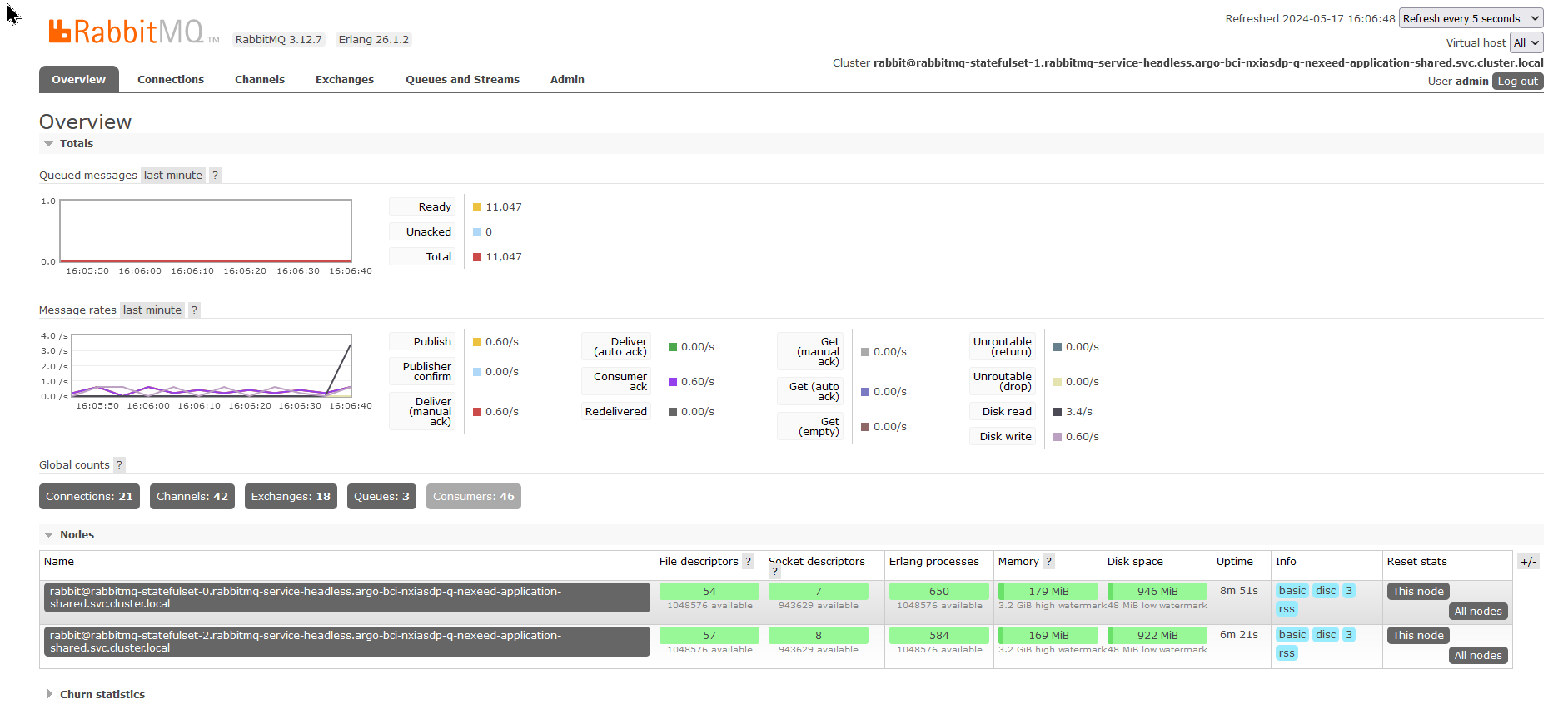
split 1

In the first image, there are only 2 nodes are displayed. Typically, there are at least 3 RabbitMQ nodes. Refreshing the page might redirect you to another node due to load balancing. In the next image, it can be observed that the node rabbitmq-statefulset-1, which appears to have formed its own cluster.
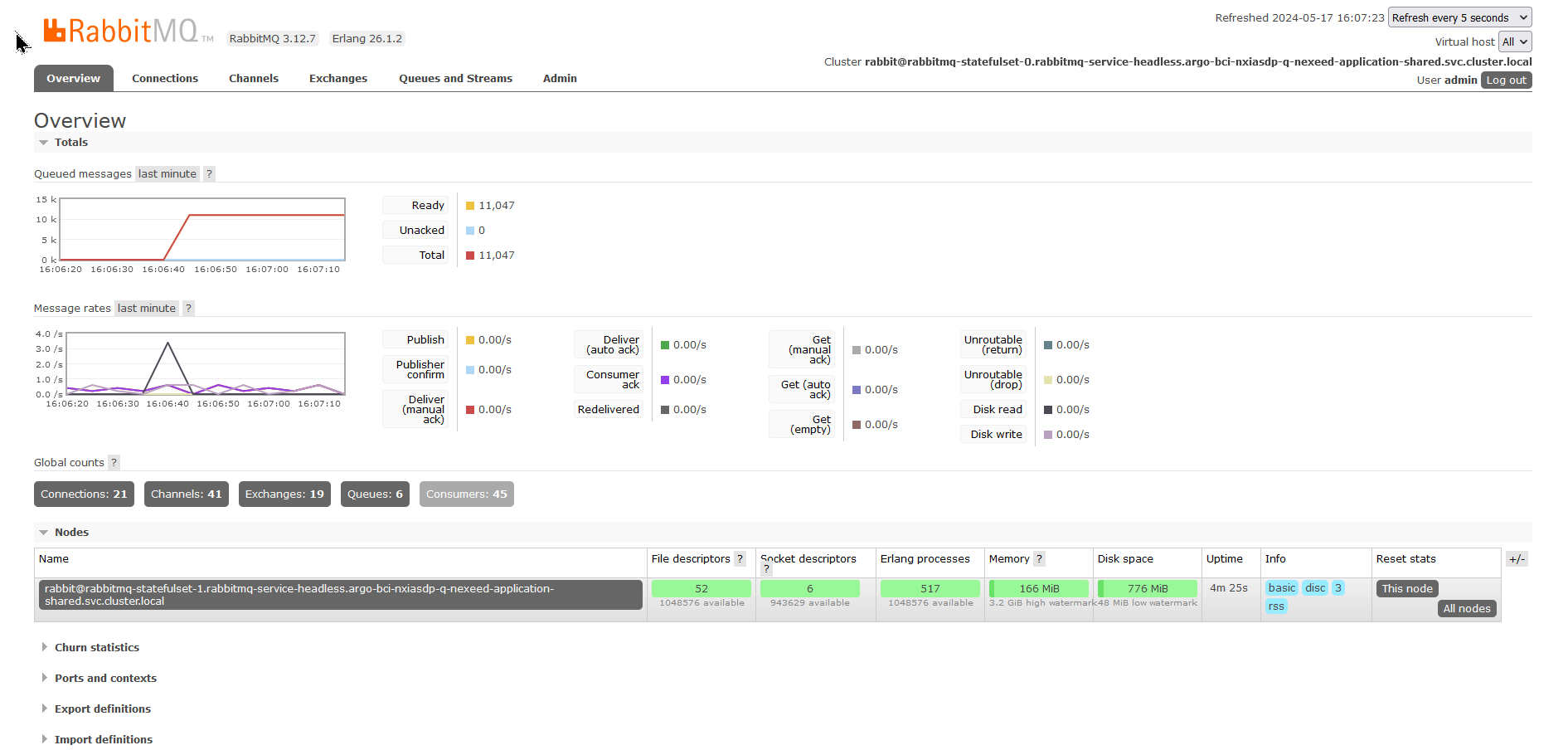
split 2

How to fix a partition

To recover from a split-brain, first choose one partition which you trust the most. This partition will become the authority for the state of the system (schema, messages) to use; any changes which have occurred on other partitions will be lost.

Stop the RabbitMQ application

First, you need to stop the RabbitMQ application on the node that is out of sync or has been partitioned.

Connect with the nodes (container) shell and execute the following command.

rabbitmqctl stop_app

Reset the RabbitMQ node

After stopping the application, reset the node. This step clears the current node’s data about its cluster membership. It does not affect message data, but be cautious as this removes the node from the cluster, and it will need to rejoin.

rabbitmqctl reset

Join the cluster

Next, join the node back to the cluster by specifying the name of the node you trust (the one you determined to be the source of truth). Replace rabbit@rabbitmq1 with the actual hostname of the cluster’s master node or the node you’re using as the authoritative source.

rabbitmqctl join_cluster <rabbit@rabbitmq1>

Start the RabbitMQ application

Finally, start the RabbitMQ application on the node. This action will reintegrate the node into the cluster, and it will start functioning according to the cluster configuration.

rabbitmqctl start_app

Contents

© Robert Bosch Manufacturing Solutions GmbH 2023-2025, all rights reserved

Changelog Corporate information Legal notice Data protection notice Third party licenses