Email templates
A template defines the subject and the body of an email for one purpose and one language. You view and change templates with the agent.
Prerequisite
-
ai_chat:readpermission to use the agent -
templates:readpermission to see templates -
templates:writepermission to create and change templates -
templates:deletepermission to delete templates
Template fields
| Field | Description |
|---|---|
Context ID |
Purpose of the template, for example |
Language |
|
Subject |
Subject of the email. Can contain placeholders. |
Body |
Text of the email. Can contain placeholders. |
Origin |
Default for templates that are provided with the Smart Operations Toolkit, Custom for templates that were created by your organization. |
| The context ID and the language of a template cannot be changed after the template was created. |
Placeholders
Placeholders are written in double curly brackets with a leading dot, for example {{.device}}. When the email is sent, the placeholder is replaced by its value. Conditions are possible as well, for example {{if .name}}Hello {{.name}},{{end}}.
Placeholders of the template for rule events
The template cm-rule-triggered exists in English and German.
| Placeholder | Content |
|---|---|
|
Severity of the event, for example warning |
|
Name of the rule |
|
Device on which the rule was triggered |
|
Monitored measuring point |
|
Time when the rule was triggered |
|
Value that triggered the rule |
|
Parameters of the rule, for example the thresholds (optional) |
|
Name of the recipient (optional) |
Viewing templates
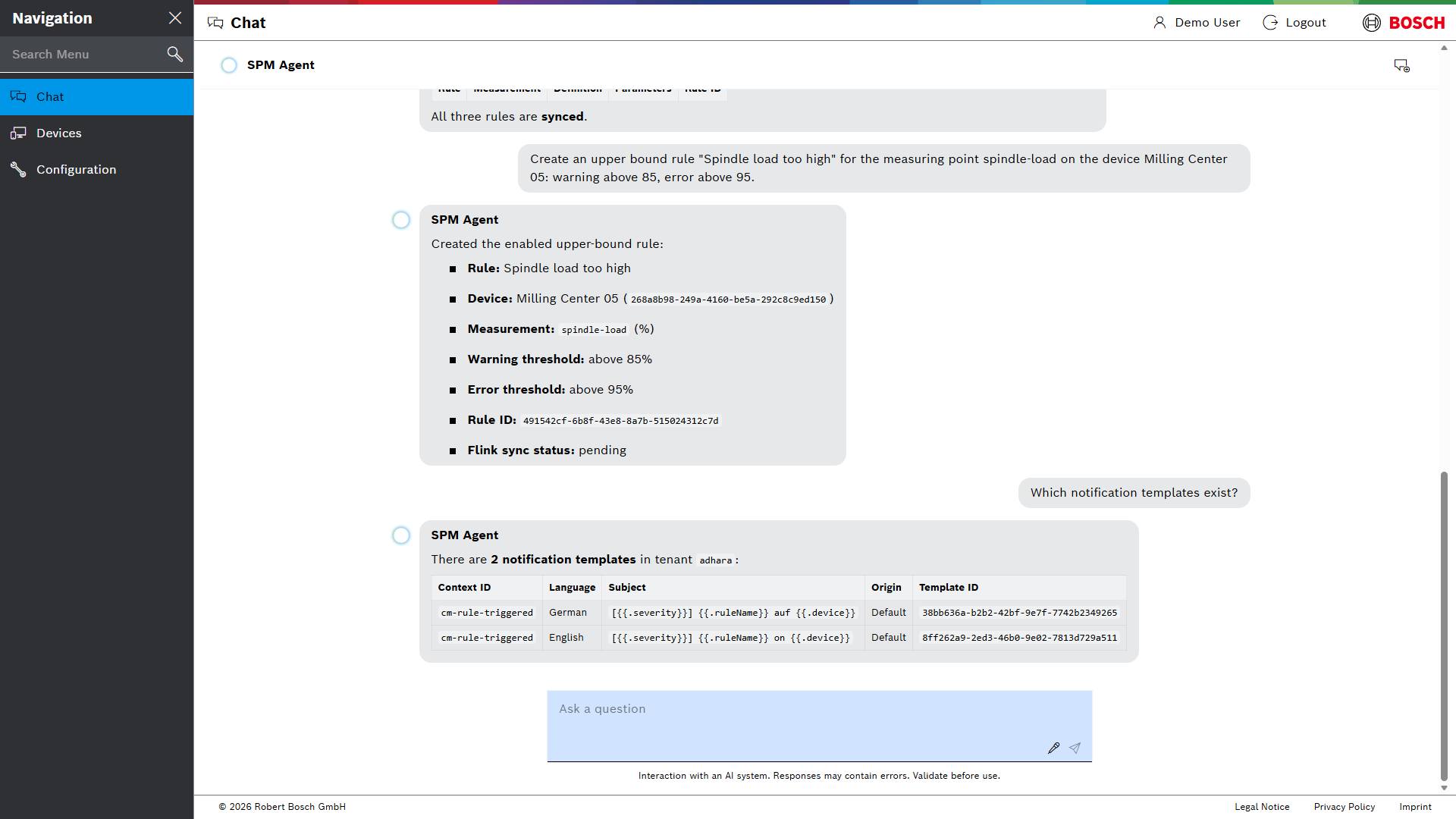
Ask the agent, for example:
Which notification templates exist?
Show the English template cm-rule-triggered.
Changing a template
-
Ask the agent, for example:
Change the subject of the English template cm-rule-triggered to "{{.severity}}: {{.ruleName}} on {{.device}} ({{.measuringPoint}})". -
Check the change that the agent shows and confirm it.
The template is changed. The next emails use the new text.
The agent keeps the placeholders exactly as you write them. It does not replace them with values.
Creating a template
Name the context ID, the language, the subject and the body. If one of them is missing, the agent asks for it.
Create an English template with the context ID shift-report, the subject "Shift report {{.shift}}" and the body "Hello {{.name}}, the report for shift {{.shift}} is ready.".
A new template is only used when notifications with this context ID are sent, for example by your own application. See Email notification API.
E-Mail-Vorlagen
Eine Vorlage legt Betreff und Nachrichtentext einer E-Mail für einen Zweck und eine Sprache fest. Vorlagen werden mit dem Agenten angezeigt und geändert.
Voraussetzung
-
Berechtigung
ai_chat:read, um den Agenten zu nutzen -
Berechtigung
templates:read, um Vorlagen zu sehen -
Berechtigung
templates:write, um Vorlagen anzulegen und zu ändern -
Berechtigung
templates:delete, um Vorlagen zu löschen
Felder einer Vorlage
| Feld | Beschreibung |
|---|---|
Kontext-ID |
Zweck der Vorlage, zum Beispiel |
Sprache |
|
Betreff |
Betreff der E-Mail. Kann Platzhalter enthalten. |
Nachrichtentext |
Text der E-Mail. Kann Platzhalter enthalten. |
Herkunft |
Default für Vorlagen, die mit dem Smart Operations Toolkit ausgeliefert werden, Custom für Vorlagen, die die Organisation angelegt hat. |
| Kontext-ID und Sprache einer Vorlage lassen sich nach dem Anlegen der Vorlage nicht mehr ändern. |
Platzhalter
Platzhalter stehen in doppelten geschweiften Klammern mit einem führenden Punkt, zum Beispiel {{.device}}. Beim Senden der E-Mail wird der Platzhalter durch seinen Wert ersetzt. Auch Bedingungen sind möglich, zum Beispiel {{if .name}}Hello {{.name}},{{end}}.
Platzhalter der Vorlage für Regelereignisse
Die Vorlage cm-rule-triggered gibt es auf Englisch und auf Deutsch.
| Platzhalter | Inhalt |
|---|---|
|
Schweregrad des Ereignisses, zum Beispiel Warnung |
|
Name der Regel |
|
Gerät, an dem die Regel ausgelöst wurde |
|
Überwachter Messpunkt |
|
Zeitpunkt, zu dem die Regel ausgelöst wurde |
|
Wert, der die Regel ausgelöst hat |
|
Parameter der Regel, zum Beispiel die Schwellenwerte (optional) |
|
Name des Empfängers (optional) |
Vorlagen anzeigen
Den Agenten fragen, zum Beispiel:
Welche Benachrichtigungsvorlagen gibt es?
Zeige die englische Vorlage cm-rule-triggered.
Vorlage ändern
-
Den Agenten fragen, zum Beispiel:
Ändere den Betreff der englischen Vorlage cm-rule-triggered in "{{.severity}}: {{.ruleName}} on {{.device}} ({{.measuringPoint}})". -
Die vom Agenten angezeigte Änderung prüfen und bestätigen.
Die Vorlage ist geändert. Die nächsten E-Mails verwenden den neuen Text.
Der Agent übernimmt die Platzhalter exakt so, wie sie eingegeben werden. Er ersetzt sie nicht durch Werte.
Vorlage anlegen
Kontext-ID, Sprache, Betreff und Nachrichtentext nennen. Fehlt eine Angabe, fragt der Agent nach.
Lege eine englische Vorlage mit der Kontext-ID shift-report, dem Betreff "Shift report {{.shift}}" und dem Nachrichtentext "Hello {{.name}}, the report for shift {{.shift}} is ready." an.
Eine neue Vorlage wird nur verwendet, wenn Benachrichtigungen mit dieser Kontext-ID gesendet werden, zum Beispiel von einer eigenen Anwendung. Siehe API für E-Mail-Benachrichtigungen.