Diese Seite ist nur auf Englisch verfügbar.
Mapper Overview
Mappers enable attributes from the identity of a user to be transferred from the identity provider to Nexeed Industrial Application System (transport via ID token). The following options are available for transferring attributes:
-
Transfer identity attributes to the user profile in Nexeed Industrial Application System using the "Attributes Importer" mapper (e.g. first name or last name)
-
Set identity attribute as user name (e.g. claim "preferred_username" using the "Username Template Importer" mapper).
This definition takes place once during the initial login of the user and cannot be changed again.
-
Use identity attributes using the "Advanced claim to group mapper" mapper to add users to a group of the Multitenant Access Control and authorize them with predefined roles.
Add Mapper
Prerequisite
Group Mapper Manager or Identity Provider Manager role
Procedure
-
Call up the Multitenant Access Control > Identity provider menu.
-
Click on an entry in the list of identity providers.
The details area of the selected identity provider appears.
-
In the header of the details area, add a new mapper with
 .
The Add Mapper dialog appears.
Fields marked with an asterisk (*) are mandatory and must be completed.

-
In the Name text field, enter a freely selectable (user-friendly) name for the mapper.
-
In the Synchronization Mode drop-down list, specify how the mapper is to be synchronized:
-
Inherit
Applies the synchronization mode that has been set for this identity provider.
-
Import
The user information is synchronized with Nexeed Industrial Application System once when the user logs in for the first time.
-
Legacy
Current settings in Nexeed Industrial Application System are retained.
-
Force
The user information is synchronized upon every login.
-
-
Select the group assignment from the Type drop-down list.
-
Advanced Claim to Groups
Adds the user to a Multitenant Access Control group and authorizes the user with the roles assigned to it.
This group assignment can only be made by the
Group Mapper Manager. -
Attribute Importer
Transfers attributes of externally defined users to attributes or properties of the imported Nexeed Industrial Application System user.
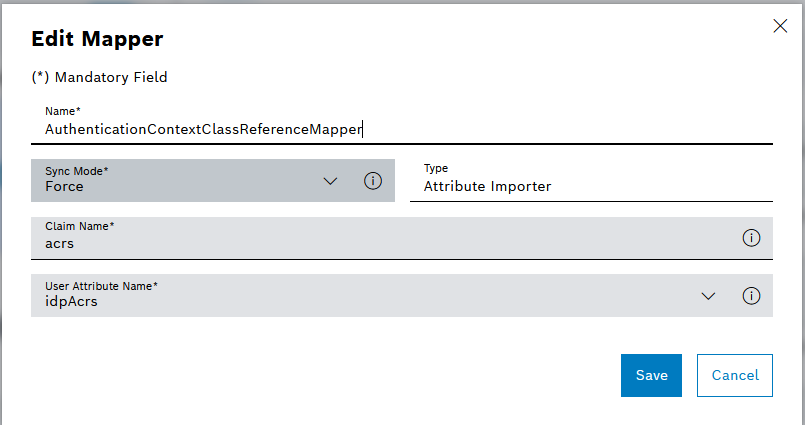
Starting from version 1.41, MACMA supports multifactor authentication by using conditional access authentication context feature from EntraID, to secure elevated functions in other modules. To use this feature, a user attribute mapper is needed to map the
acrsclaim from the Entra ID Token to the user attribute "idpAcrs".For existing Entra ID Identity Providers, this user attribute mapper is added automatically during MACMA migration. For new Entra ID Identity Providers, the user attribute mapper needs to be created manually. Make sure exactly the same setting is used as below:
-
Username Template Importer
Maps externally defined OIDC claims or SAML attributes with a template to the user name of the imported user.
Depending on the selected Type , different input fields are displayed below.
-
-
Mapper selection Advanced Claim to Groups :
-
Enter Claim Name.
A claim is an attribute in the user’s ID token.
-
Enter Claim Value.
The claim value must be included in the claim’s value list in order to add the user to a Nexeed Industrial Application System group.
The matching is case-sensitive, the value must match exactly.
-
In the Group list, select the Multitenant Access Control group to which the new mapper is to be linked.
-
-
Mapper selection Attribute Importer :
-
Enter Claim Name.
-
Enter Name of the User Attribute.
A user attribute provides information about the user, such as email address, first name or last name. The name of the user attribute is defined by the identity provider and can be different for each identity provider. Only one attribute can be entered.
-
-
Mapper selection Username Template Importer :
-
Enter Template.
Entering the name template "${ALIAS}.$\{CLAIM.preferred_username}" results in "idp.johndoe" for the identity provider with the alias "idp" and the preferred_username claim value "johndoe".
It is possible to convert to lowercase or uppercase letters with "$\{CLAIM.sub | lowercase}" or "$\{CLAIM.sub | uppercase}" respectively.
-
Enter the storage location for the user name in the Target input field.
LOCAL (default) for saving in the local database during user import or BROKER_ID and BROKER_USERNAME for saving in the ID or in the user name used during the federated user lookup.
-
-
Click Save.
The mapper is added.
Edit mapper
Prerequisite
Group Mapper Manager or Identity Provider Manager role
Procedure
-
Call up the Multitenant Access Control > Identity provider menu.
-
Click on an entry in the list of identity providers.
The details area of the selected identity provider appears.
-
Select a mapper and open it for editing with
 .
The Edit Mapper dialog appears.
Only the
Group Mapper Managercan make changes to mappers of the Claim to Group type. -
Make changes to the mapper Add Mapper.
-
To save the changes, click Save.
The mapper is changed.