Diese Seite ist nur auf Englisch verfügbar.
Setup click once
Overview
The purpose of a ClickOnce client is that any number of clients can get a client application with just "one click (click once)" from a server, and it’s ready to run, including only the endpoint configuration files.
This is achieved with a web URL executed on the client machines.
When the web-URL gets called, the browser downloads a .application-file from the server.
Executing this .application-file will result in getting and installing the client from the server.
After the installation, the client is ready to run on the client system.
If the client gets updated (new version) on the server system, this new version can be downloaded and used by all client systems simply by using the web URL again.
It will update the client automatically.
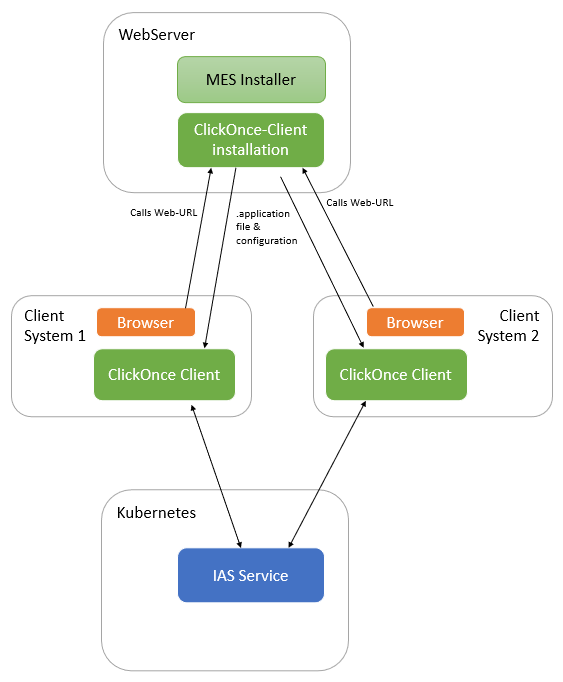
This graphic shows a server system that hosts the services in Kubernetes and a ClickOnce client installation.
This installation allows us to call the web URL from each client system, resulting in a client installation on each client system using the same application and configuration provided by the server system.
For the installation, no admin rights are required for the user. The application will be installed on the client system in a cryptic directory made by Windows. It is unnecessary to know where the directory is and especially not where the config files are located.