Identity provider integration
502 Bad Gateway on SSO
In the Multitenant Access Control UI select the particular identity provider and go to edit: Toggle 'Disable User Info'.
Login fails with identity provider using ClaimToGroup mapper fails after renaming / moving / deleting group
Symptom: Unexpected login failure after successful login at identity provider.
Diagnosis: If a group has recently been renamed, moved or deleted, the configuration of the ClaimToGroup mappers may have become inconsistent leading to errors during mapping the user’s information from the identity provider.
Treatment: Check correctness of Multitenant Access Control group references in the identity provider’s mappers inside Multitenant Access Control UI.
Azure Active Directory: Invalid client credentials
Symptom: After login, users are shown the login form again without any errors on screen.
Some users might be able to login.
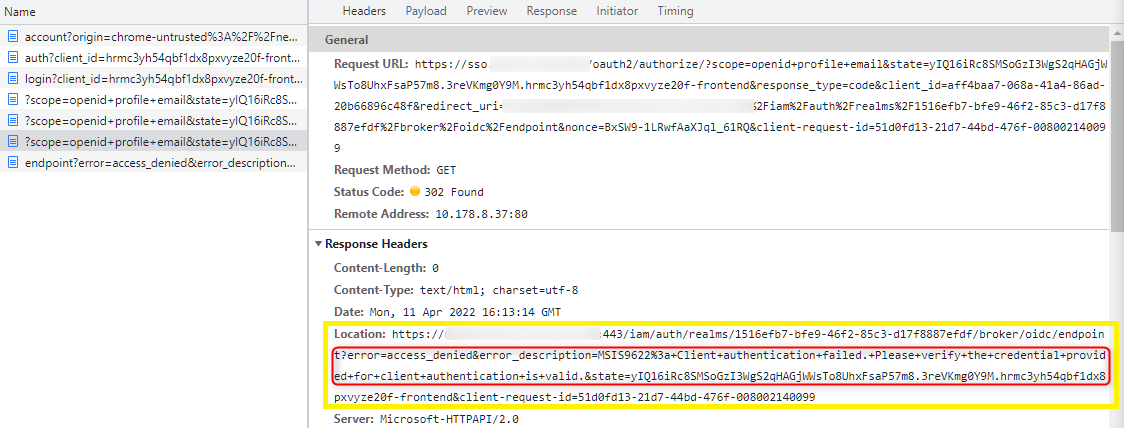
Diagnosis: Azure Active Directory when connected via OpenID Connect may return
error=access_denied with
error_description="MSIS9622 Client authentication failed. Please verify the credential provided for client
authentication is valid"
when redirecting to MACMA.
This error can be seen either in the Location header of the last request to the Identity Provider and might also be shown in the URL (see img-verifyCredentialProvided.
Even though the error seems to indicate wrong credentials between MACMA and Azure Active Directory it is really caused by the user not having a required security group.
Username is not automatically mapped
Symptom: After login, users are shown the login form again requiring to fill in a username.
Diagnosis:
When configuring the Identity Provider mappers, the following ID token claims can be used instead of 'upn' claim for displaying sign-in state to the user: 'preferred_username' or 'unique_name' for v1 tokens and 'preferred_username' for v2 tokens. Check the openid-configuration of the identity provider for the list of supported claims (e.g. https://stfs.bosch.com/adfs/.well-known/openid-configuration)
Identity provider login failure shown to user, unique database constraint violated
Symptom: The keycloak logs contain the message 'unique constraint (MACMA.CONSTRAINT_40) violated'. Unexpected login failure after successful login at identity provider is shown to the user.
Diagnosis:
The problem is related to a changed client-id in the federation of the tenant.
If the change was done on purpose (please investigate it) the solution is to delete the identity provider links for each user in that tenant.