Known limitations
Manual deletion of queues
When the Deviation Processor module is removed from the system, the queues used by it will not be deleted automatically.
Deletion of entities in Master Data Management
The Deviation Processor synchronizes facilities (equipment), devices, device types, and error code definitions from Master Data Management (MDM) to the Deviation Processor database.
When an entity is deleted in MDM, it will not be automatically deleted from the Deviation Processor database. This is because deviations linked to deleted facilities should not be lost or orphaned.
As a result, the Deviation Processor will continue to display the deleted entity in the UI, which can lead to confusion or inconsistencies in the data presented to users.
Until a software-based solution is implemented, MDM entities in the Deviation Processor database must be manually deleted and then re-synchronized. This can be done as follows:
|
Business Impact Considerations Before proceeding, ensure that the customer understands and approves the following:
|
-
Obtain customer approval for the deletion of facilities in Deviation Processor (synchronization with MDM) as described in the warning above.
Performance Impact During Synchronization
During the sync process, users may temporarily not see all error codes, processes, devices, device types or facilities in UI dropdowns. However, the Deviation Processor will continue to function normally in the background, including creating deviations from module notifications and triggering actions. The UI remains available throughout the synchronization process.
-
Delete the MDM synchronization job for the tenant in the database to stop the background synchronization for cleaning:
SQL Server:
DELETE FROM QRTZ_JOB_DETAILS WHERE JOB_GROUP = '<tenant_id>' AND JOB_NAME = 'MdmSyncJob';Oracle:
DELETE FROM "QRTZ_JOB_DETAILS" WHERE "JOB_GROUP" = '<tenant_id>' AND "JOB_NAME" = 'MdmSyncJob'; -
Remove all MDM data for the specific tenant from the following tables:
-
Device
-
DeviceFacility
-
DeviceType
-
Error
-
ErrorFacility
-
ErrorTranslation
-
Facility
-
FacilityTranslation
-
Process
-
ProcessFacility
-
ProcessTranslation
Execute the following SQL commands, replacing
<tenant_id>with the actual tenant ID:SQL Server:
DELETE FROM DeviceType WHERE TenantId = '<tenant_id>';
DELETE FROM DeviceFacility WHERE TenantId = '<tenant_id>';
DELETE FROM Device WHERE TenantId = '<tenant_id>';
DELETE FROM ErrorTranslation WHERE TenantId = '<tenant_id>';
DELETE FROM ErrorFacility WHERE TenantId = '<tenant_id>';
DELETE FROM Error WHERE TenantId = '<tenant_id>';
DELETE FROM ProcessTranslation WHERE TenantId = '<tenant_id>';
DELETE FROM ProcessFacility WHERE TenantId = '<tenant_id>';
DELETE FROM Process WHERE TenantId = '<tenant_id>';
DELETE FROM FacilityTranslation WHERE TenantId = '<tenant_id>';
DELETE FROM Facility WHERE TenantId = '<tenant_id>';
Oracle:
DELETE FROM "DeviceType" WHERE "TenantId" = '<tenant_id>';
DELETE FROM "DeviceFacility" WHERE "TenantId" = '<tenant_id>';
DELETE FROM "Device" WHERE "TenantId" = '<tenant_id>';
DELETE FROM "ErrorTranslation" WHERE "TenantId" = '<tenant_id>';
DELETE FROM "ErrorFacility" WHERE "TenantId" = '<tenant_id>';
DELETE FROM "Error" WHERE "TenantId" = '<tenant_id>';
DELETE FROM "ProcessTranslation" WHERE "TenantId" = '<tenant_id>';
DELETE FROM "ProcessFacility" WHERE "TenantId" = '<tenant_id>';
DELETE FROM "Process" WHERE "TenantId" = '<tenant_id>';
DELETE FROM "FacilityTranslation" WHERE "TenantId" = '<tenant_id>';
DELETE FROM "Facility" WHERE "TenantId" = '<tenant_id>';
Alternative for single-tenant databases:
If the database contains only one tenant, use the following commands to delete all MDM data:
SQL Server:
TRUNCATE TABLE DeviceType;
TRUNCATE TABLE DeviceFacility;
TRUNCATE TABLE Device;
TRUNCATE TABLE ErrorTranslation;
TRUNCATE TABLE ErrorFacility;
TRUNCATE TABLE Error;
TRUNCATE TABLE ProcessTranslation;
TRUNCATE TABLE ProcessFacility;
TRUNCATE TABLE Process;
TRUNCATE TABLE FacilityTranslation;
TRUNCATE TABLE Facility;
Oracle
TRUNCATE TABLE "DeviceType";
TRUNCATE TABLE "DeviceFacility";
TRUNCATE TABLE "Device";
TRUNCATE TABLE "ErrorTranslation";
TRUNCATE TABLE "ErrorFacility";
TRUNCATE TABLE "Error";
TRUNCATE TABLE "ProcessTranslation";
TRUNCATE TABLE "ProcessFacility";
TRUNCATE TABLE "Process";
TRUNCATE TABLE "FacilityTranslation";
TRUNCATE TABLE "Facility";
-
-
Trigger the
MdmSyncJobvia the Quartz State Overview interface. Access this through the base tenant:<IAS domain>/deviationprocessor?appPath=%2Fbackground-jobs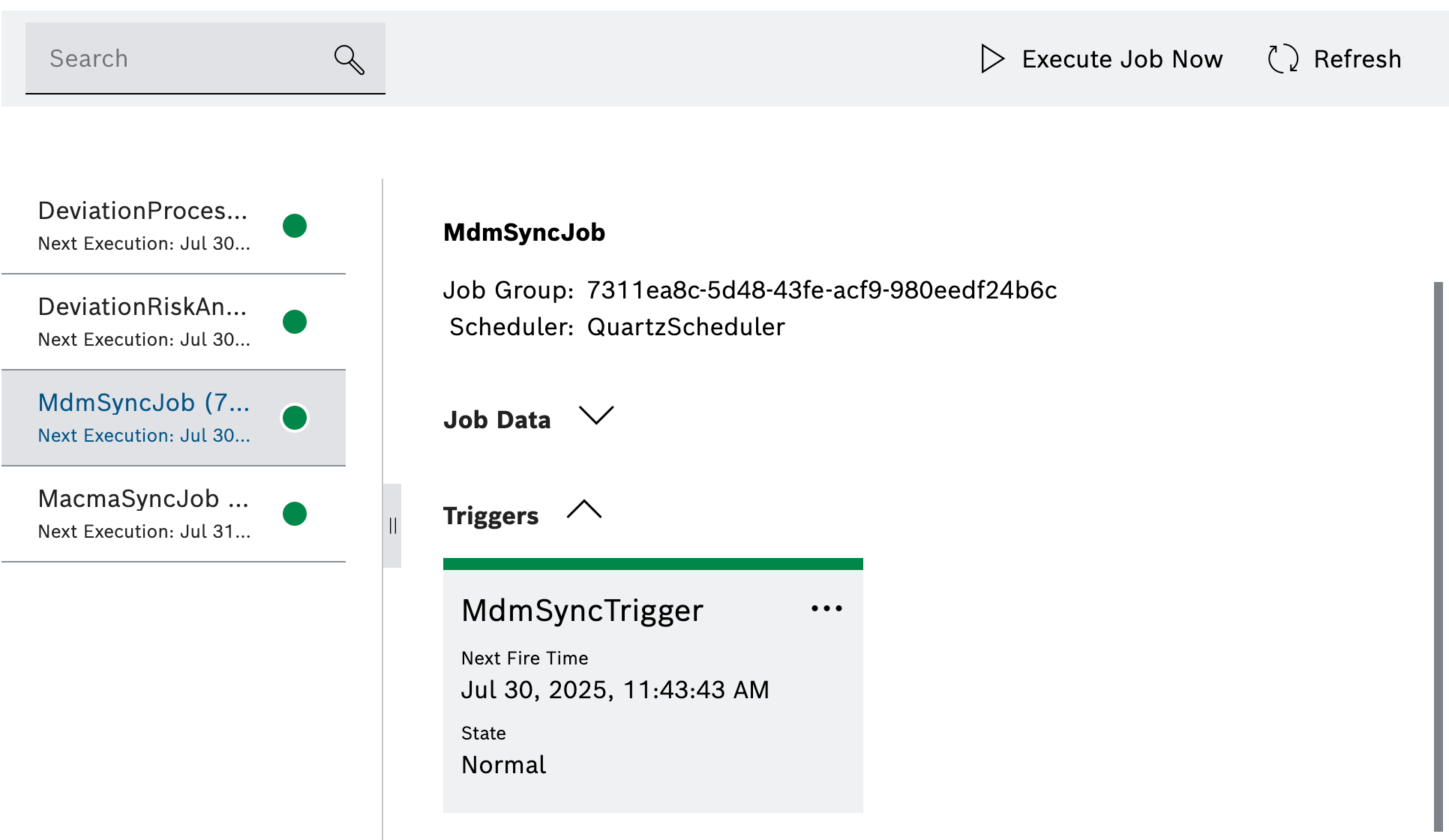
-
Verify that the MDM synchronization jobs for the tenant have been successfully recreated.
-
Validate that the MDM synchronization ran successfully via the Quartz State Overview interface. If successful, the state of the
MdmSyncTriggershould return to normal.