Nexeed
    • Introduction
    • User manual
      • General Descriptions
        • Fine-grained access control
        • Ticket Management Groups
      • Ticket Management
        • Filter options
        • Ticket details
        • Ticket archiving
        • Ticket anonymization
        • Notifications
        • Ticket escalation mapping
      • Maintenance status widget
    • Operations manual
      • Overview
      • System Architecture and Interfaces
      • System Requirements
        • tm/ticket-service
      • Migration from Previous Versions
        • Migration to 7.3.0+
        • Migration to 7.4.0+
        • Migration to 7.4.1+
        • Migration to 7.8.0+
        • Migration to 7.9.0+
        • Migration to 7.10.0+
        • Migration to 7.11.0+
        • Migration to 7.12.0+
        • Migration to 7.13.0+
        • Migration to 7.13.1+
        • Migration to 7.14.0+
        • Migration to 7.16.0+
        • Migration to 7.17.0+
        • Migration to 7.20.0+
      • Setup and Configuration
        • Setup
          • Installation guide
        • Recommendations
        • Helm Configuration
        • Ticket Management global variables
        • tm/ticket-service
        • Ticket Management IAS dependencies
      • Start and Shutdown
      • Regular Operations
      • Failure Handling
      • Backup and Restore
      • Logging and Monitoring
        • Module Health Verification Endpoints and K8S Probes
      • Known Limitations
        • Maximum 2100 parameter support of MSSQL can lead to query failure
        • Users from different tenants can have issues when calling MACMA/MDM concurrently
        • Lost messages of Notification service if maximum retry is exceeded
    • Developer documentation
      • Getting Started
      • How-Tos
        • Domain Context Registration
        • Integrating Ticket Management Views
      • Failure Handling
        • Embedded View Blocked by Content Security Policy (CSP)
    • API documentation
      • HTTP API
    • Glossary
Ticket Management
  • Industrial Application System
  • Core Services
    • Block Management
    • Deviation Processor
    • ID Builder
    • Multitenant Access Control
    • Notification Service
    • Ticket Management
    • Web Portal
  • Shopfloor Management
    • Andon Live
    • Global Production Overview
    • KPI Reporting
    • Operational Routines
    • Shift Book
    • Shopfloor Management Administration
  • Product & Quality
    • Product Setup Management
    • Part Traceability
    • Process Quality
    • Setup Specs
  • Execution
    • Line Control
    • Material Management
    • Order Management
    • Packaging Control
    • Rework Control
  • Intralogistics
    • AGV Control Center
    • Stock Management
    • Transport Management
  • Machine & Equipment
    • Condition Monitoring
    • Device Portal
    • Maintenance Management
    • Tool Management
  • Enterprise & Shopfloor Integration
    • Archiving Bridge
    • Data Publisher
    • Direct Data Link
    • Engineering UI
    • ERP Connectivity
    • Gateway
    • Information Router
    • Master Data Management
    • Orchestrator

Nexeed Learning Portal

  • Ticket Management
  • Developer documentation
  • How-Tos
  • Domain Context Registration

Domain Context Registration

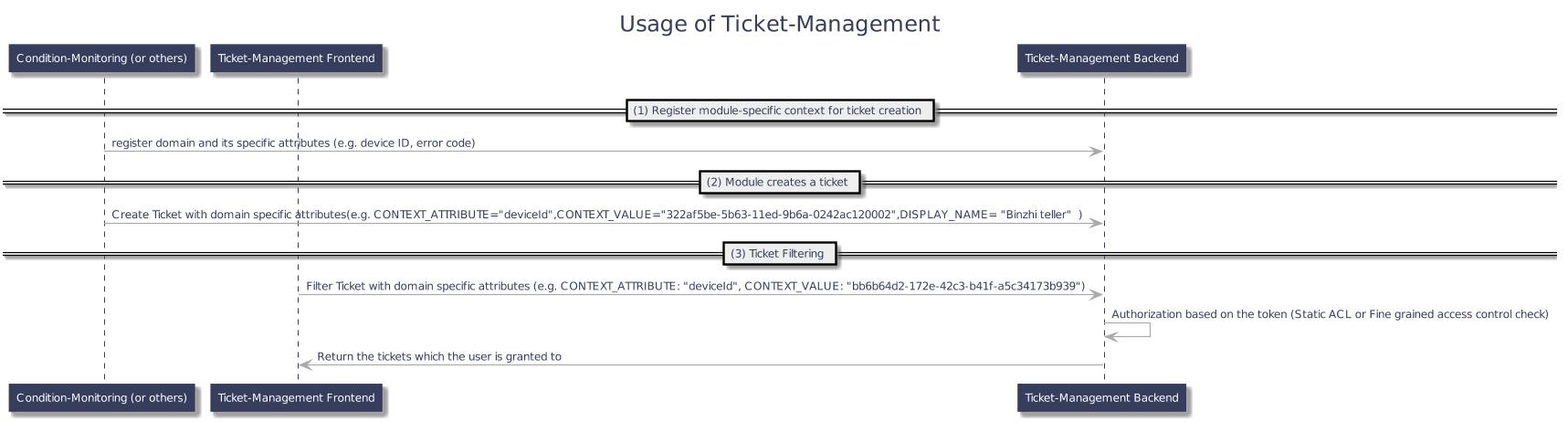
Modules integrated with Ticket Management can register a domain context. This allows for the association of tickets with a specific domain and the definition of custom context attributes, which can be used for filtering and data organization.

Prerequisites

To register or manage a domain context, the calling application must be assigned the Ticket Context Registrar role.

Registration and Management

Domain context are managed via the REST API that facilitates registration, modification, and deletion. All operations are performed through backend-to-backend communication.

Example Request Body

To register a domain context, provide a request body with the following fields. See Ticket Management API for details.

  • name (string): The name of the domain or module (e.g., Shift Book, Condition Monitoring). This appears as a filter option in the ticket overview UI.

  • attributes (list): A list of domain-specific context attributes. Each attribute object defines its properties, such as whether it is mandatory.

Example: Condition Monitoring

For CM, the context includes a single, optional attribute:

  • code (optional)

    • For CM, because of the customized implementation of "fine-grained access control" and definition of "automatic ticket", the code attribute is fixed and must be optional. New context attribute can still be registered for CM.

Example: Setup-Specs

For Setup-Specs, the context may include the following attributes:

  • productFamilyId

  • productTypeId

  • productVariantId

  • productId

  • typeNumber

Ownership and Permissions

  • When a module registers a domain, the owner is set to the registered application and cannot be changed by other non-privileged applications.

  • If a domain has no owner, any module can modify or delete its context. The module that performs the action becomes the new owner.

  • A privileged user can register, modify, or delete the context of any domain, regardless of ownership.

Rules for Modifying Context Definitions

Changes to a domain’s context definition only apply to newly created tickets. Existing tickets are not migrated or updated.

  • Adding: New context attributes can be added to a domain.

  • Removing: Existing context attributes can be removed.

  • Updating: An attribute’s characteristics (e.g., mandatory flag) can be updated.

  • Renaming: Renaming an existing context attribute is not permitted.

The maximum number of context attributes that can be registered per domain is 5.

Workflow

Workflow for Domain Context Registration

Contents

© Robert Bosch Manufacturing Solutions GmbH 2023-2025, all rights reserved

Changelog Corporate information Legal notice Data protection notice Third party licenses