Nexeed
    • Introduction
    • User manual
      • Line Overview
      • Part Count View
        • Configuration Part Count View
      • Part Count Chart
      • Incident map
      • Information Screens
        • Visitor Info
        • Visitor Info Compressed
        • Break View
      • Process Escalation
      • Terminal selection
      • Configuration Overview
        • General Configuration
        • Terminals Configuration
          • Adding a Terminal
          • Editing a terminal
        • Incident Map Configuration
        • Process Escalation Configuration
          • Configure a line for the first time
          • Edit line configuration
          • Add, edit, copy, delete error patterns
        • Audio Settings
          • Upload Audio Files
      • Additional information
        • Automatically switch views in the browser
          • Configure Revolver-Tabs
        • Custom KPIs
        • Font size control via URL
    • Operations manual
    • API documentation
      • HTTP API
      • Event API
    • Glossary
Andon Live
  • Industrial Application System
  • Core Services
    • Block Management
    • Deviation Processor
    • ID Builder
    • Multitenant Access Control
    • Notification Service
    • Ticket Management
    • Web Portal
  • Shopfloor Management
    • Andon Live
    • Global Production Overview
    • KPI Reporting
    • Operational Routines
    • Shift Book
    • Shopfloor Management Administration
  • Product & Quality
    • Product Setup Management
    • Part Traceability
    • Process Quality
    • Setup Specs
  • Execution
    • Line Control
    • Material Management
    • Order Management
    • Packaging Control
    • Rework Control
  • Intralogistics
    • Stock Management
    • Transport Management
  • Machine & Equipment
    • Condition Monitoring
    • Device Portal
    • Maintenance Management
    • Tool Management
  • Enterprise & Shopfloor Integration
    • Archiving Bridge
    • Data Publisher
    • Engineering UI
    • ERP Connectivity
    • Gateway
    • Information Router
    • Master Data Management
    • Orchestrator

Nexeed Learning Portal

  • Andon Live
  • User manual
  • Part Count Chart

Part Count Chart

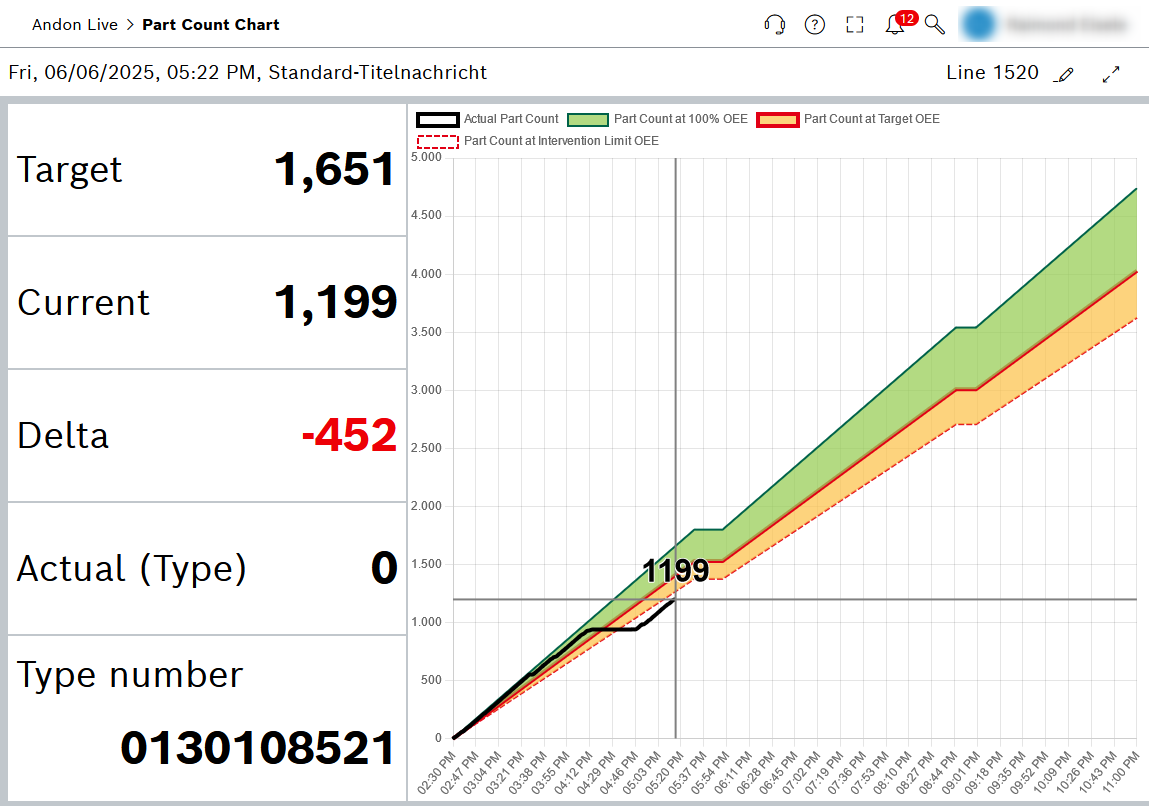
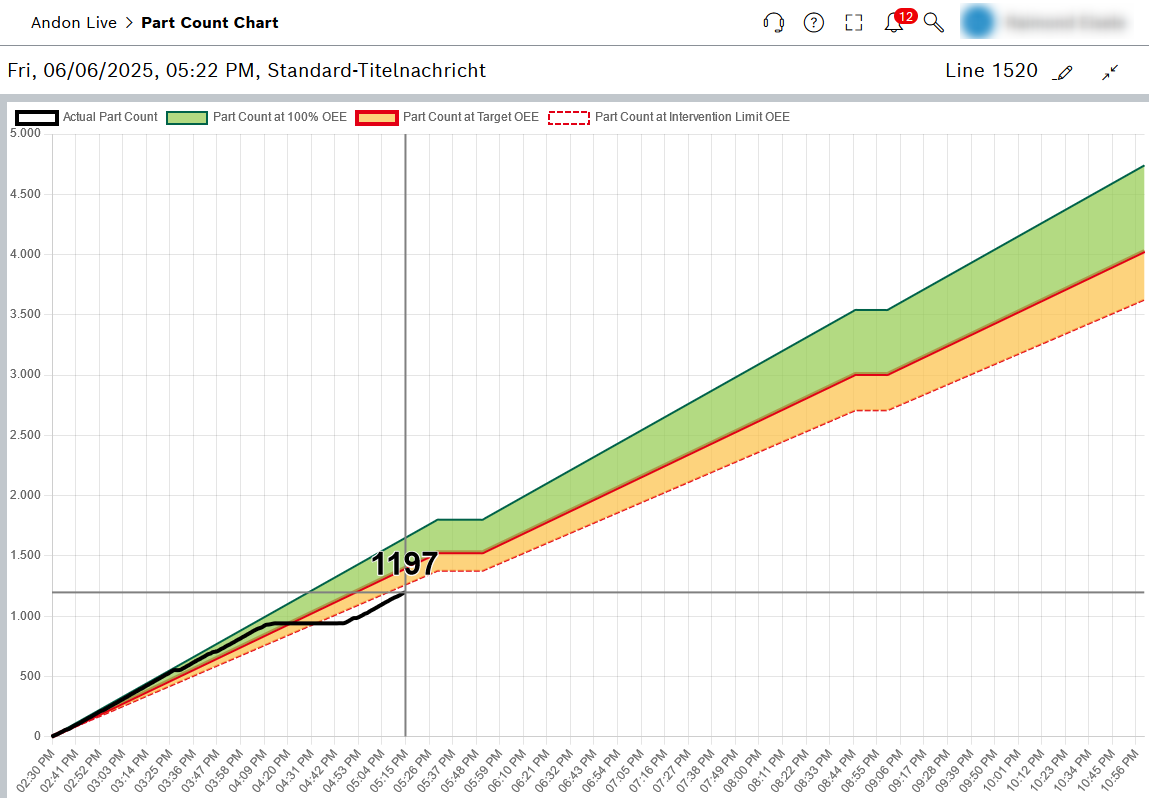
The Part Count Chart view displays the production data of the current shift graphically. By default the screen is spilt into two main parts. The left-hand area shows the production data for the selected line, while the right-hand area displays a diagram of the production process. The diagram can be maximized to the full size of the screen by clicking on the Maximize icon in the header.
andonlive_part_count_diagram
andonlive_part_count_diagram_only

Header

Element Description

Ostfildern plant

Title message: Add, edit terminal

Line xyz

The production line selected in the Select Line drop-down list

mdm_edit_icon

Select the production line and station using the drop-down lists

mdm_edit_icon

Maximize or minimize the chart area of the view

Production data

The production data for the selected line and station is displayed in the left-hand area.

Diagram

Graphical representation of the production process. The following production data is displayed:

  • Continuous red line: Part count at OEE set value.

  • Continuous green line: Part count at 100% OEE.

  • Broken red line: Quantity at OEE control limit.

  • Black line: Actual quantity of parts.

  • Green area: Part count range between 100% OEE and OEE set value.

  • Yellow area: Part count range between OEE set value and the OEE action limit.

  • Gray vertical line: Shows the current time.

Mouseover function : Detailed information is displayed.

Contents

© Robert Bosch Manufacturing Solutions GmbH 2023-2025, all rights reserved

Changelog Corporate information Legal notice Data protection notice Third party licenses