SOT
    • Introduction
    • User manual
      • Type groups and types
        • Description of the interaction elements for type groups
        • Search for type group
        • Create type group
        • Edit type group
        • Deleting a type group
        • Display types of a type group
        • CSV import type group and types
        • CSV export type group and types
      • Target cycle times
        • Description of the interaction elements for target cycle times
        • Search for type group
        • Select equipment
        • Select time stamp
        • Filter type groups with target cycle time
        • Display target cycle time history
        • Edit target cycle times
        • Delete target cycle time history
        • CSV import target cycle times
        • CSV export target cycle times
        • Configure columns
      • Target values
        • Description of the interaction elements for setpoints
        • Search for type group or KPI
        • Select equipment
        • Select display mode
        • Select KPI element or type group
        • Select time stamp
        • Filter type groups or KPI elements with target values
        • Display target value history
        • Edit target values
        • Delete target value history
      • Downtime Causes
        • Description of the interaction elements for downtime causes
        • Search for downtime causes
        • Filter downtime causes
        • Removing duplicates
        • Create downtime cause
        • Edit downtime cause
        • Delete downtime cause
        • Edit translations
        • Merge downtime causes
        • CSV Import downtime causes
        • CSV export downtime causes
        • Configure columns
      • Configuration
        • System configuration section
        • Auto-insert station error
        • Station error blocklist
        • Downtime Text Templates
        • Facility management
        • Facility configuration
    • Operations manual
    • API documentation
    • Glossary
Shopfloor Management Administration
  • Smart Operations Toolkit
    • Deviation Processor
    • Multitenant Access Control
    • Notification Service
    • Ticket Management
    • Web Portal
  • Shopfloor Management
    • Andon Live
    • KPI Reporting
    • Operational Routines
    • Shift Book
    • Shopfloor Management Administration
  • Product & Quality
    • Process Quality
    • AI Services
  • Machine & Equipment
    • Condition Monitoring
    • Device Portal
  • Enterprise & Shopfloor Integration
    • Information Router
    • Master Data Management

SOT Learning Portal

  • Shopfloor Management Administration
  • User manual
  • Target values
  • Display target value history

Display target value history

Each assigned target value is valid for an unlimited period from its time stamp, but its validity can be limited by entering further target values in the future. The resulting target value history can be displayed in the results table.

Prerequisites

  • Administration: User or Administration: Admin role

  • The Target Values tab opens. Target Values tab

Procedure

  1. Move the mouse over the type group or KPI name to make the target value history symbol history visible.

  2. Click history.

    In addition to the type group table, the target value history of the selected type group or the selected KPI element is displayed with all previously defined target values:
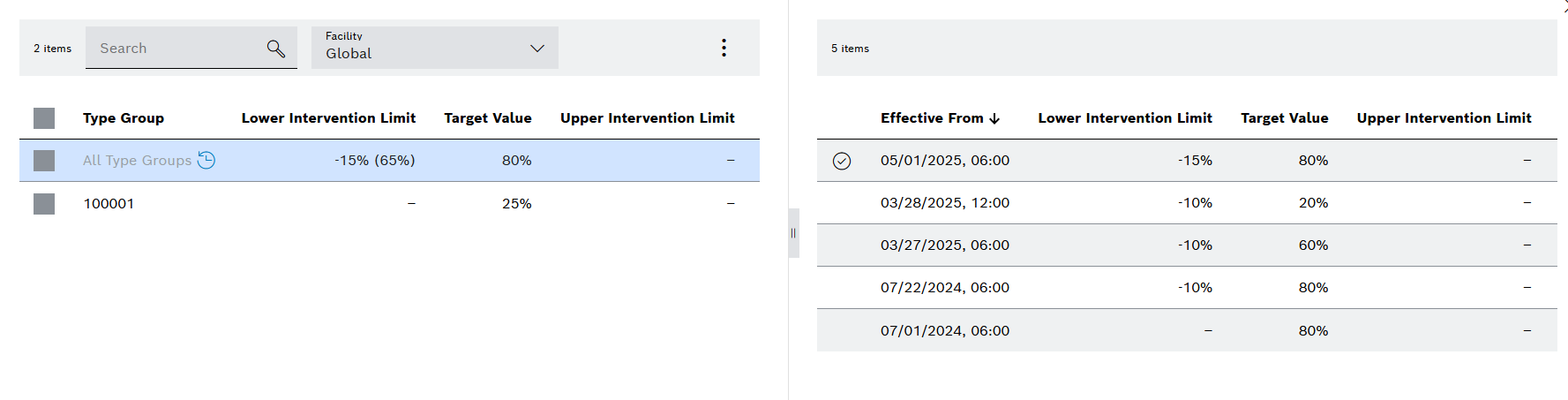
    kpi_target_values_history

    history-orange A permanently visible, orange-colored history symbol indicates that the target values displayed in the table will be overwritten by other target values in the future.

    alert_success_black Marking for the currently valid target value of the type group or KPI element based on the selected time stamp in the filters. Cells in light green indicate changes to the target value history.

Contents

© Robert Bosch Manufacturing Solutions GmbH 2023-2026, all rights reserved

Changelog Corporate information Legal notice Data protection notice Third party licenses