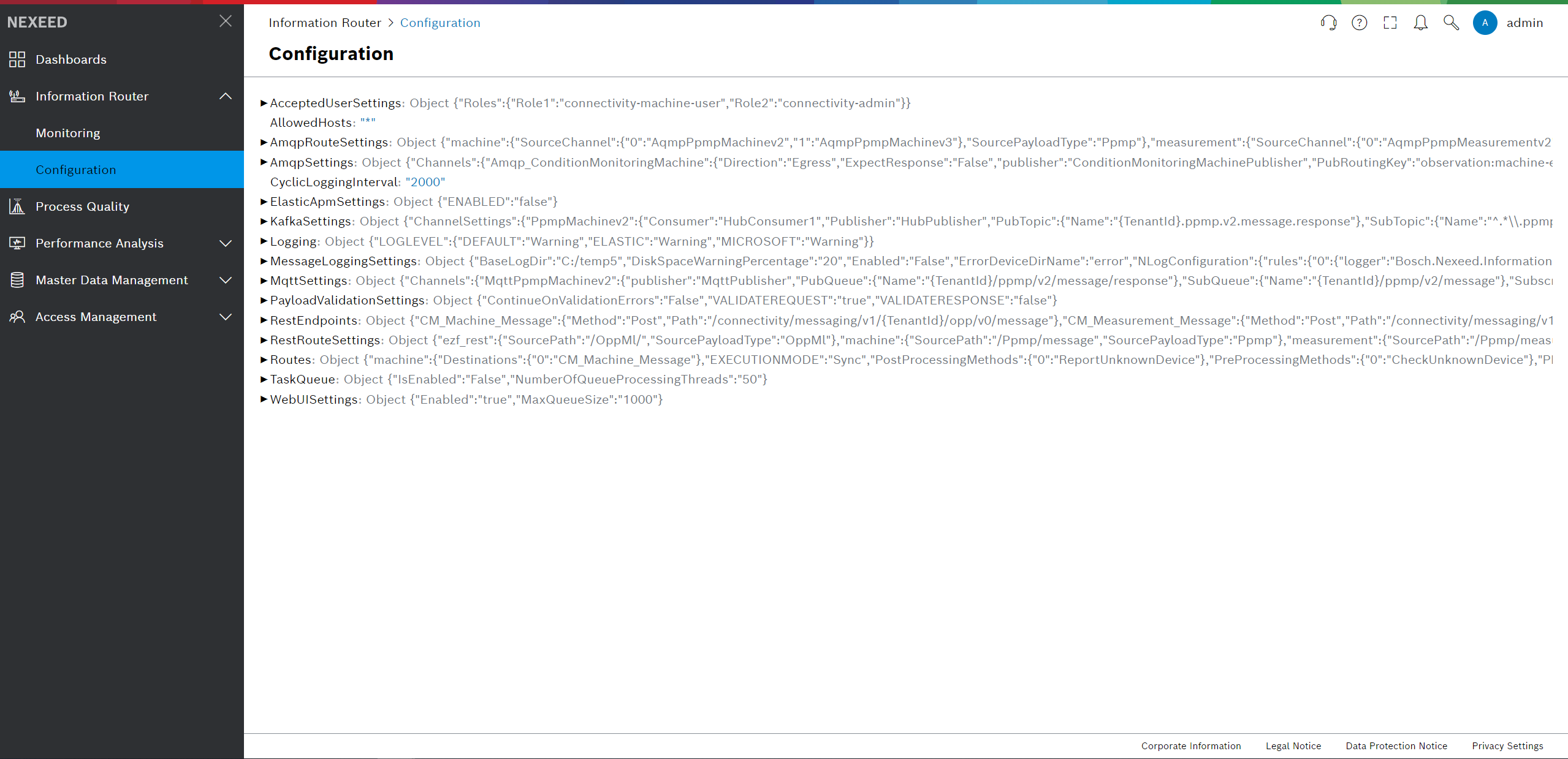
Logging
The following settings refer to the logging within the Information Router, for both cloud and on premise scenarios.
| Environment variable | Meaning | Default value | Possible values |
|---|---|---|---|
LOGGING__LOGLEVEL_DEFAULT |
Warning |
The default log level for the Information Router. |
None |
Monitoring settings
| Environment variable | Meaning | Default value | Required |
|---|---|---|---|
OTEL_ENABLED |
{observabilityOtelEnabled} |
false |
No |
OTEL_EXPORTER_OTLP_ENDPOINT |
{observabilityOtlpUrl} |
- |
Yes (if OTEL_ENABLED is true) |
OTEL_LOGS_EXPORTER |
{otelLogsExporter} |
none |
No |
OTEL_METRICS_EXPORTER |
{otelMetricsExporter} |
none |
No |
OTEL_TRACES_EXPORTER |
{otelTracesExporter} |
none |
No |
OTEL_EXPORTER_OTLP_PROTOCOL |
{otelTransportProtocol} |
grpc |
No |
OTEL_TRACES_SAMPLER |
{otelTracesSampler} |
parentbased_always_on |
No |
OTEL_TRACES_SAMPLER_ARG |
{otelTracesSamplerArg} |
- |
No |
OTEL_RESOURCE_ATTRIBUTES |
Key-value pairs to be used as resource attributes for OpenTelemetry SDK, containing e.g. service.name, service.version, deployment.environment. |
- |
Yes (if OTEL_ENABLED is true) |
OTEL_EXPORTER_OTLP_HEADERS |
Header of OpenTelemetry exporter including authentication at the APM server. |
- |
Yes (if OTEL_ENABLED is true) |
| All settings above can be configured through: Environment Variable, helmchart ConfigMap (otel-observability-configmap handled by utility-toolkit), or helmchart properties (.Values.global.observability.* or .Values.local.observability.*). |
HostOptions Configuration
HostOptions control the behavior of the Information Router host process, including service startup/shutdown and background service exception handling. These settings can be configured via environment variables, Helm chart properties, or ConfigMaps, following the same conventions as other configuration sections.
| Environment Variable | Description | Mandatory | Default Value |
|---|---|---|---|
|
Timeout duration for graceful shutdown of the Information Router service. Should be less than the Kubernetes termination grace period (typically 30 seconds) to ensure proper cleanup before the pod is forcefully terminated. |
No |
"00:00:25" |
|
Determines whether background services start concurrently or sequentially during startup. |
No |
"false" |
|
Determines whether background services stop concurrently or sequentially during shutdown. |
No |
"false" |
|
Specifies the behavior when any BackgroundService instance throws an unhandled exception. Possible values: "StopHost", "Ignore", etc. |
No |
"StopHost" |
Graceful Shutdown Configuration
The Information Router supports graceful shutdown to ensure proper cleanup of resources and completion of ongoing tasks before termination. The following settings control the graceful shutdown behavior.
Environment Variable |
Description |
Mandatory |
Default Value |
|
Include time to wait after unsubscribing from topics before shutting down publishers allowing in-flight messages to be processed. |
No |
"00:00:10" |
Service credentials
The Information Router service credentials (username and password) need to be provided to MACMA for the means of service authentication.
| Environment variable | Meaning | Default value |
|---|---|---|
SERVICECREDENTIALS__USER |
The username used for MACMA service authentication. |
development-connectivity-backend |
SERVICECREDENTIALS__PASSWORD |
The password used for MACMA service authentication. |
- |
| The service username and password need to be entered in the MACMA portal beforehand. |
Task queue
In case of asynchronous mode incoming request can be queued by enabling the task queue, which is being processed in a parallel manner. The number of worker threads can be also set.
| Environment variable | Meaning | Default value |
|---|---|---|
TASKQUEUE__ISENABLED |
Governs whether the Task Queue is enabled |
true |
TASKQUEUE__NUMBEROFQUEUEPROCESSINGTHREADS |
Governs the number of threads working off the queue in a parallel manner |
50 |
Master Data Settings
The Master Data Settings control the synchronization and management of master data from MDM (Master Data Management). These settings configure how the Information Router caches, syncs, and manages device data.
| Environment Variable | Description | Source | Mandatory | Default Value |
|---|---|---|---|---|
|
Flag to enable or disable master data synchronization. |
|
Yes |
"true" |
|
The product name used for master data identification in MACMA. |
|
Yes |
"connectivity" |
|
The retry period in seconds for MACMA operations when connection fails. |
|
Yes |
"10" |
|
The resynchronization period in minutes. Controls how often the Information Router syncs with MACMA to fetch updated master data. |
|
Yes |
"1" |
|
Flag to enable or disable full resynchronization of all master data. |
|
No |
"true" |
|
The time span (in format days.hours:minutes:seconds) between full resynchronization cycles. Example: "0.12:00:00" means every 12 hours. |
|
No |
"0.12:00:00" |
|
The time limit in minutes for handling orphaned synchronization operations (syncs that were interrupted or abandoned). |
|
Yes |
"10" |
|
The cache expiration period in minutes. Master data is cached locally and refreshed after this period. |
|
Yes |
"1" |
|
Maximum number of concurrent integration events processed during master data synchronization. Controls the parallelism of sync operations. |
ConfigMap: |
No |
"20" |
|
The polling interval (in format hours:minutes:seconds.milliseconds) for checking tenant synchronization state. |
ConfigMap: |
No |
"00:00:02.000" |
|
The renewal interval (in format hours:minutes:seconds) for the distributed leader lock. Controls how often the master data sync leader renews its lock to maintain leadership. |
ConfigMap: |
No |
"00:00:30" |
|
The time-to-live (in format hours:minutes:seconds) for the distributed leader lock. If the leader doesn’t renew the lock within this period, another instance can take over. |
ConfigMap: |
No |
"00:02:00" |
RabbitMQ Message Broker Settings for Master Data
The following settings configure the RabbitMQ connection used for master data synchronization events.
| Environment Variable | Description | Source | Mandatory | Default Value |
|---|---|---|---|---|
|
The hostname of the RabbitMQ broker used for master data integration events. |
Global module configuration: |
Yes |
- |
|
The port number of the RabbitMQ broker. |
Global module configuration: |
Yes |
- |
|
Flag to enable or disable SSL/TLS encrypted communication with the RabbitMQ broker. |
Global module configuration: |
Yes |
- |
|
The retry period in seconds for RabbitMQ connection and subscription operations. |
|
Yes |
"10" |
| The RabbitMQ connection settings (hostname, port, SSL) are inherited from the global connectivity messaging configuration and are managed by the Helm deployment infrastructure. |
Payload validation
The message payload can be validated against given validation schemas.+ Message valdiation can be enabled for message requests and / or responses.+
| Message validation should be switched off in production. |
| Environment variable | Meaning | Default value |
|---|---|---|
ValidateRequest |
Governs whether the message request payload validation is enabled. |
true |
ValidateResponse |
Governs whether the message response payload validation is enabled. |
false |
ContinueOnValidationErrors |
Governs if message processing is continued if any validation error comes up. |
false |
Route
Each route has a unique identifier, which corresponds to the message type from the incoming request (when using HTTP, it is read from the source path). In the current version, those are MESSAGE, MEASUREMENT and PROCESS.
Route settings
The route settings contain the information about the execution mode.
Environment variable |
Meaning |
Possible values |
Default value |
EXECUTIONMODE |
Whether the execution of a request is sync - synchronous (the machine waits for a response from the service endpoint) or async - asynchronous (the response returned immediately after the successful or failed authentication of the machine with MACMA). |
sync |
async |
PROCESSINGMODE |
Sets the the sequence for processing a message before and after forwarding it to the dedicated endpoint. - Forward without processing |
Forward |
Forward |
PREPROCESSINGMETHOD |
List of tasks to be done before processing the message via PROCESSINGMODE. - Check if device is known in MasterDataManagement. If yes, set device status to unknown. |
CheckUnknownDevice |
|
POSTPROCESSINGMETHOD |
List of tasks to be done after processing the message via PROCESSINGMODE. - Check if device is known in MasterDataManagement. If yes, set device status to unknown. |
CheckUnknownDevice |
|
DESTINATIONS |
List of destination endpoints or channels to forward message to. These are for - REST endpoint identifier in RESTENDPOINTS |
REST |
Examples of environment variable definitions:
"ROUTES__MACHINE__EXECUTIONMODE": "Sync"
"ROUTES__MEASUREMENT__EXECUTIONMODE": "Sync"
"ROUTES__PROCESS__EXECUTIONMODE": "Sync"
"ROUTES__REXROTHTIGHTENING__EXECUTIONMODE": "Sync"
"ROUTES__MACHINE__PROCESSINGMODE": "ProcessForwardProcess"
"ROUTES__MACHINE__PREPROCESSINGMETHOD": [ "CheckUnknownDevice" ]
"ROUTES__MACHINE__POSTPROCESSINGMETHOD": [ "ReportUnknownDevice" ]
"ROUTES__MACHINE__DESTINATIONS": [ "CPM" ]
"ROUTES__MEASUREMENT__DESTINATIONS": [ "CPM", "CM_Measurement_Message" ]
Rest route settings
Environment variable |
Meaning |
Possible values |
ENDPOINTID |
Used for defining which endpoints a route forwards the messages to. If left empty no forwarding will take place for the given endservice. |
CPM |
Machine message route:
RESTROUTESETTINGS__MACHINE__DESTINATIONENDPOINTS__CPM__ENDPOINTID: "CPM"
RESTROUTESETTINGS__MACHINE__DESTINATIONENDPOINTS__ES__ENDPOINTID: "ES"
RESTROUTESETTINGS__MACHINE__DESTINATIONENDPOINTS__LBDM__ENDPOINTID: "LBDM"
Measurement message route:
RESTROUTESETTINGS__MEASUREMENT__DESTINATIONENDPOINTS__CPM__ENDPOINTID: "CPM"
Process message route:
RESTROUTESETTINGS__PROCESS__DESTINATIONENDPOINTS__CPM__ENDPOINTID: "CPM"
Rexroth Tightening message route:
RESTROUTESETTINGS__REXROTHTIGHTENING__DESTINATIONENDPOINTS__CPM__ENDPOINTID: "CPM"
Rest destination endpoints
Only REST routes (destination endpoints support the HTTP protocol) are currently supported. For each of them, the base URL, destination path and credential type should be defined.
The identifier of the destination endpoint is referenced in the name of the corresponding environment variables. It can be freely chosen. A suggestion is that it describes the service running on the destination endpoint (e.g. CPM - Condition and process monitoring, LBDM - Line Bottleneck Detection Module)
Property |
Meaning |
Possible values |
Default value |
Example |
URL |
The base URL of the destination service endpoint, including the port number |
- |
http://localhost:8080 for local execution, on the cloud it is the NEXEED_URL variable |
|
Path |
The path of the destination service |
- |
smc/ppmp-interpreter/api/v2/{tenantId}/MachinePpmp for the the error detection service, where the tenantId is the tenant ID to which the machine is assigned to (is read from the request) and messageType is the the type of the message, also from the request. cpm/ppm/v3/{MessageType} for CPM lm/sensorservice/api/v2/ppmpevent for LBDM |
|
CredentialType |
The type of authentication used between the Information Router and the endpoint services. |
OpenId |
OpenId |
|
Method |
Method to be used for REST call |
Get |
Get |
|
Scope |
Scope used for requesting OpenId token |
- |
||
RequestPayloadType |
Payload type expected from endpoint when sending a request. |
Ppmp |
- |
|
ResponsePayloadType |
Payload type returned in endpoint response. |
Ppmp |
- |
Example environment variable definitions are:
#Destination endpoints
RestEndpoints__ES__Url: "${NEXEED_URL}"
RestEndpoints__ES__Path: "${ES_CONTEXT_PATH}/ppmp-interpreter/api/v2/{TenantId}/MachinePpmp"
RestEndpoints__ES__CredentialType: "OpenId"
RestEndpoints__CPM__Url: "${NEXEED_URL}"
RestEndpoints__CPM__Path: "${CPM_CONTEXT_PATH}/ppm/v3/{MessageType}"
RestEndpoints__CPM__CredentialType: "OpenId"
RestEndpoints__CPM__Method: "Post"
RestEndpoints__CPM__Scope: "aud:u0v34kpqif7n1297itte0fmvl"
RestEndpoints__CPM__RequestPayloadType: "Ppmp"
RestEndpoints__CPM__ResponsePayloadType: "Plain"
RestEndpoints__LBDM__Url: "${NEXEED_URL}"
RestEndpoints__LBDM__Path: "${LBDM_CONTEXT_PATH}/sensorservice/api/v2/ppmpevent"
RestEndpoints__LBDM__CredentialType: "OpenId"
MACMA
In the following table, the settings for the MACMA client are explained.
Environment variable |
Meaning |
Possible values |
Default value |
Example |
OIDC__SERVICEURL |
The base URL of the destination service endpoint, including the port number |
- |
|
|
OIDC__REQUIREHTTPS |
If HTTPS between MACMA and the Information Router is required |
false |
false |
|
OIDC__CLIENTID |
The username and secret for the MACMA client |
- |
||
OIDC__CLIENTSECRET |
The password and secret for the MACMA client |
- |
||
OIDC__CONFIGURATION__INTROSPECTIONENDPOINT |
The URL of the MACMA introspection endpoint |
- |
|
|
OIDC__CONFIGURATION__USERINFOENDPOINT |
The URL of the user information endpoint for MACMA |
- |
|
|
OIDC__CONFIGURATION__TOKENENDPOINT |
The URL of the token endpoint for MACMA |
- |
|
|OIDCNamedHttpClientsClients<client-name>UseResiliency |Enables resiliency for a HTTP client. Where <client-name> is the HTTP client to be configured. Currently clients are: the MacmaClient, MacmaAclClient and MasterDataClient. |true / false |false |
|OIDCNamedHttpClientsClients<client-name>ResiliencyConfig__EnableForUnsafeHttpMethods |Enables resiliency for POST, PATCH, PUT, DELETE, CONNECT methods (for more details see RFC 7231) for a HTTP client. Where <client-name> is the HTTP client to be configured. Currently clients are: the MacmaClient, MacmaAclClient and MasterDataClient. |true / false |false |
AMQP settings
Currently the following environment variables are defined in the deployment scripts which are normally suitable for the PPMP messages use case. The RexrothTightening format is not yet supported via AMQP. After setting the following variables the AMQP southbound flow should be ready to use as the above mentioned default queues are automatically generated and Information Router starts listening on them.
Environment variable |
Meaning |
Default value |
AmqpSettings__Connectors__AmqpConnector__Enabled |
Governs whether the AMQP 1.0 protocol is enabled or not. |
false |
AmqpSettings__Connectors__AmqpConnector__Hostname |
The hostname of the AMQP 1.0 broker |
empty |
AmqpSettings__Connectors__AmqpConnector__Port |
The port of the AMQP 1.0 broker |
5672 |
AmqpSettings__Connectors__AmqpConnector__UserName |
The user name for the AMQP 1.0 broker |
empty |
AmqpSettings__Connectors__AmqpConnector__Password |
The password for the AMQP 1.0 broker |
empty |
Amqp10Settings__Tenants__Tenant1 |
The tenant id of the customer which is being used in the automatically generated PPMP queue names. |
empty |
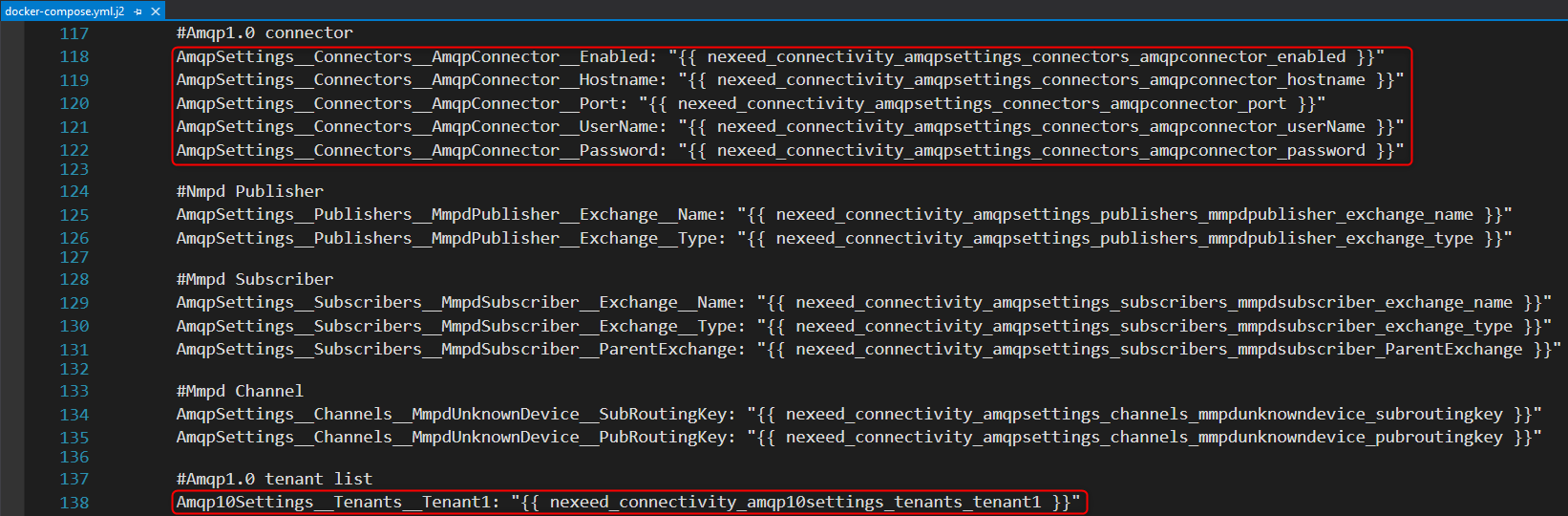
General information and all internal configuration settings
image::Amqp_SouthboundCommunication.png[height=250]
Settings
Route settings
"Routes": {
    "machine_AMQP": {
        "ExecutionMode": "Sync",
        "ProcessingMode": "ProcessForwardProcess",
        "SourceProtocol": "AMQP",
        "DestinationProtocol": "Rest",
        "DestinationProtocolRouteId": "machine",
        "PreProcessingMethod": "CheckUnknownDevice",
        "PostProcessingMethod": "ReportUnknownDevice"
    }
}
Above is a sample route - the source protocol needs to be set to AMQP.
AMQP settings
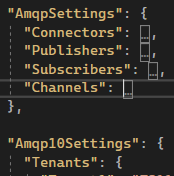
The AMQP settings contain the following sections:
-
Connectors configuration
-
Publishers configuration
-
Subscribers configuration
-
Channels configuration
-
Tenants configuration
Connectors configuration
Bellow is a sample connector configuration:
"Connectors": {
    "AMQPConnector": {
        "Name": "AMQPConnector",
        "Enabled": true,
        "Type: "Amqp1_0",
        "Hostname": "localhost",
        "Port": 5672,
        "ClientId": "ConnectivityHubConnector",
        "UserName": "default",
        "Password": "default",
        "SslEnabled": false,
        "SslVersion": "None",
        "ClientCertificate": null,
        "UseFailover": false,
        "FailoverServers": null,
    }
}
The connectors configuration contains a dictionary of configured connectors. Each connector has the following properties.
Property |
Meaning |
Name |
Name of the connector which will be referenced in the rest of the configuration (of publishers and subscribers). A freely chosen string. |
Hostname |
The hostname of the AMQP broker. |
Port |
The port of the AMQP broker. |
ClientId |
The client identifier. |
UserName |
Username of the AMQP broker. |
Password |
Password of the AMQP broker. |
SslEnabled |
AMQP makes it easy to encrypt messages using TLS and authenticate clients using modern authentication protocols, such as OAuth. This property governs that. |
SslVersion |
The SSL version. |
ClientCertificate |
Client certificate for the AMQP broker. Currently no certificate is used. |
UseFailover |
Set to true, if your AMQP broker is setup to support server sided failover. |
FailoverServers |
List of nodes that belong to a failover cluster. |
Publishers configuration
"Publishers": {
    "AMQPPublisher": {
        "Name": "AMQPPublisher",
        "Connector": "AMQPConnector",
        "Type": "Queue",
        "Durable": false,
        "Ttl": "00:00:00"
        "DeliveryConfirmationMode": "Async"
    }
}
Property |
Meaning |
Name |
The name of the publisher. Freely chosen string, is referenced in the channel configuration. |
Connector |
The name of the corresponding connector. |
Type |
The target type of publisher (i.e. if the publisher should publish to a topic or directly into a queue) |
Durable |
Set to true if messages should be sent using the Message Delivery Mode "Persistent" |
Ttl |
The time to live in milliseconds attribute for the messages published to AMQP |
DeliveryConfirmationMode |
A flag that governs how to handle published messages. There are three possible value: "Individual", "Batch" and "Async" (default). If set to "Async", the publisher will not wait for the confirmation of the message delivery from the broker, but will continue processing. If set to "Individual", the publisher will wait for the confirmation of the individual message delivery from the broker. If set to "Individual", the publisher will wait for the confirmation of the batch message delivery from the broker. |
There are two important publishers: OppObservationPublisher_Template for individual observation messages and RawOppPublisher for raw OPP batch messages. To configure the delivery confirmation mode, set the environment variables "AmqpSettings__Publishers__OppObservationPublisher_Template__DeliveryConfirmationMode and AmqpSettings__Publishers__RawOppPublisher__DeliveryConfirmationMode respectively.
|
Subscribers configuration
"Subscribers": {
    "AMQPSubscriber": {
        "Name": "AMQPSubscriber"
        "Connector": "AMQPConnector",
        "Type": "Queue",
        "AutoAcknowledge": true
    }
}
Property |
Meaning |
Name |
The name of the subscriber. Freely chosen string, is referenced in the channel configuration. |
Connector |
The name of the corresponding connector. |
Type |
The target type of subscriber (i.e. if the subscriber should subscribe to a topic endpoint or directly to a queue) |
AutoAcknowledge |
Set to true if messages should be automatically acknowledged (i.e. removed from the queue) when they are received |
Channels configuration
"Channels": {
...._
    "PpmpMachinev3": {
        "Subscriber": "AMQPSubscriber",
        "SubQueue": {
            "Name": "{TenantId}/ppmp/v3/message"
        },
        "publisher": "AMQPPublisher",
        "PubQueue": {
            "Name": "{TenantId}/ppmp/v3/message/response"
        },
        "Amqp_ConditionMonitoringMeasurement": {
            "Direction": "Egress",
            "ExpectResponse": false,
            "Publisher": "ConditionMonitoringMeasurementPublisher",
            "PubRoutingKey": "observation:machine-equipment:measurement-time-series",
            "ResponsePayloadType": "Plain",
            "RequestPayloadType": "OppMl"
        },
    }
...
},
Property |
Meaning |
Possible values |
Default value |
Direction |
- Ingoing messages |
Ingress |
Ingress |
ExpectResponse |
true if response is expected |
true |
false |
Subscriber |
The name of the corresponding subscriber. |
- |
|
SubQueue Name |
The name of the topic on which the IRsubscribes for the request. |
- |
|
Publisher |
The name of the corresponding publisher. |
- |
|
PubQueue Name |
The name of the topic on which the IR publishes the response. |
- |
|
PubRoutingKey |
Routing key used for forwarding (only for OPP messages) |
- |
|
RequestPayloadType |
Payload type returned in endpoint request |
Ppmp |
Ppmp |
ResponsePayloadType |
Payload type returned in endpoint response |
Ppmp |
Ppmp |
Kafka settings
Currently the following environment variables are defined in the deployment scripts which are normally suitable for the PPMP messages use case. The RexrothTightening format is not yet supported via Kafka. After setting the following variables the Kafka southbound flow should be ready to use as the above mentioned default Topics are automatically generated and Information Router starts listening on them.
Environment variable |
Meaning |
Default value |
KafkaSettings__ConnectorSettings__KafkaConnector__Enabled |
Governs whether the Kafka protocol is enabled or not. |
false |
KafkaSettings__ConnectorSettings__KafkaConnector__Hostname |
The hostname of the Kafka broker |
localhost |
KafkaSettings__ConnectorSettings__KafkaConnector__Port |
The port of the Kafka broker |
9092 |
KafkaSettings__ConnectorSettings__KafkaConnector__UserName |
The user name for the Kafka broker |
empty |
KafkaSettings__ConnectorSettings__KafkaConnector__Password |
The password for the Kafka broker |
empty |
KafkaSettings__Tenants__Tenant1 |
The tenant id of the customer which is being used in the automatically generated PPMP Topic names. |
empty |
image::Kafka_EnvirnonmentVarsInPlaybook.png[height=238]
General information and all internal configuration settings
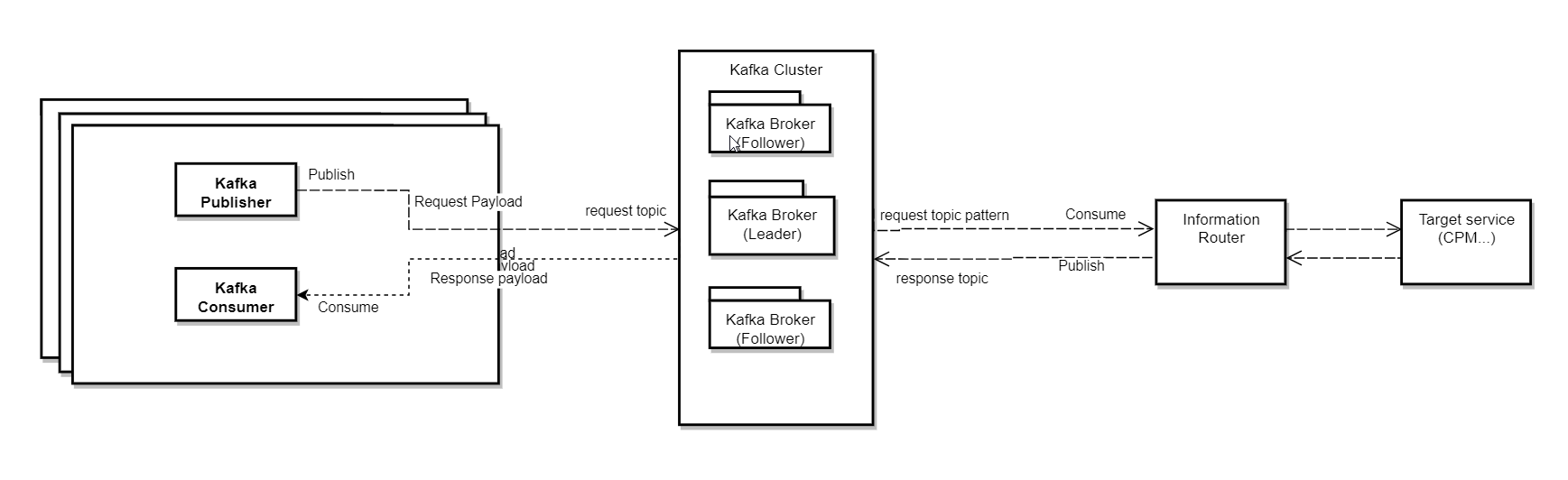
For the moment, the solution supports Kafka only as a southbound communication protocol. The general use-case for now is that messages from stations can be received by Information Router using Kafka and will be forwarded using the RestProtocol to the target services (see Route Settings configuration example below)
Station |
-----(Kafka Message)----- > |
Broker |
-----(Kafka Message)----- > |
InformationRouter |
-----(HTTP Request)----- > |
Target service |
Early implementations to have Kafka as a northbound protocol were already been made but not tested.
Settings
Route settings
RouteSettings Snippet
"Routes": {
"machine_kafka": {
"ExecutionMode": "Sync",
"ProcessingMode": "ProcessForwardProcess",
"SourceProtocol": "Kafka",
"DestinationProtocol": "Rest",
"DestinationProtocolRouteId": "machine",
"PreProcessingMethod": "CheckUnknownDevice",
"PostProcessingMethod": "ReportUnknownDevice"`
}
}
Above is a sample route - the source protocol needs to be set to Kafka.
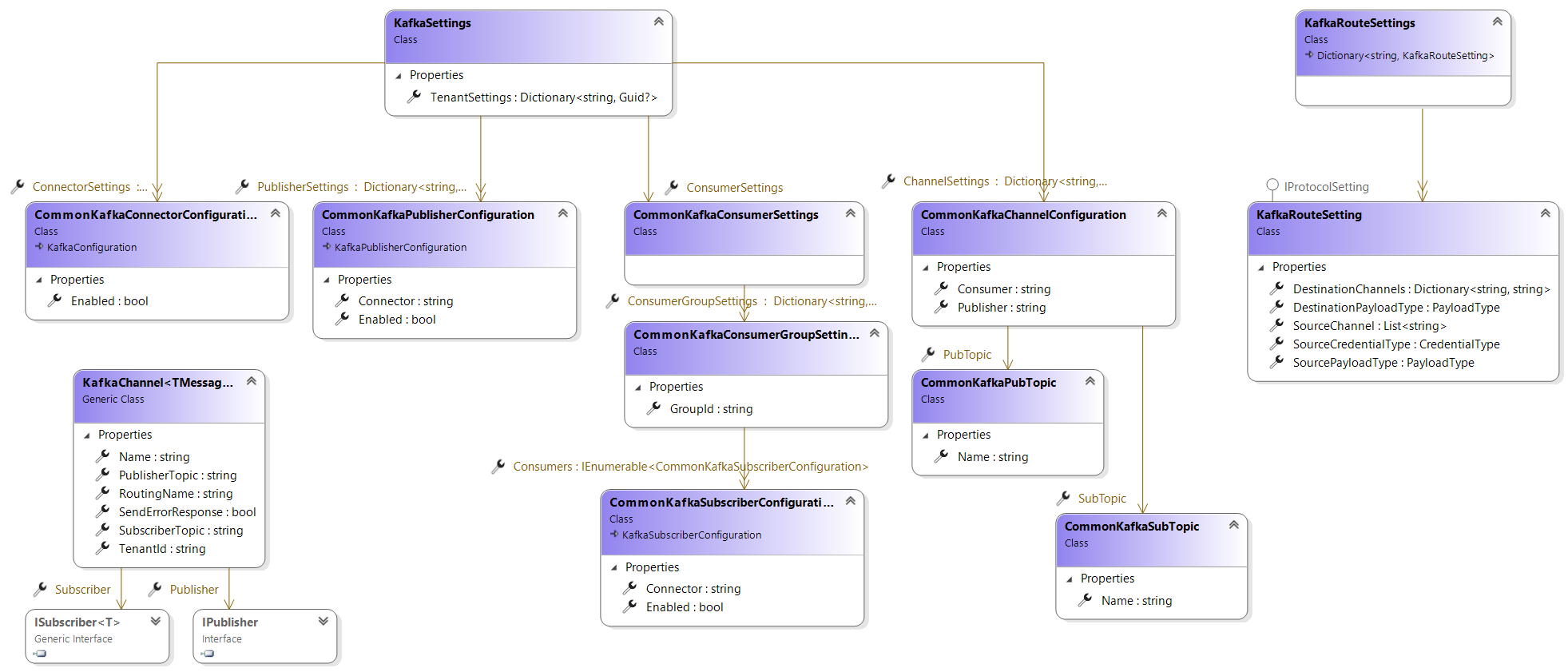
Kafka settings
Kafka Settings Collapsed
"KafkaSettings": {
"ConnectorSettings": ...,
"ConsumerSettings": ...,
"PublisherSettings": ...,
"ChannelSettings": ...,
"TenantSettings": ...,
}
The Kafka settings contain the following sections:
-
Connectors configuration
-
Consumer configuration
-
Publishers configuration
-
Channels configuration
-
Tenants configuration
Connectors configuration
Bellow is a sample connector configuration:
Snippet
"ConnectorSettings": {
"KafkaConnector": {
"Name": "KafkaConnector",
"Hostname": "localhost",
"Port": 9092,
"ClientId": "HubConnector-1",
"UserName": "guest",
"Password": "guest",
"SslEnabled": false,
"SslVersion": "None",
"Debug": true,
"SslCaCertificateLocation": null,
"ClientCertificateLocation": null,
"ClientCertificateKeyLocation": null,
"ClientCertificateKeyPassword": null,
"Enabled": true
}
}
The connectors configuration contains a dictionary of configured connectors. Each connector has the following properties.
Property |
Meaning |
Name |
Name of the connector which will be referenced in the rest of the configuration (of publishers and consumers). A freely chosen string. |
Hostname |
The hostname of the Kafka broker. |
Port |
The port of the Kafka broker. |
ClientId |
The client identifier. |
UserName |
Username of the Kafka broker. |
Password |
Password of the Kafka broker. |
SslEnabled |
Set to true if the Kafka broker uses SSL / TLS encrypted communication. |
SslVersion |
The SSL version. |
Debug |
Set to true to activate Debug logs from the underlying Kafka library. |
SslCaCertificateLocation |
The full path of the SSL CA certificate. This will be only used if the SslEnabled config is set to true. |
ClientCertificateLocation |
|
ClientCertificateKeyLocation |
|
ClientCertificateKeyPassword |
|
Enabled |
Set to true if the connector will be used. |
Publishers configuration
Snippet
"PublisherSettings": {
"HubPublisher": {
"Name": "HubPublisher",
"Connector": "KafkaConnector",
"MessageTimeoutMs": 10000,
"Retries": 0,
"EnableIdempotence": false,
"Enabled": true`
}
}
Property |
Meaning |
Default value |
Name |
Name used to identify a KafkaPublisher instance. Freely chosen string, is referenced in the channel configuration. |
- |
Connector |
The name of the corresponding connector. |
- |
MessageTimeoutMs |
The timeout for messages to be delivered and acknowledged by Kafka (0 = infinite). |
30000 |
Retries |
Setting a value greater than zero will cause the client to resend any record whose send fails with a potentially transient error. |
- |
EnableIdempotence |
When set to |
- |
Enabled |
Set to true if the publisher will be used. |
- |
Consumers configuration
Snippet
"ConsumerSettings": {
"connectivity-hub-consumers": {
"GroupId": "connectivity-hub-consumers",
"AutoOffsetReset": "Earliest",
"AutoCommit": true,
"Consumers": [
{
"Name": "HubConsumer1",
"Connector": "KafkaConnector",
"Enabled": true
},
...
]
}
},
| Property | Meaning | Possible values |
|---|---|---|
GroupId |
The name of the Consumer Group. This property should be consistent through all the Information Router instance to guaranty the scalability of the Hub. See Kafka Docs |
|
AutoOffsetReset |
What to do when there is no initial offset in Kafka or if the current offset does not exist any more on the server |
Latest |
AutoCommit |
If true the consumer’s offset will be periodically committed in the background. See Kafka Docs |
| The parameters mentioned above will be passed to all the consumers. |
Property |
Meaning |
Name |
The name of the Consumer. Freely chosen string, is referenced in the channel configuration. |
Connector |
The name of the corresponding connector. |
Enabled |
Set to true if the consumer will be used. |
Channels configuration
Snippet
"Channels": {
...,
"PpmpMachinev3": {
"Consumer":
"KafkaConsumer1",
"SubTopic": {
"Name": "^.*\\.ppmp\\.v3\\.message$"
},
"publisher":
"KafkaPublisher",
"PubTopic": {
"Name": "{TenantId}.ppmp.v3.message.response"
}
},
...
},
Property |
Meaning |
Consumer |
The name of the corresponding Consumer. |
SubTopic Name |
The regex pattern of the topic on which the Information Router subscribes for the request. |
Publisher |
The name of the corresponding publisher. |
PubTopic Name |
The name of the topic on which the Information Router publishes the response. |
|
Topic Regex Pattern
In the current implementation, the solution uses one consumer per channel, and each consumer will use regex wildcard patterns to subscribe to different topics, which enables a consumer to read messages from different topics belonging to different tenants. For example, a consumer subscribing with a topic pattern like "^.\\.ppmp\\.v3\\.message$" would be able to consume incoming messages from the following tenants: 7311ea8c-5d48-43fe-acf9-980eedf24b6c and baf04077-a3c0-454b-ac6f-9fec00b8e170
The topics following that pattern are managed by a C library underneath (librdkafka) which executes in background threads. |
Scalability
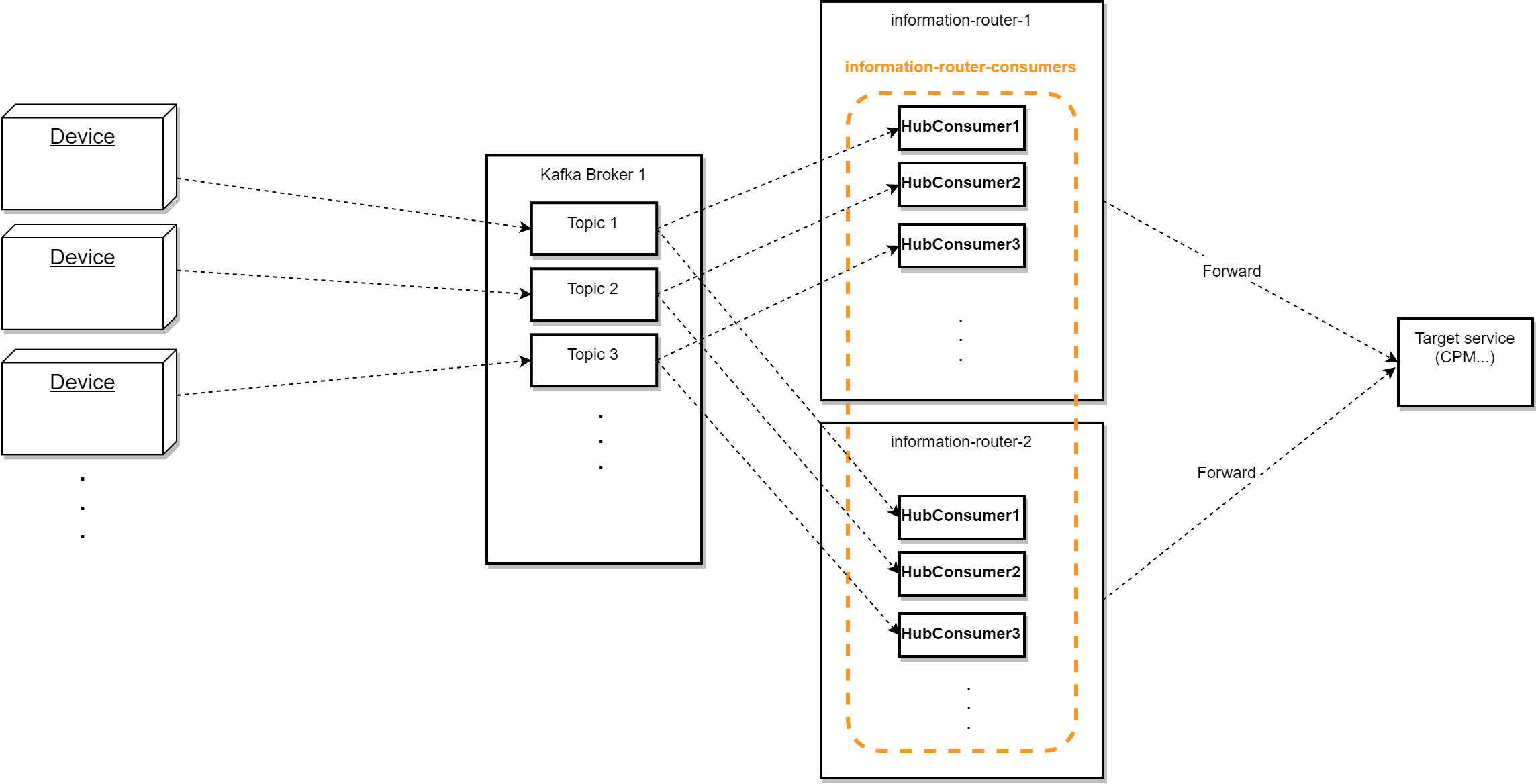
And for scalability purposes, all of the Information Router Consumers will register themselves under one consumer group (i.e. using the same Group-Id), so that the messages get consumed only once from a topic. Every Information Router instance will use the same consumer group.
That would be following/fulfilling a Message Queue Pattern so to speak. On the other hand, other application interested in those messages can also consume from the same topic but from another consumer group (i.e. using a different Group-Id), i.e. following a PubSub Model.
To achieve parallelism, more partitions can be added to a topic, which should not go beyond the number of consumers of a topic.
Reliability
Kafka uses a pull method, i.e. producers push messages to the broker in batches to minimize network overhead by reducing the number of requests, brokers then store these messages for consumers to pull at their own rate. This means that consumers don’t have to implement any kind of rate-limiting or similar. This is done on the broker side (please refer to the design quotas section in the Apache Kafka documentation for further information about this).
Kafka messaging use-case
For the moment, we are using the EnableAutoCommit config property (called AutoCommit in the appsettings.json) set to true to automatically commit the messages that are processed. In this case, it is done by the underlying Kafka library on a background thread which runs periodically every AutoCommitIntervalMs= 5000ms (default). This setup is the recommended one for most cases, but it doesn’t cover the shutdown exception when the application shuts down before the processed messages get committed - introducing duplicate processing. Alternatively, an offset corresponding to the message can also be successfully committed in the background thread while the process has not been successfully completed.
In other words, this setup can potentially belong to both the At-least-once and At-most-once use-cases. Refer to further_improvements_suggestions for information how to change/improve this.
-
One Suggestion would be to expose the AutoCommitIntervalMs config property in the foundation component so it be configured on the application (IR) level
-
Another Suggestion would be to expose EnableAutoOffsetStore and contribute to the foundation component library to add logic to check if this property is set to false and then store the offsets manually directly after the consumption of the messages, hence, covering the At-Least-once Use-case (see Kafka .NET Client docs for more information).
MQTT settings
Route settings
"Routes": {
"machine_mqtt": {
"ExecutionMode": "Sync",
"ProcessingMode": "ProcessForwardProcess",
"SourceProtocol": "Mqtt",
"DestinationProtocol": "Rest",
"DestinationProtocolRouteId": "machine",
"PreProcessingMethod": "CheckUnknownDevice",
"PostProcessingMethod": "ReportUnknownDevice"
}
}
Above is a sample route - the source protocol needs to be set to MQTT.
MQTT settings
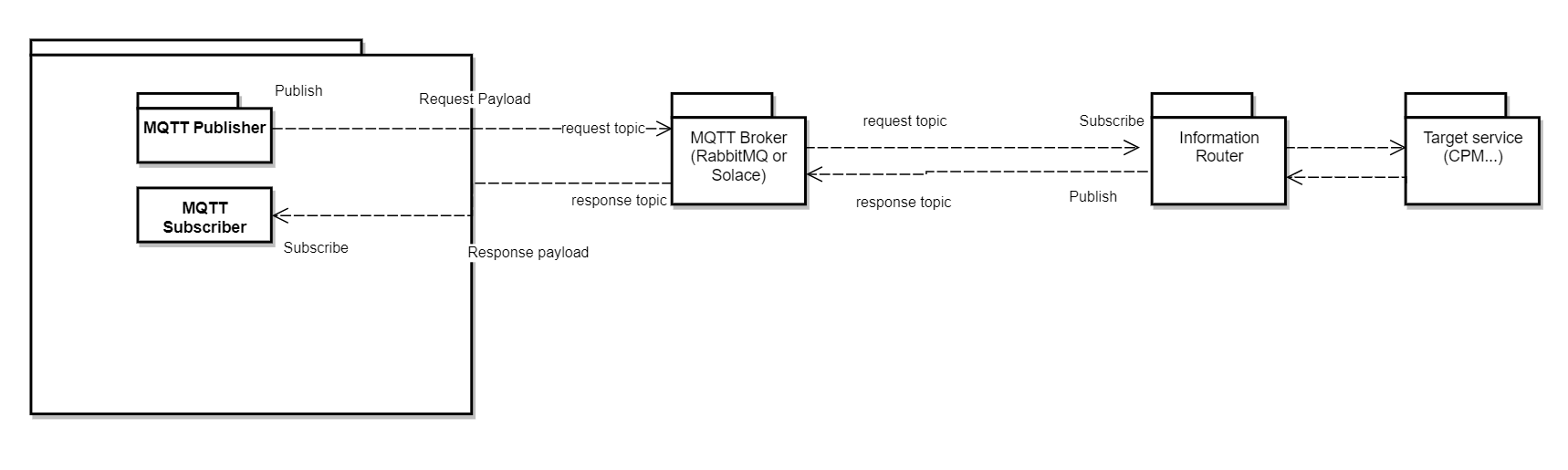
The MQTT settings contain the following sections:
-
Connectors configuration
-
Publishers configuration
-
Subscribers configuration
-
Channels configuration
-
Tenants configuration
Connectors configuration
Bellow is a sample connector configuration:
"Connectors": {
"MqttConnector": {
"Name": "MqttConnector",
"Hostname": "localhost",
"Port": 1883,
"ClientId": "ConnectivityHubConnector",
"UserName": "default",
"Password": "default",
"SslEnabled": false,
"SslVersion": "None",
"ClientCertificate": null
}
}
The connectors configuration contains a dictionary of configured connectors. Each connector has the following properties.
Property |
Meaning |
Name |
Name of the connector which will be referenced in the rest of the configuration (of publishers and subscribers). A freely chosen string. |
Hostname |
The hostname of the MQTT broker. |
Port |
The port of the MQTT broker. |
ClientId |
The client identifier. |
UserName |
Username of the MQTT broker. |
Password |
Password of the MQTT broker. |
SslEnabled |
MQTT makes it easy to encrypt messages using TLS and authenticate clients using modern authentication protocols, such as OAuth. This property governs that. |
SslVersion |
The SSL version. |
ClientCertificate |
Client certificate for the MQTT broker. Currently no certificate is used. |
Publishers configuration
"Publishers": {
"MqttPublisher": {
"Connector": "MqttConnector",
"Name": "ConnectivityHubPub",
"QualityOfServiceLevel": "AtLeastOnce",
"RetainMessages": false
}
}
| Property | Meaning | Possible Values |
|---|---|---|
Connector |
The name of the corresponding connector. |
|
Name |
The name of the publisher. Freely chosen string, is referenced in the channel configuration. |
|
RetainMessages |
Whether the message should be retained in the broker. |
|
QualityOfServiceLevel |
Reliability of message delivery is important for many IoT use cases. This is why MQTT has 3 defined quality of service levels |
0 - at most once |
Subscribers configuration
"Subscribers": {
"MqttSubscriber": {
"Connector": "MqttConnector",
"Name": "ConnectivityHubSub"
}
}
Property |
Meaning |
Connector |
The name of the corresponding connector. |
Name |
The name of the subscriber. Freely chosen string, is referenced in the channel configuration. |
Channels configuration
"Channels": {
....
"PpmpMachinev3": {
"Subscriber": "MqttSubscriber",
"SubQueue": {
"Name": "{TenantId}/ppmp/v3/message"
},
"publisher": "MqttPublisher",
"PubQueue": {
"Name": "{TenantId}/ppmp/v3/message/response"
}
}
...
},
Property |
Meaning |
Subscriber |
The name of the corresponding subscriber. |
SubQueue Name |
The name of the topic on which the Information Router subscribes for the request. |
Publisher |
The name of the corresponding publisher. |
PubQueue Name |
The name of the topic on which the Information Router publishes the response. |
Tenants configuration
"Tenants": {
    "Tenant1": "7311ea8c-5d48-43fe-acf9-980eedf24b6c"
}
Contains a list of tenants whose devices send to the Information Router via MQTT.
Roles
The following roles are needed so that Information Router can send data to CPM and Error Statistics as well as communicate with MDM.
Internally used name in Playbook |
Role name |
Module |
Description |
module: mdm nameL: Admin |
MDM Administrator |
Master Data Management |
Has full access |
module: ppm nameL: BCI_PPM_USER |
PPM Core User |
Nexeed Condition and Process Monitoring |
PPM Core User |
module: easysmc nameL: Admin |
Admin |
Nexeed Error Statistics |
Has full access |
An excerpt from the deployment playbook is given here ias-deployment-playbooks.
Configuration UI
The Configuration UI in the Web Portal can be found in > Information Router > Configuration. It provides an overview of the deployed configuration of Information Router.
The Configuration parts can be further expanded by clicking on the rows which contain triangular black errors at the beginning or the row itself. After fully expanding an element you can see the value which it is configured as.