Technical context and deployment view
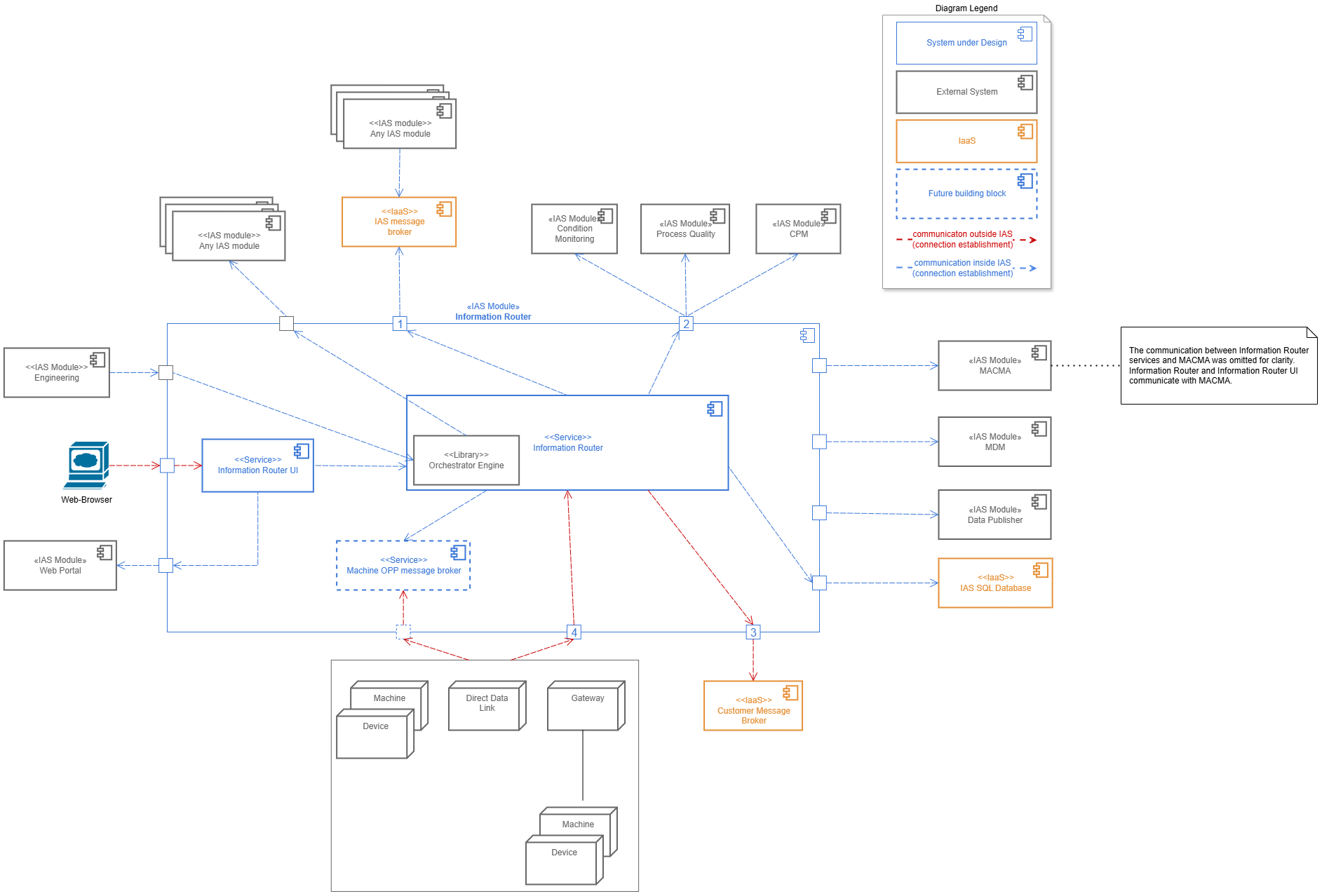
External Actor |
Description |
Any IAS Module |
These IAS modules perform their domain specific use cases. They are doing this by either:
|
IAS message broker |
Distributes messages inside the IAS. This includes integration events and OPP messages. |
IAS Module Condition Monitoring IAS Module Process Quality |
Perform their domain specific use cases by synchronously receiving HTTPS requests. As of 26 Apr 2023 Process Quality consumes PPMP over HTTP and Condition Monitoring consumes OPP via HTTP. The reason for the direct HTTPS forwarding of messages to Condition Monitoring and Process Quality are historic reason. In the very beginning, Information Router needed to enable connectivity from machines and devices to CPM. As CPM only had a HTTP interface, a HTTP forwarding was implemented. After the CPM split, still both CM and PQ receive messages via HTTPS. |
"Former" IAS Module CPM |
In the very beginning, Information Router needed to enable connectivity from machines and devices to CPM. CPM was a former IAS modules, which was split into multiple new IAS modules. Certain costumers still use CPM |
IAS Module Web Portal |
All IAS modules are required to make their Web UI available in this IAS Module. Hosts the Web UI of Information Router and offers a uniform user experience for users of IAS |
IAS Module MACMA |
All IAS modules are required to use this module to authenticate and authorize users and access secured API of other IAS modules. Is used by Information Router for two use cases:
|
IAS Module Data Publisher |
Is used to publish OPP raw messages to external Systems. The Information Router, if enabled, will register itself with Data Publisher at startup at publish raw OPP (batch) messages to the internal RabbitMq when it receives them. |
IAS Module MDM |
Is used for the "unknown device" feature, which is implemented by interacting with CM/PQ. |
Customer Message Broker |
An existing customer message broker, which is already used for message distribution by the customer. It is connected to the Information Router, so that device and machines are able to communicate with IAS. |
Gateway |
Connects machine or device, which are not able to communicate with OPP or via IP in general. Example gateways are "DeviceBridge" and "NEXEED gateway". It is restricted to use only OPP. |
Direct Data Link |
Acts as a special kind of gateway, because it supports (because of historic reasons) OPP and PPMP. It is used in many existing deployments of MES. |
Machines and devices |
Machines or devices, which able to directly communicate with Information Router. |
Browser |
The Web UI of Engineering is hosted in the Web Portal. Users access the Engineering Web UI with a Browser. |
IAS Azure Kubernetes deployment
Motivation
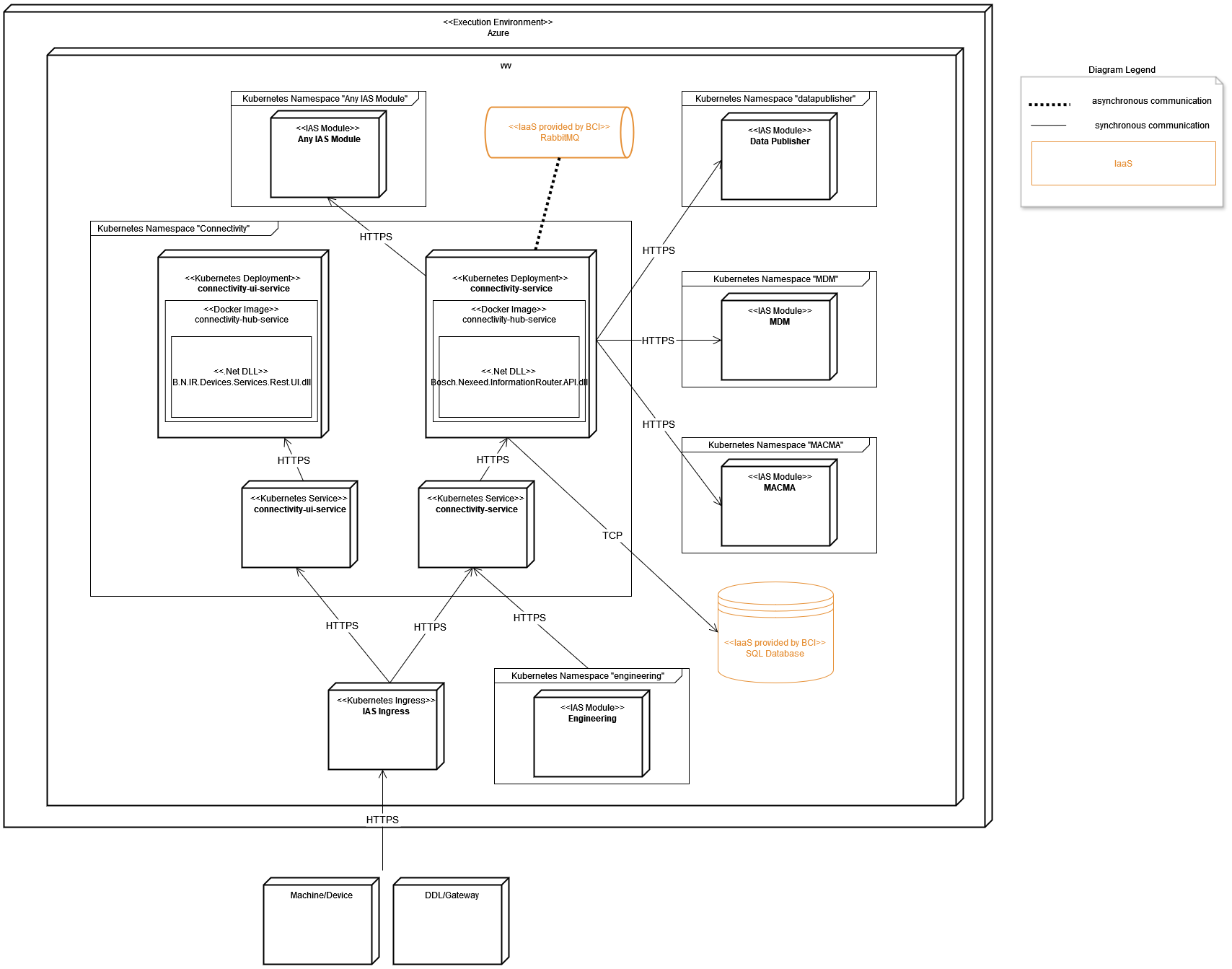
The Kubernetes deployment is a requirment of IAS. Each IAS modules runs in its own namespace. Possible Applications Gateways or Web Application Firewalls on Azure __ are omitted for comprehensibility. Other IAS modules like MACMA are displayed in simplified representation for comprehensibility.
Description
Bosch.Nexeed.InformationRouter.API.dll and the docker image connectivity/connectivity-service is build via pipelines in Azure DevOps.
The deployment of all Information Router Kubernetes resources (e.g. Deployment, Service, etc..) is done via pipelines in Azure DevOps.
Mapping of building blocks to infrastructure
The Information Router is packed in the BCI docker base image for dotnetcore and then deployed in a kubernetes pod.
| Level 1 Building Block | Artifact |
|---|---|
Information Router |
The docker image connectivity/connectivity-service contains the built Bosch.Nexeed.InformationRouter.API.dll. |