If Information Router receives a "device not found" response from CPM, it adds the device identifier to its internal blocking list and skips forwarding messages with the specified device id, while reporting the device to Master Data Management. After the device is approved on the portal, Information Router gets notified by MDM and resumes forwarding messages for the relevant device.
|
|
-
This functionality is currently only supported in single instance deployments.
-
Verify if MasterDataSettings is enabled in configuration and the initial synchronization with MDM is successful by looking for "MasterData is now ready" log entry in Information Router logs.
-
If the device created event doesn’t reach Information Router (because of messaging infrastructure or network issues), blocked devices can be unblocked without restarting the service by re-publishing the device registration event to the system.
-
Alternatively, restarting Information Router will reset the internal blocked device list.
|
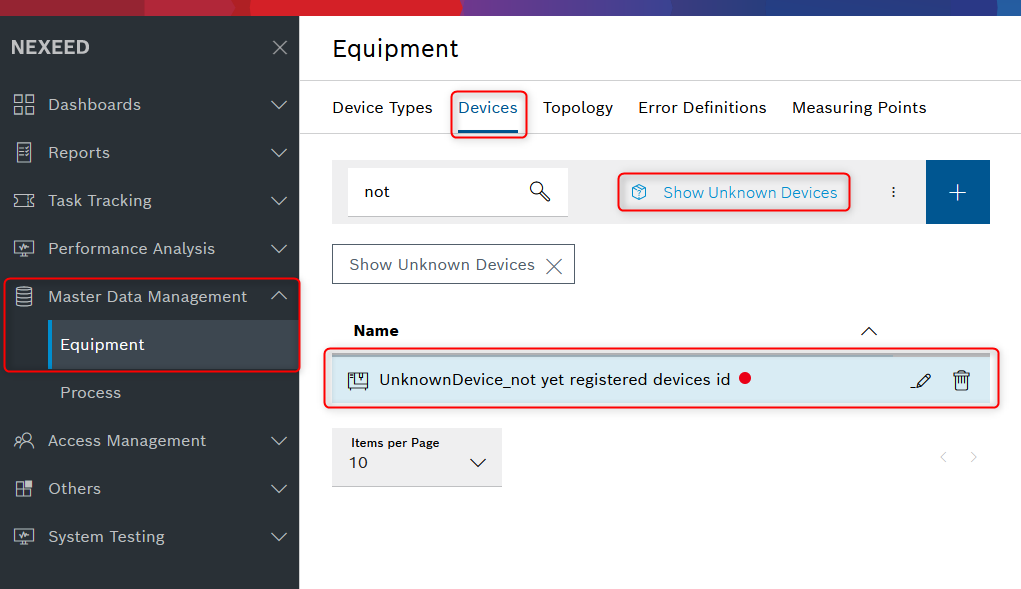
Information Router blocks forwarding of messages until they are registered in Master Data Management Equipment:
image::IR_MessageBlocking.png[height=250]
Figure 1. The unknown device is automatically showing up under the Unknown Devices part of the Master Data Management menu’s Devices tab: