SOT
    • Introduction
    • User manual
      • Operational routines
        • Meetings: daily morning round
        • Prepare dashboard
        • Prepare daily morning round
        • Perform daily morning round
      • Safety
        • Display details of a safety event
        • Add safety event
        • Edit safety event
        • Delete safety event
    • Operations manual
      • Overview
      • System architecture and interfaces
      • System requirements
        • Resource requirements per pod
      • Migration from previous versions
      • Setup and configuration
        • Helm configuration
        • Service to service configuration
        • Recommendations
      • Start and shutdown
      • Regular operations
      • Failure handling
      • Backup and Restore
      • Logging and monitoring
      • Known limitations
Operational Routines
  • Smart Operations Toolkit
    • Deviation Processor
    • Multitenant Access Control
    • Notification Service
    • Ticket Management
    • Web Portal
  • Shopfloor Management
    • Andon Live
    • KPI Reporting
    • Operational Routines
    • Shift Book
    • Shopfloor Management Administration
  • Product & Quality
    • Process Quality
    • AI Services
  • Machine & Equipment
    • Condition Monitoring
    • Device Portal
  • Enterprise & Shopfloor Integration
    • Information Router
    • Master Data Management

SOT Learning Portal

  • Operational Routines
  • User manual
  • Operational routines
  • Prepare dashboard
preview 2026.01.00

Prepare dashboard

The moderator prepares the dashboard for the daily morning round by adding or removing catalog KPI elements to/from the dashboard.

Some KPI elements cannot be added or removed. These have been selected by the administrator and remain on the dashboard.

Prerequisite

Admin role

Procedure

  1. Click options in the respective KPI category.

    The available KPI elements for the KPI category are displayed on the right in the catalog.
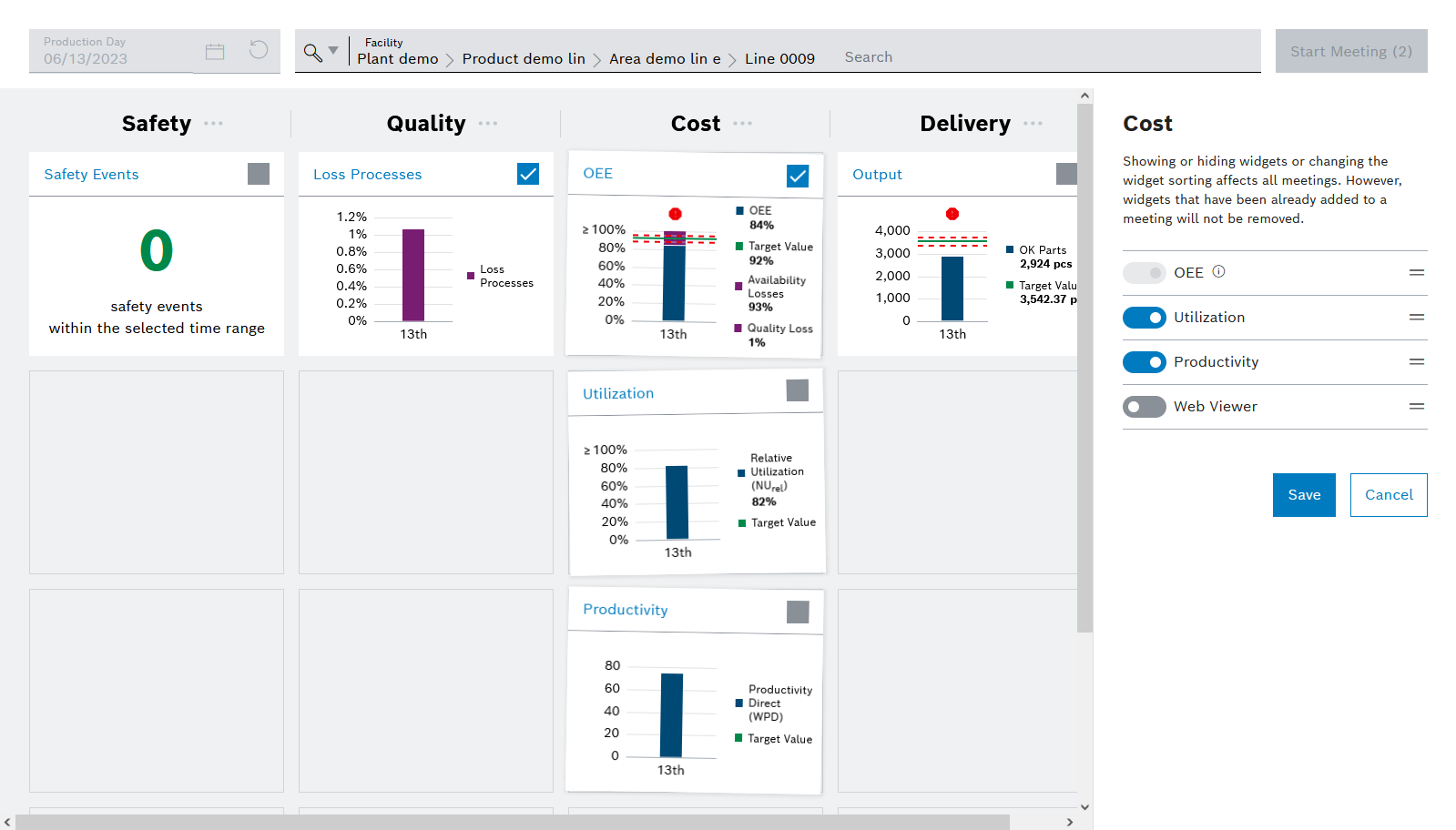
    ir_dmm_prepare_dashboard
  2. To add a KPI element to the dashboard, click switch-disabled.

    The KPI element is added to the dashboard.

  3. To remove a KPI element from the dashboard, click switch-checked.

    The KPI item is removed from the dashboard.

  4. Finally, click Save changes.

Contents

© Robert Bosch Manufacturing Solutions GmbH 2023-2026, all rights reserved

Changelog Corporate information Legal notice Data protection notice Third party licenses