Health endpoints configurations
Health endpoints were implemented to check the health statuses for modules. For the following moduels, we set Synthetics monitoring to monitor their status:
-
deviceportal
-
connectivity
-
macma
-
mdm
-
om
-
portal
-
cm
-
rabbitmq
The Synthetics Overview page clearly shows statuses for each endpoint and environment.
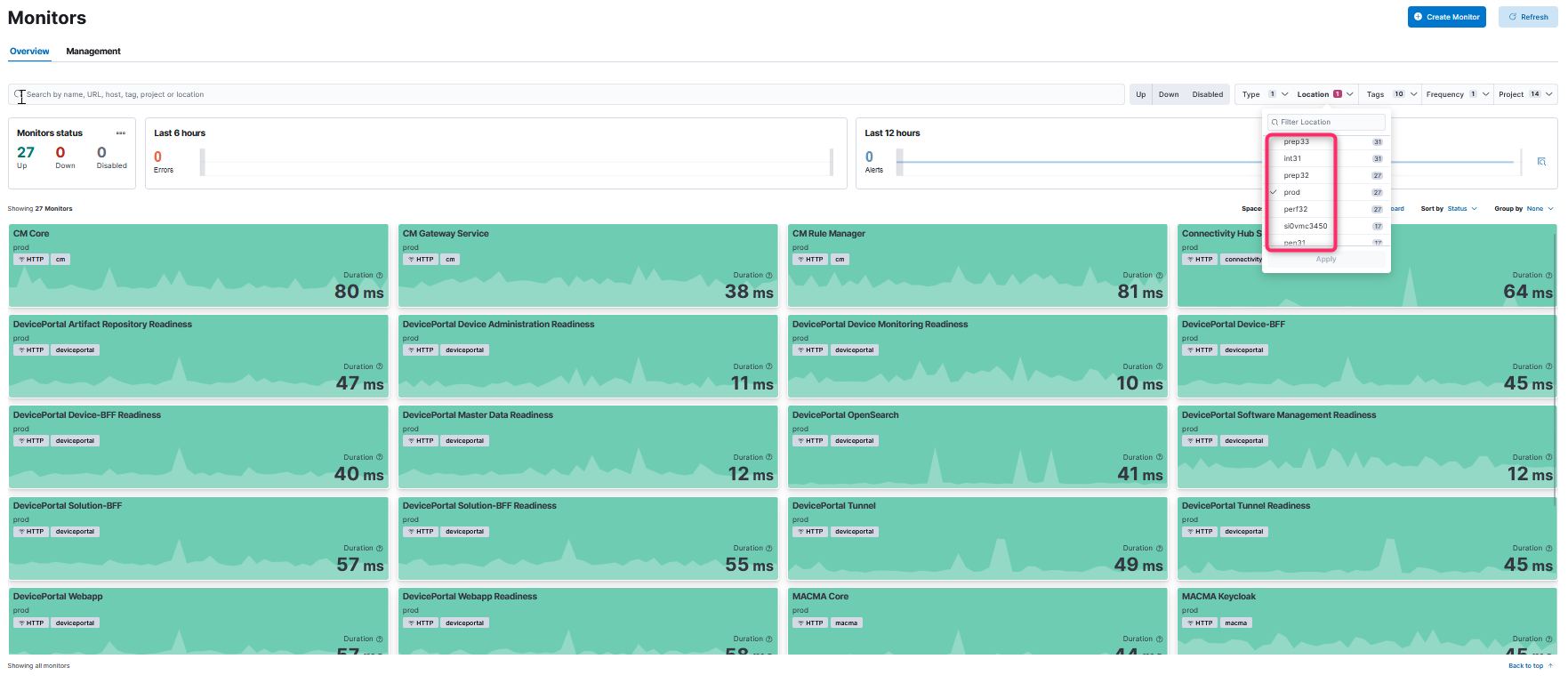
If one is planning to have the monitor against an environment, Steps shall be followed.
-
Create elastic private location and elastic enrolment token
-
Before deploying synthetics monitors in on environment elasticsearch need to be prepared by creating an agent policy, with an enrolment token and a private location used for that environment.
-
To do this, run synthetics-create-private-location pipeline. Only variable to configure is the Environment name which will be in the end the name of the private location.
-
This pipeline is needed to be triggered only once per environment. After first run, the private location for this environment is created in kibana and the enrolment token is saved in nexeed-crossenv-onPrem azure keyvault.
-
-
Copy the enrolment token in the deployment/environment keyvault
-
In the environment where you want to deploy the monitoring helmchart with synthetics you will need to have a new secret variable: `elasticFleetEnrolmentTokenForSynthetics´ the value is the enrolment token obtained in previous step.
-
Since it is a sensitive value, you are not allow to add this value in custom values files as plain text. For azure environments put the variable and the secret in the azure keyvault from the foundation resource group. For other dev envs follow the guides to configure it in the appropriate keyvault or use some form of tokenization for this value.
-
-
Deploy the monitoring helmchart with synthetics in your environment
-
Deploy the monitoring helmchart version 0.2.8-rev1 or above after adding below changes specific for synthetics monitoring:
-
Enable synthetics monitoring:
monitoring:
local:
  deploySyntheticsElasticAgent: true
Make sure you don't override the local variable elasticAgentUptime which now is by default to false.
-
Under global monitoring add the new variable with the token created in previous steps:
global: modules: monitoring: elasticFleetEnrolmentTokenForSynthetics: ref+azurekeyvault://nexeed-<env>/elasticFleetEnrolmentTokenForSynthetics- NOTE
-
Keep in mind that the other configurations for monitoring helmchart need to be also present. And that the value for `elasticFleetEnrolmentTokenForSynthetics´ is specific for each environmnet and may be reference differently if is tokenized in another way.
-
-
-
Add the passwords needed for some monitors in azure devops library
-
Few monitors require a password for that endpoint. Current examples are rabbitMQ and deviceportal search health endpoints. If you have this kind of endpoints you need to provide the password in azure devops elasticsearch library. The format of the variable name must be:
-
dpSearchPass-<EnvName>
-
rabbitmqPass-<EnvName>
-
-
-
Configure synthetic monitors
-
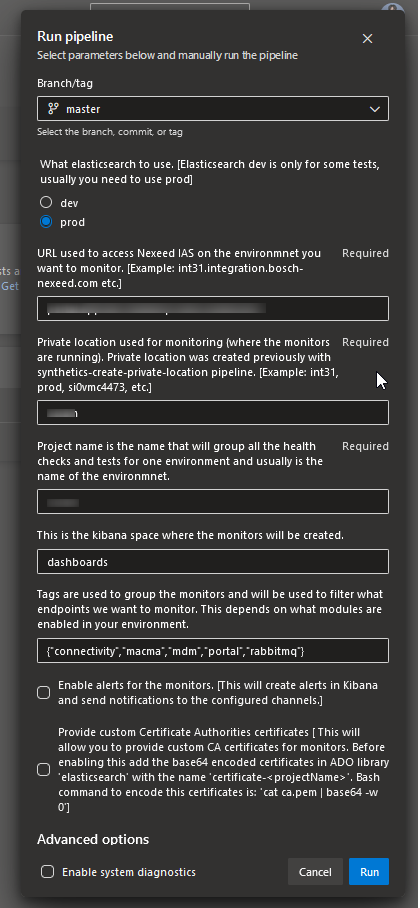
To deploy synthetics monitors you need to run the last pipeline: link: synthetics-monitors. This pipeline will have the following parameters:
-
You need to fill the following parameters:
-
URL of your environment (for example: int31.integration.bosch-nexeed.com[])
-
private location name created at step 1
-
project name - this is usually the same as environment name (for example: int31, prod, …)
-
kibana space where this synthetics monitors will be created (usually you will used "dashboard" kiabana space)
-
tags to select what monitors will be deployed depending on what modules are deployed on your environment. We currently have this tags available (in project-template/lightweight/heartbeat.yml file)
{"deviceportal","connectivity","macma","mdm","om","portal","cm","rabbitmq"} -
Enable or not the alerts for this monitors (check the box if you want to enable alerts). This is enabled usually for prod envs.
-
optional CA certificate configuration – only needed if you’re using the default elastic-agent-complete image from Elastic (e.g., in OSRAM environment). In our environments, this is not required because the custom-built image already includes Bosch CA certificates.
-
-