SOT
    • Introduction
    • Release notes
      • 2025.03.00
        • RC2
        • RC1
      • 2025.02.01
        • SP10
        • SP9
        • SP8
        • SP7
        • SP6
        • SP5
        • SP3
        • SP2
        • SP1
      • 2025.02.00
        • SP25
        • SP24
        • SP23
        • SP22
        • SP21
        • SP20
        • SP19
        • SP18
        • SP17
        • SP16
        • SP15
        • SP14
        • SP13
        • SP12
        • SP11
        • SP10
        • SP9
        • SP8
        • SP7
        • SP6
        • SP5
        • SP4
        • SP3
        • SP2
        • SP1
    • Getting started
      • Getting access
      • Login
      • Main screen
      • Welcome dashboard
      • Detecting process anomalies
      • Analyzing data and detecting event sequences
      • Analyzing KPIs
    • How-tos
      • Monitors on production lines
        • Configuring the automatic login in the Smart Operations Toolkit
        • Configuring the automatic login to the identity provider with the Windows user
        • Setting cookies in the browser
        • Configuring the automatic logout in the Smart Operations Toolkit
        • Configuring the command line parameters in the browser
        • Known limitations and troubleshooting
      • Try out the APIs
    • Integration guide
      • Underlying concepts
        • Underlying concepts
        • Onboarding
        • Security
        • Communication
      • Integration journey
      • Example integrations
        • Node-RED
        • Power BI
      • Overview of APIs
    • Operations manual
      • Release
      • System architecture and interfaces
      • System requirements
        • Cluster requirements
        • Database requirements
        • Support for service meshes
      • Migration from previous SOT versions
      • Setup and configuration
        • Deployment process
        • Deployment with Helm
        • Advanced configuration
        • Integrations with external secret management solutions
        • Context paths
        • Service accounts and authorizations
        • Validation tests
        • Setup click once
        • Database user setup and configuration
      • Start and shutdown
      • Regular operations
        • User management & authentication
        • How to add additional tenants
        • How to access the cluster and pods
        • Automatic module role assignments in customer tenants
        • User credentials rotation - database and messaging secrets
      • Failure handling
        • Failure handling guidelines
        • Ansible operator troubleshooting
        • How to reach BCI for unresolved issues
      • Backup and restore
      • Logging and monitoring
        • The concept and conventions
        • ELK stack
        • ELK configurations aspects for beats
        • Proxy setup for ELK
        • Health endpoints configurations
      • Known limitations
      • Supporting functions
      • Security recommendations
        • Kubernetes
        • Security Best Practices for Databases
        • Certificates
        • Threat detection tools
    • Infrastructure manual
      • Release
      • System architecture and interfaces
        • RabbitMQ version support
      • System requirements
      • Migration from previous SOT infrastructure versions
      • Setup and configuration
        • Deployment process of the SOT infrastructure Helm chart
        • Deployment with Helm
      • Start and shutdown
      • Regular operations
        • RabbitMQ
          • User management & authentication
          • Disk size change
          • Upgrade performance with high performant disk type
          • Pod management policy
      • Failure handling
        • Connection failures
        • Data safety on the RabbitMQ side
        • Fix RabbitMQ cluster partitions
        • Delete unsynchronized RabbitMQ queues
        • How to reach BCI for unresolved issues
      • Backup and restore
      • Logging and monitoring
      • Known limitations
    • Training
    • Glossary
    • Further information and contact
Smart Operations Toolkit
  • Smart Operations Toolkit
    • Deviation Processor
    • Multitenant Access Control
    • Notification Service
    • Ticket Management
    • Web Portal
  • Shopfloor Management
    • Andon Live
    • KPI Reporting
    • Operational Routines
    • Shift Book
    • Shopfloor Management Administration
  • Product & Quality
    • Process Quality
    • AI Services
  • Machine & Equipment
    • Condition Monitoring
    • Device Portal
  • Enterprise & Shopfloor Integration
    • Information Router
    • Master Data Management

SOT Learning Portal

  • Smart Operations Toolkit
  • Operations manual
  • Setup and configuration
  • Service accounts and authorizations

Service accounts and authorizations

In the Smart Operations Toolkit, service accounts are utilized by modules or workloads rather than individual users. These service accounts can make authorized API calls by authenticating the service account rather than relying on individual user credentials.

Each application integrated into the SOT has its own set of roles and permissions, determining what actions it is authorized to perform within the system. Additionally, each application may require specific roles and permissions from other integrated applications to function correctly.

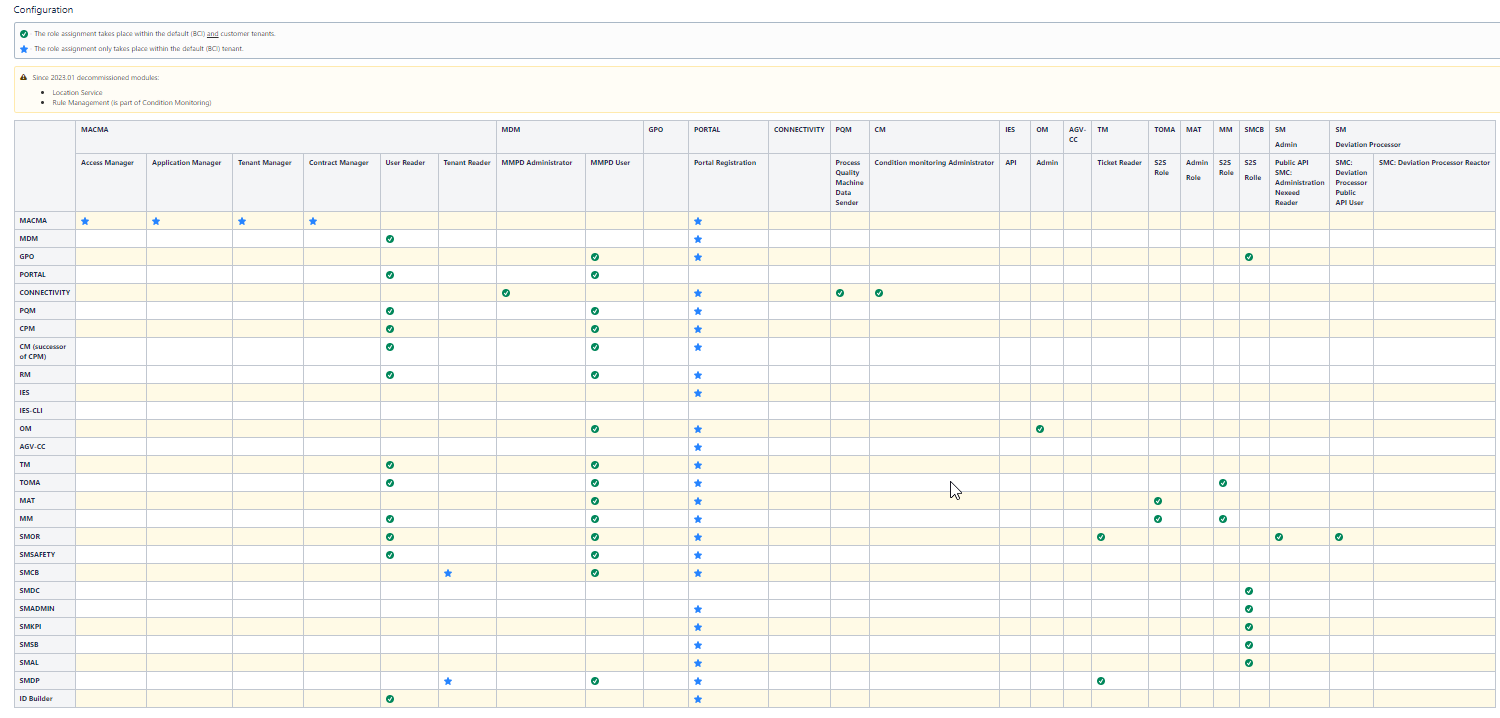
Roles assignments inside main tenant are configured automatically by Macma Configuration operator based on module helm chart settings.

Role assignments for customer tenant must be configured individually in each tenant.

The following table explains exactly the roles required for each module. On the vertical legend are the modules, and on the horizontal side are the essential roles that must be assigned to each module to function correctly.
roles

Contents

© Robert Bosch Manufacturing Solutions GmbH 2023-2026, all rights reserved

Changelog Corporate information Legal notice Data protection notice Third party licenses