NEXEED IAS | Operations Manual
- Introduction "AI Services"
- Overview
- System Architecture and Interfaces
- System Requirements
- Migration from Previous Versions
- Setup and Configuration
- Permissions & Roles
- Operation API
- Receiving PPMP
- Module Configuration
- ai core
- AI_CLIENT_ID
- AI_CLIENT_SECRET
- MACMA_CLIENT_SCOPE
- MMPD_CLIENT_SCOPE
- PORTAL_CLIENT_SCOPE
- MACMA_ZERO_TENANT_ID
- JAVA_TLS_DISABLE
- JAVA_CACERT_FILE
- JAVA_CACERT_STORE_PASS
- JAVA_CACERT_KEY_PASS
- JAVA_SERVER_CERT_FILE
- JAVA_SERVER_KEY_FILE
- JAVA_SERVER_KEY_PASS
- JAVA_SERVER_CACERT_FILE
- JAVA_KEYSTORE_FILE
- JAVA_KEYSTORE_PASS
- NEXEED_GLOBAL_ENVIRONMENT_NAME
- NEXEED_GLOBAL_APPLICATION_NAME
- NEXEED_GLOBAL_APPLICATION_VERSION
- NEXEED_GLOBAL_APPLICATION_INSTANCE_ID
- MAX_SLOTS_PER_TENANT_COUNT
- INFERENCE_CACHE_CRON
- https_proxy
- DATABRICKS_HOST_URL
- DATABRICKS_TOKEN
- LOG_LEVEL_ROOT
- LOG_LEVEL_BOSCH
- LOG_LEVEL_AMQP
- LOG_LEVEL_SPRING
- LOG_LEVEL_SPRING_SECURITY
- LOG_LEVEL_SPRING_WEB
- LOG_LEVEL_HIBERNATE
- AI_DATASOURCE_MAXIMUM_POOL_SIZE
- ANOMALY_DETECTION_RESULT_LOG_RETENTION_IN_DAYS
- SEQUENCE_DETECTION_RESULT_LOG_RETENTION_IN_DAYS
- RABBITMQ_HOST
- RABBITMQ_PASSWORD
- RABBITMQ_PORT
- RABBITMQ_USERNAME
- RABBITMQ_VHOST
- RABBITMQ_TLS_ENABLED
- RABBITMQ_LOGIN_METHOD
- WEB_SERVER_ADDRESS
- WEB_SERVER_HTTP_PORT
- NEXEED_GLOBAL_DISABLE_TLS
- WEB_SERVER_HTTPS_PORT
- SERVER_CERT_FILE
- SERVER_KEY_FILE
- OTEL_ENABLED
- OTEL_EXPORTER_OTLP_ENDPOINT
- ELASTIC_APM_SECRET_TOKEN
- OTEL_EXPORTER_OTLP_HEADERS
- OTEL_AGENT_LOGGING_LEVEL
- OTEL_LOGS_EXPORTER
- OTEL_TRACES_SAMPLER
- OTEL_TRACES_SAMPLER_ARG
- DATABASE_URL
- DB_USER
- DB_PASSWORD
- NEXEED_GLOBAL_ENVIRONMENT_NAME
- NEXEED_GLOBAL_SYSTEM_NAME
- NEXEED_GLOBAL_APPLICATION_INSTANCE_ID
- LOG_LEVEL
- RQ_LOG_LEVEL
- LOG_TENANTID
- LOG_USERID
- NAMEKO_MAX_WORKERS
- CACHE_ENABLED
- CACHE_PRUNE_SIZE
- CACHE_DEFAULT_SIZE
- CACHE_INVALIDATION_SECONDS
- TRAINING
- DATA_QUALITY
- CLEANUP
- DYNAMIC_MIN_DATA_RATE_DECLINE
- KEEP_HIGH_RUNNER_RANKS
- INITIAL_MIN_DATA_RATE
- MIN_COLLECTION_DAYS
- DAYS_BEFORE_CLEANUP
- SLOT_CLEANUP_INTERVAL
- TRAINING_CLEANUP_INTERVAL
- PROCESS_DATA_CLEANUP_INTERVAL
- MODEL_CACHE_PRUNE_SIZE
- MODEL_CACHE_DEFAULT_SIZE
- MODEL_CACHE_INVALIDATION_SECONDS
- PROCESS_CACHE_INVALIDATION_SECONDS
- ai-scoring
- RABBITMQ_HOST
- RABBITMQ_PASSWORD
- RABBITMQ_PORT
- RABBITMQ_USERNAME
- RABBITMQ_VHOST
- RABBITMQ_TLS_ENABLED
- RABBITMQ_LOGIN_METHOD
- WEB_SERVER_ADDRESS
- WEB_SERVER_HTTP_PORT
- NEXEED_GLOBAL_DISABLE_TLS
- WEB_SERVER_HTTPS_PORT
- SERVER_CERT_FILE
- SERVER_KEY_FILE
- OTEL_ENABLED
- OTEL_EXPORTER_OTLP_ENDPOINT
- ELASTIC_APM_SECRET_TOKEN
- OTEL_EXPORTER_OTLP_HEADERS
- OTEL_AGENT_LOGGING_LEVEL
- OTEL_LOGS_EXPORTER
- OTEL_TRACES_SAMPLER
- OTEL_TRACES_SAMPLER_ARG
- https_proxy
- DATABASE_URL
- DB_USER
- DB_PASSWORD
- NEXEED_GLOBAL_ENVIRONMENT_NAME
- NEXEED_GLOBAL_SYSTEM_NAME
- NEXEED_GLOBAL_APPLICATION_INSTANCE_ID
- LOG_LEVEL
- RQ_LOG_LEVEL
- LOG_TENANTID
- LOG_USERID
- NAMEKO_MAX_WORKERS
- CACHE_ENABLED
- CACHE_PRUNE_SIZE
- CACHE_DEFAULT_SIZE
- CACHE_INVALIDATION_SECONDS
- PREDICTION_THRESHOLD
- MODEL_CACHE_PRUNE_SIZE
- MODEL_CACHE_DEFAULT_SIZE
- MODEL_CACHE_INVALIDATION_SECONDS
- PROCESS_CACHE_INVALIDATION_SECONDS
- DATA_EXTRACTION
- Start and Shutdown
- Regular Operations
- Failure Handling
- Backup and Restore
- Cloning AI Services to a new host
- Logging and Monitoring
- Known Limitations
- Glossary
Introduction "AI Services"
Main Goals
-
Leverage cross-module usage of data processed in IAS to create insights
-
Base for cross domain features with Data and AI focus
-
Combination of Data Science and domain knowledge
-
Implementation of ML workflows: Training, Scoring, Extraction, Retrain, Optimization
-
Enables 3rd party Data Scientists to implement their own Use Cases
-
Offers data as a product
Essential Features
Training of AI Models
-
Preprocessing of data
-
Collecting of data
-
Automated training of an individual AI Model to serve the functional use case
-
Automated training of an individual AI Model to serve the data quality assessment
-
Sorting out bad quality data for training
-
Retraining of AI Models
Scoring of data
-
Assessment of bad data quality
-
Assessment of data provided to serve the functional use case (e.g. anomaly detection, event sequence detection)
-
Provisioning of Deviation Notifications
Overview
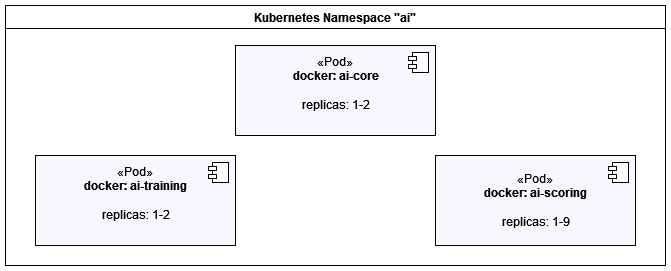
The AI Services consists of the following docker images.
| Docker Image | Description | Required |
|---|---|---|
|
Java Spring Boot MVC serves module application logic and integration. |
✅ |
|
Python based container to train ML models. |
✅ |
|
Python based container to score data based in ML models. |
✅ |
System Architecture and Interfaces
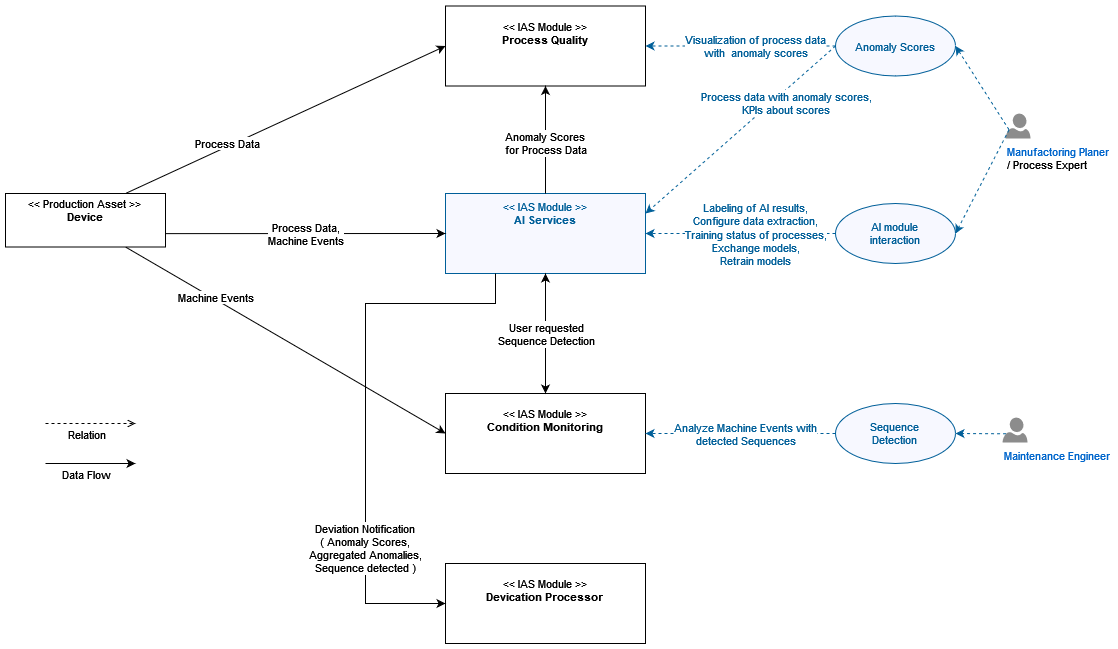
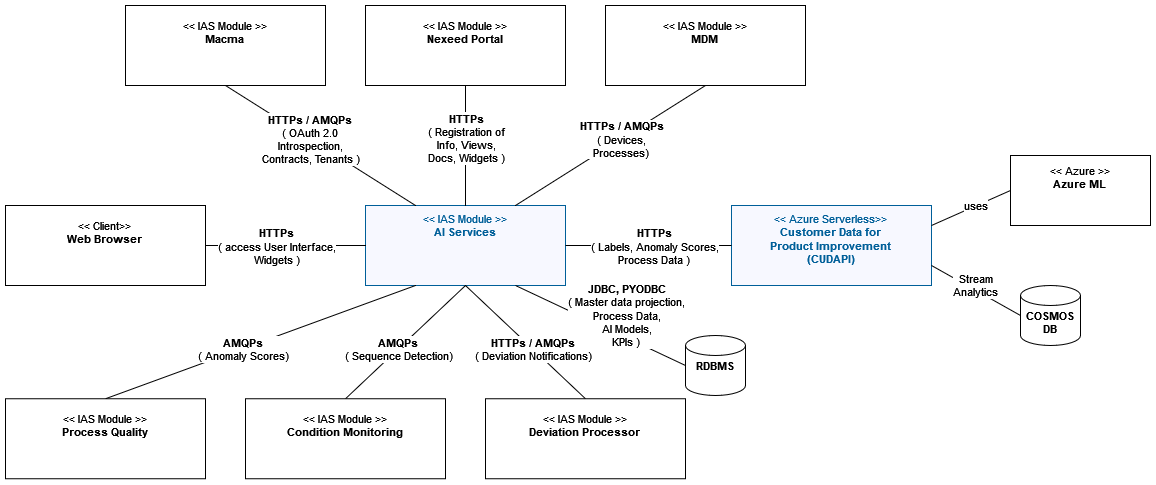
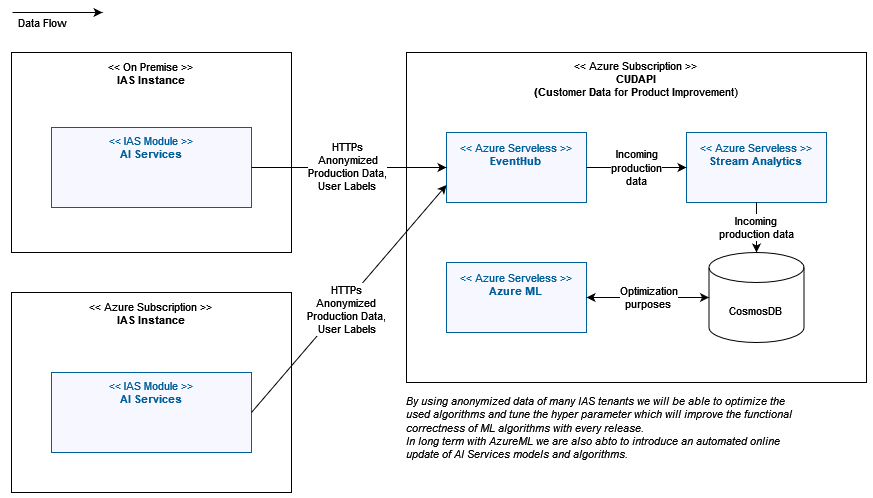
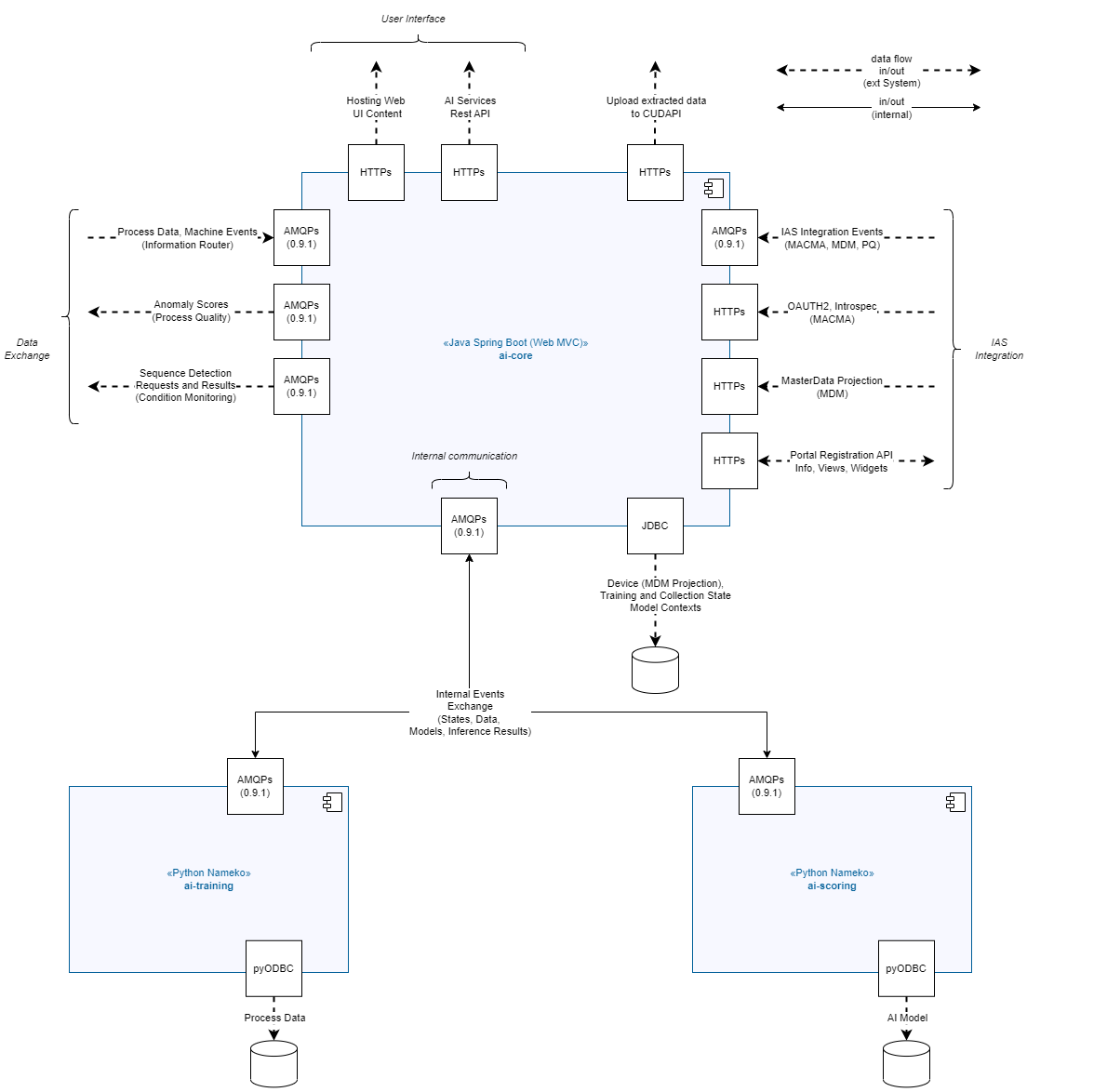
Element Descriptions
| Element | Description |
|---|---|
AI Service |
The AI Services modules provides AI Functionality to other modules. It consists of three microservices. |
Ai-Core |
Microservice which handles Portal, MDM and Macma Integration. It also serves as an gateway relaying requests to the other two microservices depending on the use-case |
Ai-Training |
performs one-time evaluations or collects and trains machine learning models to be later used by ai-scoring during inference |
Ai-Scoring |
stores machine learning models and performs real-time inference for incoming messages |
RabbitMQ |
Message Broker used for inter microservice and inter module communication |
RDBMS |
Supported are Oracle DB and MS SQL Server more information can be found in chapter System Requirements |
Network Connections Overview
| Source | Destination | Protocol |
|---|---|---|
AI-Core |
MACMA |
https |
AI-Core |
Portal |
https |
AI-Core |
MDM |
https |
AI-Core |
JDBC |
TCP/IP with TLS |
AI-Core |
RabbitMQ |
AMQP 0.9.1 with TLS |
AI-Core |
AI-Training |
https |
AI-Core |
AI-Scoring |
https |
AI-Scoring |
PYODBC |
TCP/IP with TLS |
AI-Scoring |
RabbitMQ |
AMQP 0.9.1 with TLS |
AI-Training |
PYODBC |
TCP/IP with TLS |
AI-Training |
RabbitMQ |
AMQP 0.9.1 with TLS |
System Requirements
General Notes: Messaging Middleware
RabbitMQ 3.8.2+
This applies to all services using RabbitMQ
- Privileges, Required by the AI RabbitMQ User
-
-
Configure: ^(q|x){1}\.(ai)\..+$
-
Write: ^(q|x){1}\.(ai|cm|pqm|nexeed)\..+$
-
Read: ^(q|x){1}\.(ai|cm|pqm|nexeed)\..+$
-
Note: With the current version we still rely on messaging communication to the CM and PQM module.
General Notes: Relational Databases
This applies to all services requiring a 'Relational Database' in IAS:
-
One of:
-
Oracle DB 19c / 12c
-
MS SQL 2016
-
PostgreSQL 13.2
-
Azure SQL
-
ai-core
Required quota at host system (Expected usual Load)
CPU Clock Rate in GHz |
Intel Xeon Gold 6248R (3.0 GHz @~4.0GFLOPS/core) |
|---|---|
CPU Cores |
0.3 |
RAM in MB |
2000 MB |
Local File Storage in MB |
- |
Required quota at host system (Max Load)
CPU Clock Rate in GHz |
Intel Xeon Gold 6248R (3.0 GHz @~4.0GFLOPS/core) |
|---|---|
CPU Cores |
1 |
RAM in MB |
3000 MB |
Local File Storage in MB |
- |
Required software at host system
Operating System |
Linux, 64-bit (Redhat 7+ recommended) |
|---|---|
Docker Version |
Docker Version 18.09+ |
Further Software |
— |
Required infrastructure services
Databases
-
Relational Database
- Relative Capacity
-
less then 1 GB / tenant
An oracle user with the privileges "NEXEED_BASIC_ROLE" as described in the Nexeed IAS Operations Manual is required.
Tables relevant for this module: * AI_DEVICE * AI_MDM_SYNC
Furthermore, the permissions granted should follow the principle of least privilege.
ai training
Required quota at host system (Usual Load)
CPU Clock Rate in GHz |
Intel Xeon Gold 6248R (3.0 GHz @~4.0GFLOPS/core) |
|---|---|
CPU Cores |
0.7 |
RAM in MB |
1.300 MB |
Local File Storage in MB |
- |
Required quota at host system (Max Load)
CPU Clock Rate in GHz |
Intel Xeon Gold 6248R (3.0 GHz @~4.0GFLOPS/core) |
|---|---|
CPU Cores |
1 |
RAM in MB |
2.000 MB |
Local File Storage in MB |
- |
Required software at host system
Operating System |
Linux, 64-bit (Redhat 7+ recommended) |
|---|---|
Docker Version |
Docker Version 18.09+ |
Further Software |
— |
Required infrastructure services
Databases
-
Relational Database
- Relative Capacity
-
4 GB / tenant
- Relative Capacity
-
less then 1 GB / tenant
An oracle user with the privileges "NEXEED_BASIC_ROLE" as described in the Nexeed IAS Operations Manual is required.
Tables relevant for this module: * AI_CAS00_ALEMBIC_VERSION * AI_CAS_PROCESS * AI_CAS_PROCESS_DATA
Furthermore, the permissions granted should follow the principle of least privilege.
ai scoring
Required quota at host system (Usual Load)
CPU Clock Rate in GHz |
Intel Xeon Gold 6248R (3.0 GHz @~4.0GFLOPS/core) |
|---|---|
CPU Cores |
1 |
RAM in MB |
700 MB |
Local File Storage in MB |
- |
Required quota at host system (Usual Load)
CPU Clock Rate in GHz |
Intel Xeon Gold 6248R (3.0 GHz @~4.0GFLOPS/core) |
|---|---|
CPU Cores |
9 (1 Core per replica) |
RAM in MB |
9000 MB (1000 MB per replica) |
Local File Storage in MB |
- |
Required software at host system
Operating System |
Linux, 64-bit (Redhat 7+ recommended) |
|---|---|
Docker Version |
Docker Version 18.09+ |
Further Software |
— |
Required infrastructure services
Databases
-
Relational Database
- Relative Capacity
-
less then 1 GB / tenant
An oracle user with the privileges "NEXEED_BASIC_ROLE" as described in the Nexeed IAS Operations Manual is required.
Tables relevant for this module: * AI_INF_ALEMBIC_VERSION * AI_INF_AIMODEL
Furthermore, the permissions granted should follow the principle of least privilege.
Setup and Configuration
Permissions & Roles
AI Services currently has 3 roles :
| Role | Description |
|---|---|
AI Services Administrator |
This role has full access to the general operations of the application but does not provide any additional capability. |
Process Intelligence (AI Services) |
The Anomaly Detection Capability requires the tenant to have this role and its associated resource 'Process Anomaly Detection'. |
Custom Model Deployment and Inference (AI Services) |
This role is required to manage, deploy and use custom models in AI Services (with following resources : 'Model Management', 'Inference' ) It is also required to enable the UI of the AI Services application (with following resource : 'Portal') |
| All roles are able to view the disclosure documents of AI Services application (with following resource : 'Disclosure') |
PQM Permission: Please be aware that to use the Process Intelligence feature the PQM Role "Process Intelligence (PQM)" has to be enabled.
Operation API
Chapter describes endpoints of the module used for maintenance and IAS integration.
Portal Registration
Requires Role: "AI Services Administrator": "Operation" (urn:com:bosch:bci:ai:operation).
GET /ai/portal-api/v1/info (application/json)
General information of AI Services for the Portal
GET /ai/portal-api/v1/docs (application/json)
Get documents of AI Services for portal
Health Endpoints
Requires Role: "AI Services Administrator": "Operation" (urn:com:bosch:bci:ai:operation).
GET /ai/health (application/json)
Get module wide health status information.
GET /ai/core/health (application/json)
Get health status information of the AI Core instance.
GET /ai/scoring/health (application/json)
Get health status information of the AI Scoring instance.
GET /ai/training/health (application/json)
Get health status information of the AI Training instance.
Probes and public Endpoints
No Authentication and Authorization required.
GET /ai/core/v1/ping (text)
Gets ping of the underlying AI Core instance.
GET /ai/core/v1/actuator/health (application/json)
Gets health status information of the AI Core instance without and details.
GET /ai/core/v1/actuator/health/liveness (application/json)
Gets liveness information of the underlying AI Core instance
GET /ai/core/v1/actuator/health/readiness (application/json)
Gets readiness information of the underlying AI Core instance
Master Data Synchronization
Requires Role: "AI Services Administrator": "Operation" (urn:com:bosch:bci:ai:operation).
GET /ai/core/sync/v1/{ownerId}/mdm/state (application/json)
Gets information about the synchronization of master data for the given Tenant
PUT /ai/core/sync/v1/{ownerId}/mdm/synchronize
Starts synchronization of MDM master data for the given tenant
PUT /ai/core/sync/v1/{ownerId}/mdm/recreate
Removes existing data from AI Services and start synchronization of MDM master data for the given tenant
GET /ai/core/sync/v1/{ownerId}/devices/{technicalDeviceId} (application/json)
Reads the Device from master data projection for given tenant and technical device id.
PUT /ai/core/sync/v1/cache/evict
Manual eviction of master data cache.
Receiving PPMP
Requires authentication. No further role needed.
POST /ai/ppmp/v1/{ownerId}/process/v3
Accepts PPMP V3 Process Message. Technical Device ID must be known for the given tenant.
POST /ai/ppmp/v1/{ownerId}/process/v2
Accepts PPMP V2 Process Message. Technical Device ID must be known for the given tenant.
Module Configuration
Data Extraction
In HELM an exported variable dataExtractionConfig exists which describes a data extraction configuration. This can be used to apply data extraction configuration to certain tenants.
Please find the following example.
export:
  httpsProxy: ...
  noProxy: ...
  dataExtractionConfigFile:
    extracts:
      - ownerId: "7311ea8c-5d48-43fe-acf9-980eedf24b6c"
        serviceBusName: "EhnsCustomerDataDev"
        from: "2022-01-01T11:11:11.666Z"
        to: "3021-10-01T14:30:00.000Z"
        devices:
          - "e0a27131-85a4-4071-873c-e49daa32019a"
        transmission:
          shared_access_name: "send_data"
          shared_access_key: "..."
ai core
DB_USER
- Required
-
Yes
- Description
-
database credentials (Can be used with and without prefix for global configuration. "with prefix" takes precedence)
- Sources
-
-
Environment Variable
-
DB_PASSWORD
- Required
-
Yes
- Description
-
database credentials (Can be used with and without prefix for global configuration. "with prefix" takes precedence)
- Sources
-
-
Environment Variable
-
DATABASE_URL
- Required
-
Yes
- Description
-
JDBC connection url to the database
- Sources
-
-
Environment Variable
-
DATABASE_DRIVER
- Required
-
Yes
- Description
-
JDBC Driver class to connect to the database
- Sources
-
-
Environment Variable
-
RABBITMQ_HOST
- Required
-
Yes
- Description
-
host on which RabbitMQ is listening
- Sources
-
-
Environment Variable
-
RABBITMQ_PASSWORD
- Required
-
Yes
- Description
-
host on which RabbitMQ is listening
- Sources
-
-
Environment Variable
-
RABBITMQ_PORT
- Required
-
Yes
- Description
-
port on which RabbitMQ is listening
- Sources
-
-
Environment Variable
-
RABBITMQ_USERNAME
- Required
-
Yes
- Description
-
user which should be used to get access to RabbitMQ
- Sources
-
-
Environment Variable
-
RABBITMQ_TLS_ENABLED
- Required
-
N0
- Description
-
Defines whether communication with RabbitMQ is TLS encrypted
- Defaults to
-
true
- Sources
-
-
Environment Variable
-
RABBITMQ_LOGIN_METHOD
- Required
-
No
- Description
-
Authentication method used when connecting to RabbitMQ. Can be one of 'EXTERNAL', 'AMQPLAIN', or 'PLAIN'
- Defaults to
-
PLAIN
- Sources
-
-
Environment Variable
-
AI_CLIENT_ID
- Required
-
Yes
- Description
-
ID of AI Services Module in MACMA
- Sources
-
-
Environment Variable
-
AI_CLIENT_SECRET
- Required
-
Yes
- Description
-
SECRET of AI Services Module in MACMA
- Sources
-
-
Environment Variable
-
PORTAL_CLIENT_SCOPE
- Required
-
Yes
- Description
-
Portal OAuth2 Client Scope
- Sources
-
-
Environment Variable
-
MACMA_ZERO_TENANT_ID
- Required
-
Yes
- Description
-
Tenant Zero required for Macma Migration of the Module
- Sources
-
-
Environment Variable
-
JAVA_TLS_DISABLE
- Required
-
No
- Description
-
Optionally disable TLS for Java for specific use-cases such as development testing
- Defaults to
-
false
- Sources
-
-
Environment Variable
-
JAVA_CACERT_FILE
- Required
-
No
- Description
-
Filename including location of the trusted certificate file (cacerts)
- Defaults to
-
/etc/ssl/java/cacerts
- Sources
-
-
Environment Variable
-
JAVA_CACERT_STORE_PASS
- Required
-
No
- Description
-
Trust store password
- Defaults to
-
changeit
- Sources
-
-
Environment Variable
-
JAVA_CACERT_KEY_PASS
- Required
-
No
- Description
-
Key password (cannot be different than trust store password?)
- Defaults to
-
changeit
- Sources
-
-
Environment Variable
-
JAVA_SERVER_CERT_FILE
- Required
-
No
- Description
-
Certificate file for server TLS endpoint
- Defaults to
-
server.crt
- Sources
-
-
Environment Variable
-
JAVA_SERVER_KEY_FILE
- Required
-
No
- Description
-
Key file for server TLS endpoint in /etc/ssl/server
- Defaults to
-
server.key
- Sources
-
-
Environment Variable
-
JAVA_SERVER_KEY_PASS
- Required
-
No
- Description
-
Optional password for key file in /etc/ssl/server
- Defaults to
-
secret
- Sources
-
-
Environment Variable
-
JAVA_SERVER_CACERT_FILE
- Required
-
No
- Description
-
Optional additional trusted certificate in
- Defaults to
-
/etc/ssl/trusted
- Sources
-
-
Environment Variable
-
JAVA_KEYSTORE_FILE
- Required
-
No
- Description
-
Filename of keystore (relative to certificate volume)
- Defaults to
-
/etc/ssl/java/java.pfx
- Sources
-
-
Environment Variable
-
JAVA_KEYSTORE_PASS
- Required
-
No
- Description
-
Key store password
- Defaults to
-
changeit
- Sources
-
-
Environment Variable
-
NEXEED_GLOBAL_ENVIRONMENT_NAME
- Required
-
No
- Description
-
used for logging
- Sources
-
-
Environment Variable
-
NEXEED_GLOBAL_APPLICATION_NAME
- Required
-
No
- Description
-
used for logging
- Defaults to
-
ai-core
- Sources
-
-
Environment Variable
-
NEXEED_GLOBAL_APPLICATION_VERSION
- Required
-
No
- Description
-
used for logging
- Defaults to
-
unknown
- Sources
-
-
Environment Variable
-
NEXEED_GLOBAL_APPLICATION_INSTANCE_ID
- Required
-
No
- Description
-
ID of the Microservice. Used for logging and health details.
- Defaults to
-
NEXEED_GLOBAL_APPLICATION_INSTANCE_ID_example
- Sources
-
-
Environment Variable
-
MAX_SLOTS_PER_TENANT_COUNT
- Required
-
No
- Description
-
"Maximum number of unique process types for which datasets are simultaneously aggregated. This will have linear dependency on the maximum required storage space on the database. More slots will result in faster collection and training of new models. Currently each tenant is allowed to collect data for this number of unique processes."
- Defaults to
-
20
- Sources
-
-
Environment Variable
-
INFERENCE_CACHE_CRON
- Required
-
No
- Description
-
"Cron to trigger eviction of model execution data. Default means every 10 absolute seconds e.g. 10:00:10 10:00:20"
- Defaults to
-
0/10 * * * * *
- Sources
-
-
Environment Variable
-
https_proxy
- Required
-
No
- Description
-
"Will be used to provide internet access for data bricks."
- Defaults to
-
None
- Sources
-
-
Environment Variable
-
DATABRICKS_HOST_URL
- Required
-
No
- Description
-
"The DATABRICKS_HOST_URL environment variable stores the web address of a Databricks workspace or cluster for programmatic access and management."
- Defaults to
-
None
- Sources
-
-
Environment Variable
-
DATABRICKS_TOKEN
- Required
-
No
- Description
-
"Databricks token environment variable is a secure way to store and access authentication tokens for Databricks services."
- Defaults to
-
None
- Sources
-
-
Environment Variable
-
LOG_LEVEL_ROOT
- Required
-
No
- Description
-
General logging for ai-core.
- Defaults to
-
WARN
- Sources
-
-
Environment Variable
-
LOG_LEVEL_BOSCH
- Required
-
No
- Description
-
General logging for the packages developed under Bosch.
- Defaults to
-
WARN
- Sources
-
-
Environment Variable
-
LOG_LEVEL_AMQP
- Required
-
No
- Description
-
Logging for the AMQP messages ai-core.
- Defaults to
-
WARN
- Sources
-
-
Environment Variable
-
LOG_LEVEL_SPRING
- Required
-
No
- Description
-
Logging for the Spring Framework messages in ai-core.
- Defaults to
-
WARN
- Sources
-
-
Environment Variable
-
LOG_LEVEL_SPRING_SECURITY
- Required
-
No
- Description
-
Logging for the Spring Security messages in ai-core.
- Defaults to
-
INFO
- Sources
-
-
Environment Variable
-
LOG_LEVEL_SPRING_WEB
- Required
-
No
- Description
-
Logging for the Spring Web messages in ai-core.
- Defaults to
-
WARN
- Sources
-
-
Environment Variable
-
LOG_LEVEL_HIBERNATE
- Required
-
No
- Description
-
Logging for the Object Relational Mapper in ai-core.
- Defaults to
-
WARN
- Sources
-
-
Environment Variable
-
AI_DATASOURCE_MAXIMUM_POOL_SIZE
- Required
-
No
- Description
-
Number of open DB connections in the pool
- Defaults to
-
15
- Sources
-
-
Environment Variable
-
ANOMALY_DETECTION_RESULT_LOG_RETENTION_IN_DAYS
- Required
-
No
- Description
-
Number of days result log records for Anomaly Detection remains in DB
- Defaults to
-
2
- Sources
-
-
Environment Variable
-
SEQUENCE_DETECTION_RESULT_LOG_RETENTION_IN_DAYS
- Required
-
No
- Description
-
Number of days result log records for Sequence Detection remains in DB
- Defaults to
-
2
- Sources
-
-
Environment Variable === ai-training
-
RABBITMQ_HOST
- Required
-
Yes
- Description
-
host on which RabbitMQ is listening
- Sources
-
-
Environment Variable
-
RABBITMQ_PASSWORD
- Required
-
Yes
- Description
-
host on which RabbitMQ is listening
- Sources
-
-
Environment Variable
-
RABBITMQ_PORT
- Required
-
Yes
- Description
-
port on which RabbitMQ is listening
- Sources
-
-
Environment Variable
-
RABBITMQ_USERNAME
- Required
-
Yes
- Description
-
user which should be used to get access to RabbitMQ
- Sources
-
-
Environment Variable
-
RABBITMQ_VHOST
- Required
-
Yes
- Description
-
In multi-tenant environments, use a separate vhost for each tenant/environment
- Sources
-
-
Environment Variable
-
RABBITMQ_TLS_ENABLED
- Required
-
Yes
- Description
-
Defines whether communication with RabbitMQ is TLS encrypted
- Defaults to
-
true
- Sources
-
-
Environment Variable
-
RABBITMQ_LOGIN_METHOD
- Required
-
No
- Description
-
Authentication method used when connecting to RabbitMQ. Can be one of 'EXTERNAL', 'AMQPLAIN', or 'PLAIN'
- Defaults to
-
PLAIN
- Sources
-
-
Environment Variable
-
WEB_SERVER_ADDRESS
- Required
-
No
- Description
-
IP Interface Web server listens to (Currently only used for health endpoint)
- Defaults to
-
0.0.0.0
- Sources
-
-
Environment Variable
-
WEB_SERVER_HTTP_PORT
- Required
-
No
- Description
-
Port used for HTTP socket (Currently only used for health endpoint)
- Defaults to
-
8000
- Sources
-
-
Environment Variable
-
NEXEED_GLOBAL_DISABLE_TLS
- Required
-
No
- Description
-
"Can be used to manually disable TLS for HTTP endpoint. If set to true, cert.pem and key.pem do not need to be mounted to container"
- Defaults to
-
false
- Sources
-
-
Environment Variable
-
WEB_SERVER_HTTPS_PORT
- Required
-
No
- Description
-
Port used for HTTPS Socket (Currently only used for health endpoint)
- Defaults to
-
8443
- Sources
-
-
Environment Variable
-
SERVER_CERT_FILE
- Required
-
Yes
- Description
-
"Certificate used by Server during TLS connections. Files need to be mounted to '/etc/ssl/server/{{SERVER_CERT_FILE}}'"
- Defaults to
-
cert.pem
- Sources
-
-
Environment Variable
-
SERVER_KEY_FILE
- Required
-
Yes
- Description
-
"Keyfile used by server during TLS connections. Files need to be mounted to '/etc/ssl/server/{{SERVER_KEY_FILE}}'"
- Defaults to
-
key.pem
- Sources
-
-
Environment Variable
-
OTEL_ENABLED
- Required
-
No
- Description
-
used to toggle Elastic APM on / off
- Defaults to
-
true
- Sources
-
-
Environment Variable
-
OTEL_EXPORTER_OTLP_ENDPOINT
- Required
-
Yes
- Description
-
URL of Elastic instance for OpenTelemetry exporter
- Sources
-
-
Environment Variable
-
ELASTIC_APM_SECRET_TOKEN
- Required
-
Yes
- Description
-
used for authentication with Elastic
- Sources
-
-
Environment Variable
-
OTEL_EXPORTER_OTLP_HEADERS
- Required
-
Yes
- Description
-
used for authentication and exporting OpenTelemetry to Elastic using ELASTIC_APM_SECRET_TOKEN
- Sources
-
-
Environment Variable
-
OTEL_AGENT_LOGGING_LEVEL
- Required
-
No
- Description
-
Elastic APM Log-Level
- Defaults to
-
INFO
- Sources
-
-
Environment Variable
-
OTEL_LOGS_EXPORTER
- Required
-
No
- Description
-
Specifies which exporter is used for logs. Possible values are 'none', 'otlp'.
- Defaults to
-
otlp
- Sources
-
-
Environment Variable
-
OTEL_TRACES_SAMPLER
- Required
-
Yes
- Description
-
Necessary to reduce the load. Specifies the Sampler used to sample traces by the SDK.
- Defaults to
-
"parentbased_always_on"
- Sources
-
-
Environment Variable
-
OTEL_TRACES_SAMPLER_ARG
- Required
-
Yes
- Description
-
Necessary to reduce the load. Specifies arguments, if applicable, to the sampler defined in by OTEL_TRACES_SAMPLER. The specified value will only be used if OTEL_TRACES_SAMPLER is set.
- Defaults to
-
none
- Sources
-
-
Environment Variable
-
DATABASE_URL
- Required
-
Yes
- Description
-
"OPTION 1: TNS-connection string → (driver oracle+oracledb will be used) OPTION 2: jdbc-url → (python driver will be inferred from jdbc-schema ['oracle:thin:@//', 'sqlserver://', 'postgresql://']). jdbc-url is only accepted in this format: 'jdbc:sqlserver://mssql.db.svc.cluster.local:1433/ppm' OPTION 3: sqlalchemy compatible connection string (Can be used with and without prefix for global configuration. ""with prefix"" takes precedence)"
- Sources
-
-
Environment Variable
-
DB_USER
- Required
-
Yes
- Description
-
database credentials (Can be used with and without prefix for global configuration. "with prefix" takes precedence)
- Sources
-
-
Environment Variable
-
DB_PASSWORD
- Required
-
Yes
- Description
-
database credentials (Can be used with and without prefix for global configuration. "with prefix" takes precedence)
- Sources
-
-
Environment Variable
-
NEXEED_GLOBAL_ENVIRONMENT_NAME
- Required
-
No
- Description
-
used for logging
- Defaults to
-
NEXEED_GLOBAL_ENVIRONMENT_NAME_example
- Sources
-
-
Environment Variable
-
NEXEED_GLOBAL_SYSTEM_NAME
- Required
-
No
- Description
-
used for logging
- Defaults to
-
NEXEED_GLOBAL_SYSTEM_NAME_example
- Sources
-
-
Environment Variable
-
NEXEED_GLOBAL_APPLICATION_INSTANCE_ID
- Required
-
No
- Description
-
used for logging
- Defaults to
-
NEXEED_GLOBAL_APPLICATION_INSTANCE_ID_example
- Sources
-
-
Environment Variable
-
LOG_LEVEL
- Required
-
No
- Description
-
general log level
- Defaults to
-
WARNING
- Sources
-
-
Environment Variable
-
RQ_LOG_LEVEL
- Required
-
No
- Description
-
log level for request based logging
- Defaults to
-
ERROR
- Sources
-
-
Environment Variable
-
LOG_TENANTID
- Required
-
No
- Description
-
"list of tentant_ids for request based logging. use '[""tenantid_a"", ""tenantid_b""]' to print requested logs for a number of tenants. '[""tenant_visible""]' will print all request logs"
- Sources
-
-
Environment Variable
-
LOG_USERID
- Required
-
No
- Description
-
"list of user_ids for request based logging. use '[""userid_a"", ""userid_b""]' to print requested logs for a number of tenants"
- Sources
-
-
Environment Variable
-
NAMEKO_MAX_WORKERS
- Required
-
No
- Description
-
Maximum number of concurrent processes. This will also determine how many AMQP messages will be prefetched by the framework
- Defaults to
-
30
- Sources
-
-
Environment Variable
-
CACHE_ENABLED
- Required
-
No
- Description
-
Enables or disables in memory cache for trained ai models
- Defaults to
-
true
- Sources
-
-
Environment Variable
-
CACHE_PRUNE_SIZE
- Required
-
No
- Description
-
Number of models in cache at which cache will be pruned (most recently used models are kept) to get back to CACHE_DEFAULT_SIZE
- Defaults to
-
50
- Sources
-
-
Environment Variable
-
TRAINING
MIN_CURVES_TRAINING
- Required
-
No
- Description
-
The number of curves that are collected for and used by model training. NB: There is one additional curve needed to actually trigger the training.
- Defaults to
-
2000
- Sources
-
-
Environment Variable
-
MIN_CURVES_TRAINING_FILTERED
- Required
-
No
- Description
-
The minimum number of collected curves that need to be valid for training. A curve can be invalid for training in case of bad data quality.
- Defaults to
-
1800
- Sources
-
-
Environment Variable
-
MAX_CONCURRENT_TRAININGS
- Required
-
No
- Description
-
Maximum of concurrent trainings allowed
- Defaults to
-
1
- Sources
-
-
Environment Variable
-
DATA_QUALITY
To optimize data quality issue detection, you can adjust the following variables. To get additional information for improving these values, you can inspect the associated logs of the ai-scoring container. You can find the logs by searching for the following strings, after enabling request based logging for your tenant and user: "DQ_P_004" (mean), "DQ_P_005" (std), "DQ_P_006" (len).
DQ_LEN_QUANT
- Required
-
No
- Description
-
Share of process curves to ignore for determining both the normal upper and normal lower length of a process series. The share of training curves between the normal lengths for that series is: 1 - 2 * DQ_LEN_QUANT. This means the normal_upper_length and normal_lower_length are set by the curve at the DQ_LEN_QUANT and 1-DQ_LEN_QUANT quantiles. Only the following values are supported: 0.01, 0.02, 0.03, 0.05, 0.075, 0.1
- Defaults to
-
0.02
- Sources
-
-
Environment Variable
-
DQ_LEN_FACTOR
- Required
-
No
- Description
-
Factor that gets multiplied with the difference of both the normal upper and normal lower length with the mean of a process series to determine upper and lower thresholds for labeling a curve to be a data quality issue. (e.g. upper_threshold = DQ_LEN_FACTOR * (normal_upper_length - mean_length) )
- Defaults to
-
4.2
- Sources
-
-
Environment Variable
-
DQ_STD_QUANT
- Required
-
No
- Description
-
Share of process curves to ignore for determining both the normal upper and normal lower standard deviation of a process series. The share of training curves between the normal standard deviations for that series is: 1 - 2 * DQ_STD_QUANT. This means the normal_upper_std and normal_lower_std are set by the curve at the DQ_STD_QUANT and 1-DQ_STD_QUANT quantiles. Only the following values are supported: 0.01, 0.02, 0.03, 0.05, 0.075, 0.1
- Defaults to
-
0.02
- Sources
-
-
Environment Variable
-
DQ_STD_FACTOR
- Required
-
No
- Description
-
Factor that gets multiplied with the difference of both the normal upper and normal lower standard deviation with the mean of a process series to determine upper and lower thresholds for labeling a curve to be a data quality issue. (e.g. upper_threshold = DQ_STD_FACTOR * (normal_upper_std - mean_std) )
- Defaults to
-
5.0
- Sources
-
-
Environment Variable
-
DQ_MEAN_QUANT
- Required
-
No
- Description
-
Share of process curves to ignore for determining both the normal upper and normal lower mean of a process series. The share of training curves between the normal means for that series is: 1 - 2 * DQ_MEAN_QUANT. This means the normal_upper_mean and normal_lower_mean are set by the curve at the DQ_MEAN_QUANT and 1-DQ_MEAN_QUANT quantiles. Only the following values are supported: 0.01, 0.02, 0.03, 0.05, 0.075, 0.1
- Defaults to
-
0.075
- Sources
-
-
Environment Variable
-
DQ_MEAN_FACTOR
- Required
-
No
- Description
-
Factor that gets multiplied with the difference of both the normal upper and normal lower mean with the mean of a process series to determine upper and lower thresholds for labeling a curve to be a data quality issue. (e.g. upper_threshold = DQ_MEAN_FACTOR * (normal_upper_mean - mean_mean) )
- Defaults to
-
15.1
- Sources
-
-
Environment Variable
-
CLEANUP
DYNAMIC_MIN_DATA_RATE_DECLINE
- Required
-
No
- Description
-
Ratio by which the average data collection rate of active processes will be reduced to calculate an update to the INITIAL_MIN_DATA_RATE (new_min_data_rate = min(initial_min_data_rate, average_data_rate * (1 - dynamic_min_data_rate_decline)).
- Defaults to
-
0.2
- Sources
-
-
Environment Variable
-
KEEP_HIGH_RUNNER_RANKS
- Required
-
No
- Description
-
Number of quickest-collecting process types to keep during cleanup
- Defaults to
-
4
- Sources
-
-
Environment Variable
-
INITIAL_MIN_DATA_RATE
- Required
-
No
- Description
-
Initial minimum messages to receive per day for a given process type (so that it will not be cleaned up)
- Defaults to
-
350
- Sources
-
-
Environment Variable
-
MIN_COLLECTION_DAYS
- Required
-
No
- Description
-
time in days for a process to start collecting without the risk of beeing cleaned up
- Defaults to
-
1
- Sources
-
-
Environment Variable
-
DAYS_BEFORE_CLEANUP
- Required
-
No
- Description
-
The number of days a process needs to have status "low_data_quality" before process can be reset by cleanup function
- Defaults to
-
3
- Sources
-
-
Environment Variable
-
SLOT_CLEANUP_INTERVAL
- Required
-
No
- Description
-
Interval for time-triggered cleanup routine for slots with low data rate or low data quality.
- Defaults to
-
43200
- Sources
-
-
Environment Variable
-
TRAINING_CLEANUP_INTERVAL
- Required
-
No
- Description
-
Interval for time-triggered cleanup routine to ensure processes stuck in training are cleaned up.
- Defaults to
-
14400
- Sources
-
-
Environment Variable
-
PROCESS_DATA_CLEANUP_INTERVAL
- Required
-
No
- Description
-
Interval for time-triggered cleanup routine to clean up unused process data from process data table.
- Defaults to
-
43200
- Sources
-
-
Environment Variable
-
MODEL_CACHE_PRUNE_SIZE
- Required
-
No
- Description
-
At this value the number of models in the cache will be pruned.
- Defaults to
-
150
- Sources
-
-
Environment Variable
-
MODEL_CACHE_DEFAULT_SIZE
- Required
-
No
- Description
-
This is the number of most recently used models in the cache that will be kept after pruning.
- Defaults to
-
130
- Sources
-
-
Environment Variable
-
ai-scoring
RABBITMQ_HOST
- Required
-
Yes
- Description
-
host on which RabbitMQ is listening
- Sources
-
-
Environment Variable
-
RABBITMQ_PASSWORD
- Required
-
Yes
- Description
-
host on which RabbitMQ is listening
- Sources
-
-
Environment Variable
-
RABBITMQ_PORT
- Required
-
Yes
- Description
-
port on which RabbitMQ is listening
- Sources
-
-
Environment Variable
-
RABBITMQ_USERNAME
- Required
-
Yes
- Description
-
user which should be used to get access to RabbitMQ
- Sources
-
-
Environment Variable
-
RABBITMQ_VHOST
- Required
-
Yes
- Description
-
In multi-tenant environments, use a separate vhost for each tenant/environment
- Sources
-
-
Environment Variable
-
RABBITMQ_TLS_ENABLED
- Required
-
Yes
- Description
-
Defines whether communication with RabbitMQ is TLS encrypted
- Defaults to
-
true
- Sources
-
-
Environment Variable
-
RABBITMQ_LOGIN_METHOD
- Required
-
No
- Description
-
Authentication method used when connecting to RabbitMQ. Can be one of 'EXTERNAL', 'AMQPLAIN', or 'PLAIN'
- Defaults to
-
PLAIN
- Sources
-
-
Environment Variable
-
WEB_SERVER_ADDRESS
- Required
-
No
- Description
-
IP Interface Web server listens to (Currently only used for health endpoint)
- Defaults to
-
0.0.0.0
- Sources
-
-
Environment Variable
-
WEB_SERVER_HTTP_PORT
- Required
-
No
- Description
-
Port used for HTTP socket (Currently only used for health endpoint)
- Defaults to
-
8000
- Sources
-
-
Environment Variable
-
NEXEED_GLOBAL_DISABLE_TLS
- Required
-
No
- Description
-
"Can be used to manually disable TLS for HTTP endpoint. If set to true, cert.pem and key.pem do not need to be mounted to container"
- Defaults to
-
false
- Sources
-
-
Environment Variable
-
WEB_SERVER_HTTPS_PORT
- Required
-
No
- Description
-
Port used for HTTPS Socket (Currently only used for health endpoint)
- Defaults to
-
8443
- Sources
-
-
Environment Variable
-
SERVER_CERT_FILE
- Required
-
Yes
- Description
-
"Certificate used by Server during TLS connections. Files need to be mounted to '/etc/ssl/server/{{SERVER_CERT_FILE}}'"
- Defaults to
-
cert.pem
- Sources
-
-
Environment Variable
-
SERVER_KEY_FILE
- Required
-
"( File needs to be mounted
-
see description )"
-
- Description
-
"Keyfile used by server during TLS connections. Files need to be mounted to '/etc/ssl/server/{{SERVER_KEY_FILE}}'"
- Defaults to
-
key.pem
- Sources
-
-
Environment Variable
-
OTEL_ENABLED
- Required
-
No
- Description
-
used to toggle Elastic APM on / off
- Defaults to
-
true
- Sources
-
-
Environment Variable
-
OTEL_EXPORTER_OTLP_ENDPOINT
- Required
-
Yes
- Description
-
URL of Elastic instance for OpenTelemetry exporter
- Sources
-
-
Environment Variable
-
ELASTIC_APM_SECRET_TOKEN
- Required
-
Yes
- Description
-
used for authentication with Elastic
- Sources
-
-
Environment Variable
-
OTEL_EXPORTER_OTLP_HEADERS
- Required
-
Yes
- Description
-
used for authentication and exporting OpenTelemetry to Elastic using ELASTIC_APM_SECRET_TOKEN
- Sources
-
-
Environment Variable
-
OTEL_AGENT_LOGGING_LEVEL
- Required
-
No
- Description
-
Elastic APM Log-Level
- Defaults to
-
INFO
- Sources
-
-
Environment Variable
-
OTEL_LOGS_EXPORTER
- Required
-
No
- Description
-
Specifies which exporter is used for logs. Possible values are 'none', 'otlp'.
- Defaults to
-
otlp
- Sources
-
-
Environment Variable
-
OTEL_TRACES_SAMPLER
- Required
-
Yes
- Description
-
Necessary to reduce the load. Specifies the Sampler used to sample traces by the SDK.
- Defaults to
-
"parentbased_always_on"
- Sources
-
-
Environment Variable
-
OTEL_TRACES_SAMPLER_ARG
- Required
-
Yes
- Description
-
Necessary to reduce the load. Specifies arguments, if applicable, to the sampler defined in by OTEL_TRACES_SAMPLER. The specified value will only be used if OTEL_TRACES_SAMPLER is set.
- Defaults to
-
none
- Sources
-
-
Environment Variable
-
https_proxy
- Required
-
No
- Description
-
"Will be used to provide internet access for data extraction."
- Defaults to
-
None
- Sources
-
-
Environment Variable
-
DATABASE_URL
- Required
-
Yes
- Description
-
"OPTION 1: TNS-connection string → (driver oracle+oracledb will be used) OPTION 2: jdbc-url → (python driver will be inferred from jdbc-schema ['oracle:thin:@//', 'sqlserver://', 'postgresql://']). jdbc-url is only accepted in this format: 'jdbc:sqlserver://mssql.db.svc.cluster.local:1433/ppm' OPTION 3: sqlalchemy compatible connection string (Can be used with and without prefix for global configuration. ""with prefix"" takes precedence)"
- Sources
-
-
Environment Variable
-
DB_USER
- Required
-
Yes
- Description
-
database credentials (Can be used with and without prefix for global configuration. "with prefix" takes precedence)
- Sources
-
-
Environment Variable
-
DB_PASSWORD
- Required
-
Yes
- Description
-
database credentials (Can be used with and without prefix for global configuration. "with prefix" takes precedence)
- Sources
-
-
Environment Variable
-
NEXEED_GLOBAL_ENVIRONMENT_NAME
- Required
-
No
- Description
-
used for logging
- Defaults to
-
NEXEED_GLOBAL_ENVIRONMENT_NAME_example
- Sources
-
-
Environment Variable
-
NEXEED_GLOBAL_SYSTEM_NAME
- Required
-
No
- Description
-
used for logging
- Defaults to
-
NEXEED_GLOBAL_SYSTEM_NAME_example
- Sources
-
-
Environment Variable
-
NEXEED_GLOBAL_APPLICATION_INSTANCE_ID
- Required
-
No
- Description
-
ID of the Microservice. Used for logging and health details.
- Defaults to
-
NEXEED_GLOBAL_APPLICATION_INSTANCE_ID_example
- Sources
-
-
Environment Variable
-
LOG_LEVEL
- Required
-
No
- Description
-
general log level
- Defaults to
-
WARNING
- Sources
-
-
Environment Variable
-
RQ_LOG_LEVEL
- Required
-
No
- Description
-
log level for request based logging
- Defaults to
-
ERROR
- Sources
-
-
Environment Variable
-
LOG_TENANTID
- Required
-
No
- Description
-
"list of tentant_ids for request based logging. use '[""tenantid_a"", ""tenantid_b""]' to print requested logs for a number of tenants. '[""tenant_visible""]' will print all request logs"
- Sources
-
-
Environment Variable
-
LOG_USERID
- Required
-
No
- Description
-
"list of user_ids for request based logging. use '[""userid_a"", ""userid_b""]' to print requested logs for a number of tenants"
- Sources
-
-
Environment Variable
-
NAMEKO_MAX_WORKERS
- Required
-
No
- Description
-
Maximum number of concurrent processes. This will also determine how many AMQP messages will be prefetched by the framework
- Defaults to
-
30
- Sources
-
-
Environment Variable
-
CACHE_ENABLED
- Required
-
No
- Description
-
Enables or disables in memory cache for trained ai models
- Defaults to
-
true
- Sources
-
-
Environment Variable
-
CACHE_PRUNE_SIZE
- Required
-
No
- Description
-
Number of models in cache at which cache will be pruned (most recently used models are kept) to get back to CACHE_DEFAULT_SIZE
- Defaults to
-
50
- Sources
-
-
Environment Variable
-
CACHE_DEFAULT_SIZE
- Required
-
No
- Description
-
Number of most recently used models in cache that will always be kept
- Defaults to
-
70
- Sources
-
-
Environment Variable
-
CACHE_INVALIDATION_SECONDS
- Required
-
No
- Description
-
Number of seconds a model may stay in cache until it will be reloaded from the database
- Defaults to
-
600
- Sources
-
-
Environment Variable
-
PREDICTION_THRESHOLD
- Required
-
No
- Description
-
Process curves with an anomaly score above this prediction threshold will be labeled as an anomaly. NB: this is the internal anomaly score that will always be scaled to 100 for display in the UI.
- Defaults to
-
31
- Sources
-
-
Environment Variable
-
MODEL_CACHE_PRUNE_SIZE
- Required
-
No
- Description
-
At this value the number of models in the cache will be pruned.
- Defaults to
-
150
- Sources
-
-
Environment Variable
-
MODEL_CACHE_DEFAULT_SIZE
- Required
-
No
- Description
-
This is the number of most recently used models in the cache that will be kept after pruning.
- Defaults to
-
130
- Sources
-
-
Environment Variable
-
DATA_EXTRACTION
DATA_EXTRACTION_RELOAD_S
- Required
-
No
- Description
-
Timer used to reload configuration periodically (in seconds)
- Defaults to
-
300
- Sources
-
-
Environment Variable
-
Cloning AI Services to a new host
AI Services do not hold environment specific information in the database tables. If all environment variables are updated accordingly, an AI Module instance can be cloned to a new host by cloning all AI module database tables.